
Scripting example
This example shows adding a button to a manual instruction control step that when selected sets the value of report AMOUNT_ADDED to 70 from JavaScript.
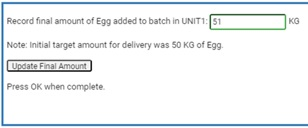
The HTML code with the button that updates the report value in the manual instruction control step resembles this:
<form>Record final amount of Egg added to batch in <sop>UNIT</sop>: <input id="AMOUNT_ADDED" name="AMOUNT_ADDED" type="text" size="15" value="51" > <sop>AMOUNT_ADDED.eu</sop><br /><br />Note: Initial target amount for delivery was <sop>ADD_AMOUNT</sop> <sop>ADD_AMOUNT.eu</sop> of Egg.br /><br /><input type="button" onclick="updateFinalAmount()" value="Update Final Amount" ><br /><br /> Press OK when complete. <script language="javascript" type="text/javascript" >function updateFinalAmount() {const elInput = window.document.getElementById("AMOUNT_ADDED");if (elInput) {elInput.value = 70;elInput.dispatchEvent(new Event("rabvinput", {bubbles: true}));}}</script></form>
IMPORTANT:
Any time a report value is set through JavaScript, for the value to be updated appropriately in the system dispatch Event, (new Event (rabvinput, {{bubbles:true}) must also be called. (See example manual instruction html for proper syntax).
Provide Feedback