
Bar code scanner integration example
A "keyboard wedge" attached bar code scanner can be simulated to enter values into a manual instruction using copy/paste. The instruction file looks similar to this example:
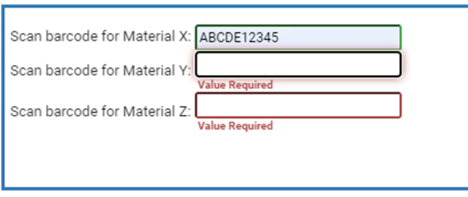
The HTML code for the manual instruction resembles:
<form id="barCode"> Scan barcode for Material X: <input type="text" name="MaterialXCode" onkeydown="validateInputValue(this)"><BR> Scan barcode for Material Y: <input type="text" name="MaterialYCode" onkeydown="validateInputValue(this)"><BR> Scan barcode for Material Z: <input type="text" name="MaterialZCode" onkeydown="validateInputValue(this)"><BR> <script language="javascript" type="text/javascript" src="customercontent/userfunctions.js" ></script> <script id="barCodeSetup" language="javascript" type="text/javascript">blnTimerStarted = false;selectFirstInput(window.document.getElementById("barCode"));</script> </form>
This file, userfunctions.js, must be located in the Batch View Server’s customercontent directory:
var blnTimerStarted;// When the form loads, put the cursor in the first input box function selectFirstInput(element) {// get reference to the form objectconst elForm = getParentForm(element);setFocusToFirstBox(elForm);} // Traverse up the DOM until a FORM element is found. // Return the FORM element. function getParentForm(element) {if (!element) {return;}let elForm = element;while ("form" !== elForm.tagName.toLowerCase()) {elForm = elForm.parentNode;}return elForm;} // Set the focus in the form to the first enabled and // visable text box in the form function setFocusToFirstBox(elForm) {if (elForm && elForm.elements && elForm.elements.length) {for (elFormInput of elForm.elements) {if(!elFormInput.disabled && "none" !==elFormInput.style.display) {const tagNameelFormInput.tagName.toLowerCase();if ("textarea" === tagName ||"input" === tagName ||"text" === tagName) {elFormInput.focus();break;}}}}} // Most barcode scanners work through a keyboard wedge, which // makes input from the scanner work like input from the keyboard. // The challenge is to make sure the input is coming from a scanner and not from // someone typing. We'll make the assumption that a scanner will be much faster entering // text than someone typing. When the first key is pressed, we'll start a 100ms timer. At the // end of that time, we'll validate the input. If it isn't correct, we'll revert to what // was in in previously function validateInputValue(elInput) {if (!elInput) {return;}if (!blnTimerStarted) {window.setTimeout(() => {validateBarcode(elInput.id, elInput.value);}, 100);blnTimerStarted = true;}} // Validate barcode value. function validateBarcode(inputId, lastValue) {let elInput;const len = window.document.all.length;for (let i = 0; i < len; i++) {const element = window.document.all[i];if (inputId === element.id) {elInput = element;break;}}// Validate the input. a valid barcode is assumed to have 10 characters.// Your actual validation code will vary.const blnValid = (elInput && elInput.value.length >= 10);if (!blnValid) {// if the value is invalid, revert to the previous value// or, if the new value is blank, leave the new valueif (elInput.value.length > 0) {elInput.value = (lastValue && lastValue.length >=10) ? lastValue : "";elInput.dispatchEvent(new Event("rabvinput", {bubbles: true}));}} else {// if the value is valid, move the cursor to the next input boxmoveToNextBox(elInput);}// clear the timer started flagblnTimerStarted = false;}
// This routine takes an input element, then sets focus to the next input box function moveToNextBox(elInput){ let blnSelectNext = false;// first, get parent FORM elementconst elForm = getParentForm(elInput);// loop through the elements collection. Find the input box that was passed in based on// its id and then set focus to the next one.for (elFormInput of elForm.elements) {if (blnSelectNext) {if(!elFormInput.disabled && "none" !== elFormInput.style.display) {let tagName = elFormInput.tagName.toLowerCase();if ("textarea" === tagName ||"input" === tagName ||"text" === tagName) {elFormInput.focus();return;}}} else {if (elFormInput.id === elInput.id) {blnSelectNext = true;}}}}
Provide Feedback