
Create a custom BatchIDCreate.dll
You can use the BatchIDCreate solution to automatically generate custom batch IDs in any
values or increments. If this option is chosen, you must modify some C# code in an example
project, compile it into a new Dynamic Link Library (DLL) file, and then replace the existing
DLL in the
BATCH\Bin
folder.It is recommended that you make a backup copy of the original BatchIDCreate.dll before making
any changes. The example solution project provides a starting point that you can modify as
needed. You can build this solution using
Microsoft®
Visual Studio®
2019 (version 16.11.9 or later).
TIP:
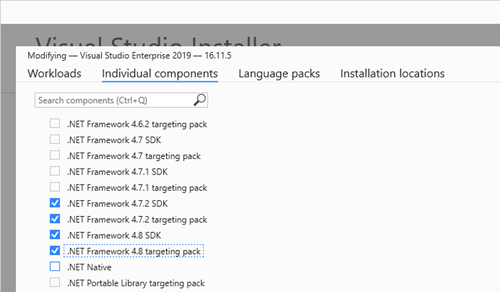
Before attempting to build the project confirm that the .NET Framework 4.8 targeting pack
is installed:
To customize BatchIDCreate.dll:
- Copy theC:\Program Files x86\Rockwell Software\Batch\Custom\BatchIDCreate\bin\Releasefolder, including all subdirectories, to the local hard drive, leaving the structure intact.
- Double-clickBatchIDCreate.slnto open theVisual Studiosolution.
- Edit theBatchIDCreateClassto include your C# code that modifies the Custom ID generation algorithm then save the solution.TIP:The batch ID can contain a maximum of 255 characters with no spaces or invalid characters. The batch ID can be comprised of any characters except the following: The defined list separator, single or double quotes, brackets, parentheses, the percent sign (%), the tab character ( \t ), the carriage return character ( \r ), or the new line character ( \n ).
- In theVisual Studiotoolbar, set the build type toRelease.
- In the Solution Explorer, right-clickBatchIDCreate, and then selectBuild.
- Copy the newBatchIDCreate.dllfromCustom\BatchIDCreate\bin\Release.
- Paste the newBatchIDCreate.dllinto theC:\Program Files (x86)\Rockwell Software\Batch\Binfolder to replace the defaultBatchIDCreate.dll.
- Restart your computer.
Provide Feedback