
Run FactoryTalk Event Archiver
When using End of Batch Archiving, the
FactoryTalk Batch
Server runs FactoryTalk Event Archiver
after a batch is removed from the batch
list. When using Incremental Archiving, FactoryTalk Event Archiver
runs continuously during
batch execution and archives batch data at user-defined time increments. The FactoryTalk Batch
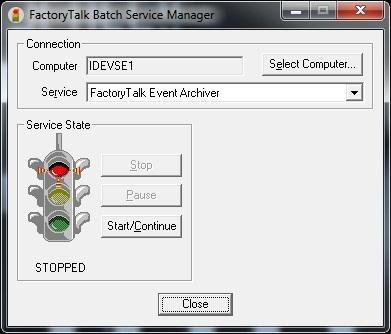
Service Manager controls the Archiver Service.The Batch Service Manager must communicate with the Windows Service Manager of the selected
computer to determine available services. A noticeable delay may exist while communications
are established. If the Batch Service Manager cannot communicate with the Windows Services, an
error message is displayed.
Before you begin:
The user who is running the
FactoryTalk Batch Service Manager
must have administrative
privileges on the computer where FactoryTalk Event Archiver
is installed.To run:
- Select .
- On theFactoryTalk Batch Service Managerdialog box, chooseSelect Computer.
- On theSelect Computerdialog box, select the name of the computer where the Archiver Service is installed, and then selectOK. TheSelect Computerdialog box closes.
- From theServicelist, selectFactoryTalk Event Archiver.
- SelectStartto start theFactoryTalk Event ArchiverService and then selectClose.
Provide Feedback