
Project information
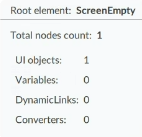
When you open your project in the
FactoryTalk®
Optix Studio™
editor, a displayed message provides you with
the actual number of nodes of the project. The message also contains the path of the
project following the nodes count. In the same way, if you open the project file that
has the extension “.optix” in the editor, you can find the project statistics about the
following items, at the bottom of the file:- TotalNodeCount
- Objects
- ObjectTypes
- Variables
- VariableTypes
- DataTypes
- Methods
- References
- ReferenceTypes
- Files
These statistics provide you with brief information about the project complexity and
size.
Provide Feedback