Loading
Innovation Center LOGO
Recent ActivityRecent Activity

Send Email Notifications with FT Optix

Learning how to send emails is essential for notifying events or system statuses from the shop floor, enabling decision making and an optimized information flow. - [Implementation Time: 30 minutes]
Innovation Center Home Page
send-email-notifications-with-ft-optix_ADO-1246271127
Innovation Center LOGO
  • Overview
  • Implementation Guide
  • Download
  • Contact us
  • Subscribe
Innovation Center Home Page
 

What does this application do?

The application was developed using FactoryTalk Optix software. The application's main objective is to send notifications via email, to indicate the status of a system, facilitating the flow of information and decision making according to the information sent. This solution uses the advanced features that FactoryTalk Optix can deliver from visualization, data management and programming structures using C#, the platform allows us to have our operations at the forefront with technological solutions that help us facilitate the challenges in today's industry.


General Characteristics

FactoryTalk Optix can help improve your processes, efficiency and deliverables - all with one easy-to-access tool. Leveraging levels of collaboration, scalability and interoperability to achieve your digital transformation vision.


FT Optix stands out for its ability to connect to a wide variety of industrial devices and protocols such as OPC UA, Ethernet/IP, Profinet, Modbus, HTTPS, MQTT among many others, allowing with this capability the integration and real-time monitoring of equipment from different manufacturers from a single IoT platform. In addition, FactoryTalk Optix can create data logs and store this information in SQL database. This allows you to present historical alarm trends and create PDF reports as needed.


Sending emails is a necessity that many users seek to notify events or statuses from the shop floor for decision making and to have an optimized flow of information. In this case we will use SMTP as the protocol for sending emails and a commercial email server.


Advantages

  • Use of structured code
  • Flexibility in connectivity
  • Impact on development time
  • Notifications according to operational model
  • Sending e-mails from a shop floor platform
  • High reliability
  • Compatible with implementation in your applications
  • Flexibility and scalability
  • Improved information flow
  • Data optimization
  • Real-time monitoring
  • Data analysis
 
 
AHIC Download ICON VF.png

Downloads

Please note: You will need to agree to the Terms & Conditions for each download.

Downloadable file ›
Legal Disclaimer Acceptance. ROCKWELL AUTOMATION WILL PROVIDE ACCESS TO ROCKWELL PRODUCTS (BEST PRACTICES, APPLICATIONS AND KNOWLEDGE) ON THE CONDITION THAT YOU ACCEPT AND COMPLY WITH THE FOLLOWING TERMS AND CONDITIONS. YOU ACCEPT AND AGREE TO BE BOUND BY THE TERMS OF THIS AGREEMENT BY DOWNLOADING, INSTALLING, COPYING, OR OTHERWISE USING PRODUCTS. IF YOU ARE ACCEPTING THESE TERMS ON BEHALF OF ANOTHER PERSON, COMPANY, OR OTHER LEGAL ENTITY, YOU REPRESENT AND WARRANT THAT YOU HAVE FULL AUTHORITY TO BIND THAT PERSON, COMPANY, OR LEGAL ENTITY TO THESE TERMS. IF YOU DO NOT AGREE TO THESE TERMS, DO NOT DOWNLOAD, INSTALL, COPY, ACCESS, OR USE THE PRODUCTS, SOFTWARE AND/OR CLOUD SERVICES. 1. Rockwell Automation retains full ownership and title to all Products and related documentation. No rights or licenses are granted other than those set forth in this Agreement. Company grants to Rockwell Automation a non-exclusive, worldwide, royalty-free, perpetual, non-revocable license to use any feedback Company provides regarding the Products, even if Company has designated the feedback as confidential. Rockwell Automation will be entitled to use the feedback without restriction or compensation to Company. 2. Company may not lease sub-lease, assign, license, sub-license or otherwise transfer any of the Products without the prior written consent of Rockwell Automation. Company may not assign or otherwise transfer access rights to the Products without the prior written consent of Rockwell Automation. Any reverse assembly, reverse engineering, decompilation, and creation of derivative works based on the Products by Company is prohibited. 3. Company acknowledges that Products provided under this Agreement are Rockwell Automation’s Confidential Information and are covered by effective or pending copyrights, patents, trademarks and/or trade secrets of Rockwell Automation, and Company agrees to maintain confidentiality by not disclosing Products or documentation to any third party without the prior written consent of Rockwell Automation and to protect the confidentiality of the Products as it would Company’s own confidential information. Company agrees that its obligation of confidentiality under this paragraph shall survive expiration or termination of this Agreement. 4. Company agrees that Products provided under this Agreement are prototypes and examples and its application and results may vary depending on each customer and project conditions. Rockwell Automation do not warranty the same results. This Agreement shall in no way be construed as a commitment by Rockwell Automation at any time to manufacture and/or offer Products for sale. There is no explicit or implicit service level agreement associated with using the Products. Rockwell Automation does not warrant that the functions contained in the Products will meet Company’s requirements. Company agrees to use all Products only in accordance with the instructions and only for the intended usages identified in the documentation. 5. EXCLUSION OF WARRANTIES AND LIMITATION OF LIABILITY. THE PRODUCTS ARE PROVIDED "AS IS". ROCKWELL AUTOMATION DISCLAIMS ANY AND ALL WARRANTIES, EXPRESS, IMPLIED OR STATUTORY, INCLUDING WITHOUT LIMITATION ANY WARRANTIES OF MERCHANTABILITY OR FITNESS FOR A PARTICULAR PURPOSE. ROCKWELL AUTOMATION EXPLICITLY DISCLAIMS ALL WARRANTIES OF NON- INFRINGEMENT AND EXPRESSLY DOES NOT WARRANT THAT THE PRODUCTS, IN WHOLE OR IN PART, WILL BE ERROR FREE OR FREE FROM SECURITY VULNERABILITIES. IN NO EVENT SHALL ROCKWELL AUTOMATION BE LIABLE FOR (i) LOST PROFITS, LOST SAVINGS, DOWNTIME, SPECIAL, INDIRECT OR CONSEQUENTIAL DAMAGES OF ANY KIND, OR (ii) ANY PERSONAL INJURY, PROPERTY DAMAGE OR ENVIRONMENTAL DAMAGE ARISING OUT OF OR IN CONNECTION WITH THIS AGREEMENT, WHETHER IN AN ACTION IN CONTRACT, STRICT LIABILITY OR IN TORT INCLUDING NEGLIGENCE. 6. COMPANY AGREES TO INDEMNIFY AND HOLD ROCKWELL AUTOMATION HARMLESS FROM ALL COSTS, AWARDS, DAMAGES, EXPENSES AND FEES (INCLUDING ATTORNEYS FEES) RESULTING FROM OR RELATED TO ANY THIRD-PARTY CLAIMS (INCLUDING EMPLOYEES AND AGENTS OF COMPANY) AGAINST ROCKWELL AUTOMATION, ITS DISTRIBUTORS, AGENTS, OFFICERS, DIRECTORS OR EMPLOYEES FOR PERSONAL INJURY (INCLUDING DEATH), PROPERTY DAMAGE OR ENVIRONMENTAL DAMAGE RELATED TO OR RESULTING FROM THE USE OF THE PRODUCTS. 7. In the event a Product is exported, Company agrees to comply with all applicable United States Export Control Law and Regulations, and the applicable export control laws of other countries. This Agreement shall be governed by the laws of the state of Wisconsin. This Agreement is the complete and exclusive Agreement between Rockwell Automation and the Company, and supersedes all prior agreements, whether written or oral, relating to the Products.
AHIC NEED HELP ICON VF.png


Need Help?

If you need help with an application or have feedback from the Innovation Center, please contact us.

Is this application relevant to me?

Having agile notifications with a flow of information associated with the requirements of sending emails directly from our application has a lot of possibilities.

This application can complement your projects to be able to send notifications or information via email to the users required in your operation.

It applies to any industry or industrial sector where you want to send information via email.

This functionality can be replicated as many times as necessary in your projects, increasing the value of your products, optimizing implementation costs and exploiting the information in continuous flow from the shop floor to where it is connected to your email.

How can I make it work?

Requirements: products, tools, prior knowledge.

Hardware

  • Controllers compatible with FT Optix connectivity

Software

  • FactoryTalk Optix (V1.5.6.0)

Prior Knowledge

  • Basic knowledge in FactoryTalk Optix and C#. 


AHIC STEP ICON.png

Implementation Guide

 
  1. Step 1
  2. Step 2.1
  3. Step 2.2
  4. Step 3.1
  5. Step 3.2
  6. Step 3.3
  7. Step 3.4
  8. Step 3.5
  9. Step 4
  10. Step 5
  11. Step 6.1
  12. Step 6.2
Open All Close All
Step 1


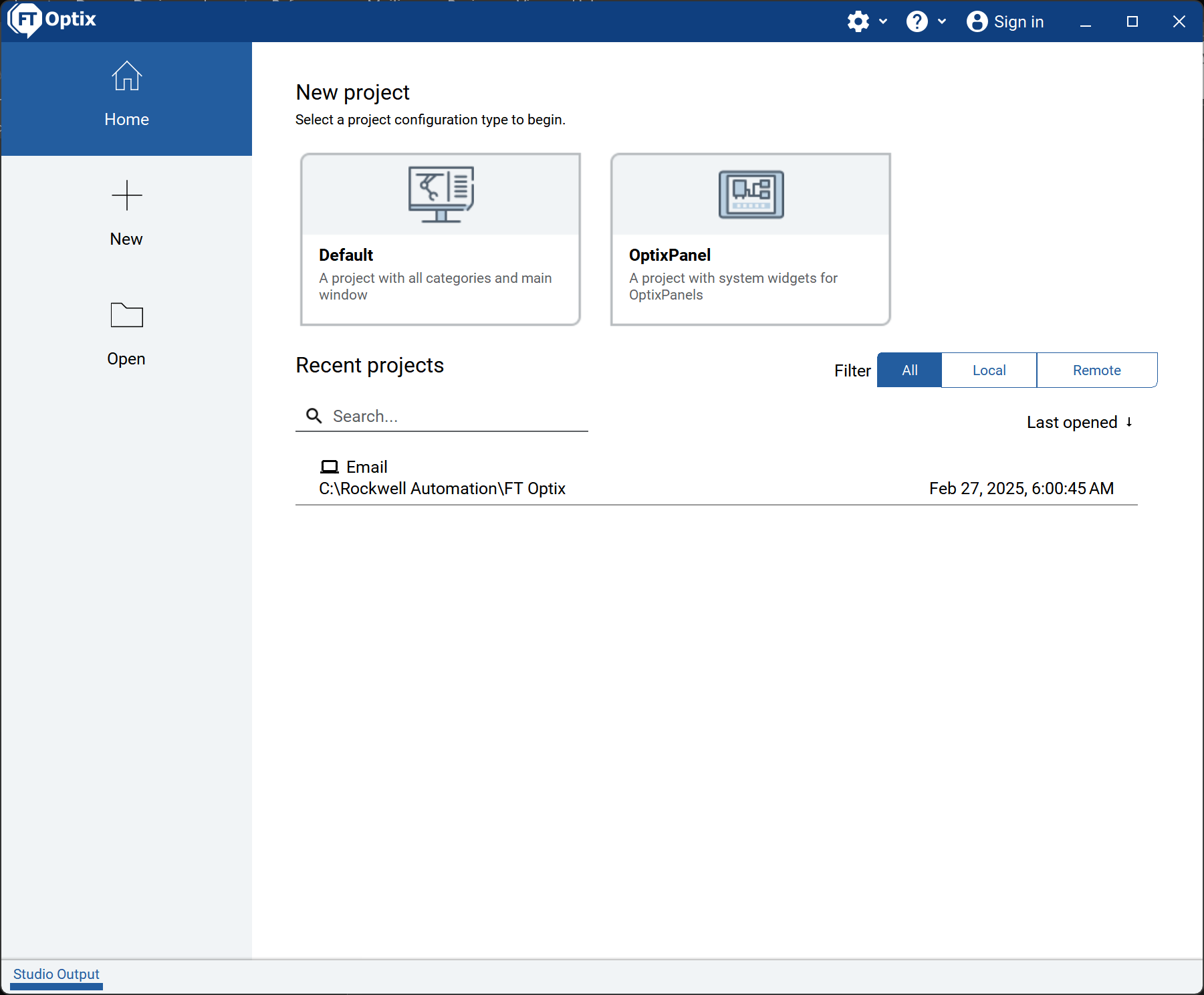
Identify the application to use: FactoryTalk Optix.


Open the file Email, in the location where you have downloaded it.


Make sure you have .NET SDK x64 installed.

https://dotnet.microsoft.com/en-us/download

 
send-email-notifications-with-ft-optix_Step 1

send-email-notifications-with-ft-optix_Step 1

Step 2.1


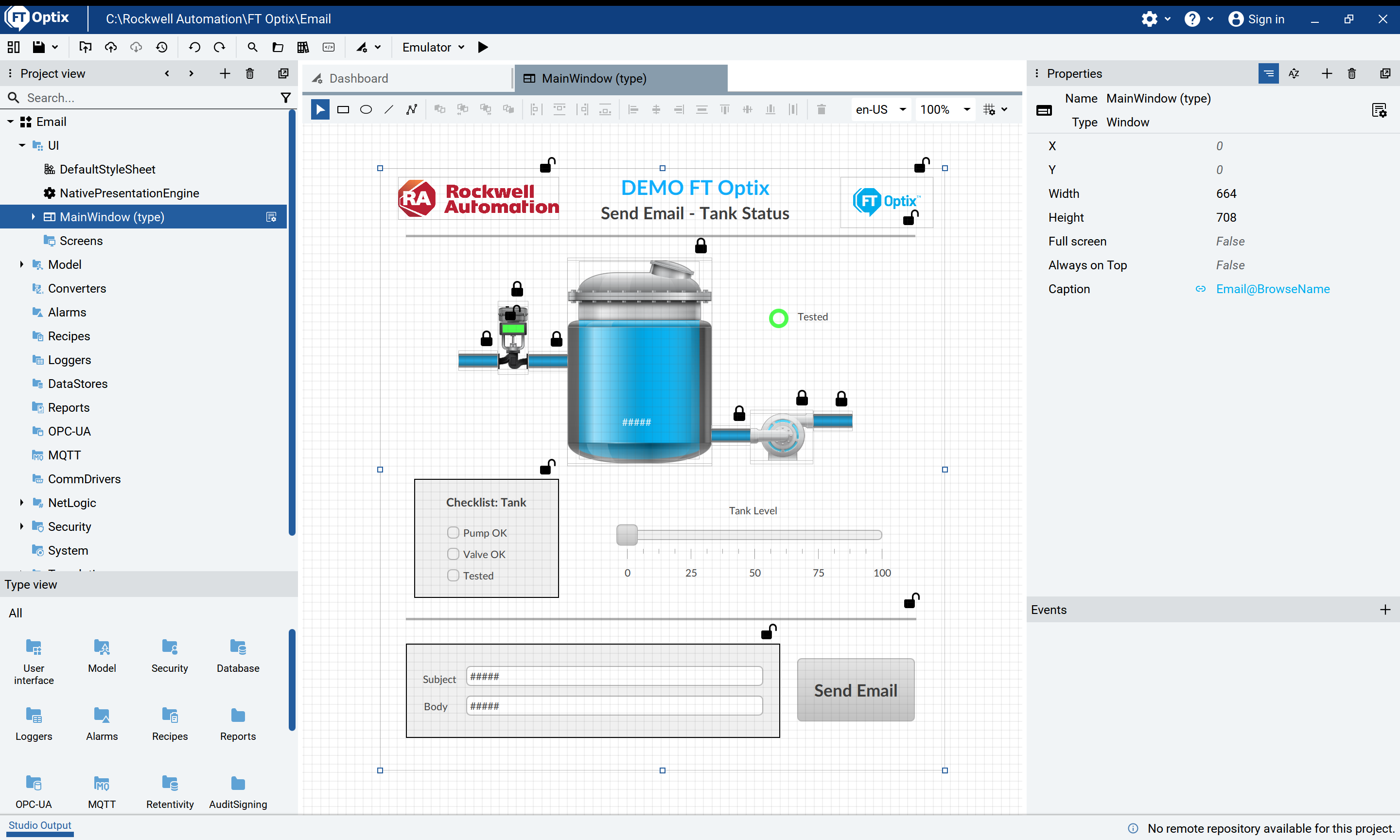
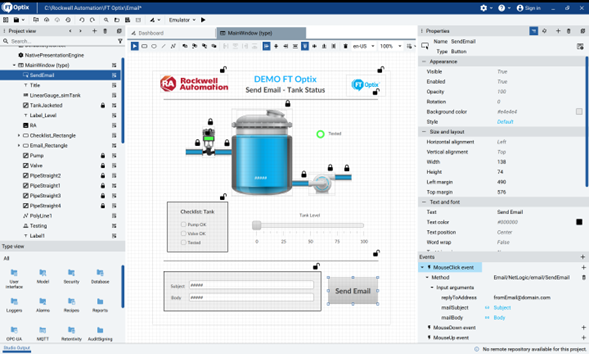
Navigate the application, open the Main Window, where you can see the elements that make up this demo.

 
send-email-notifications-with-ft-optix_Step 2_1

send-email-notifications-with-ft-optix_Step 2_1

Step 2.2


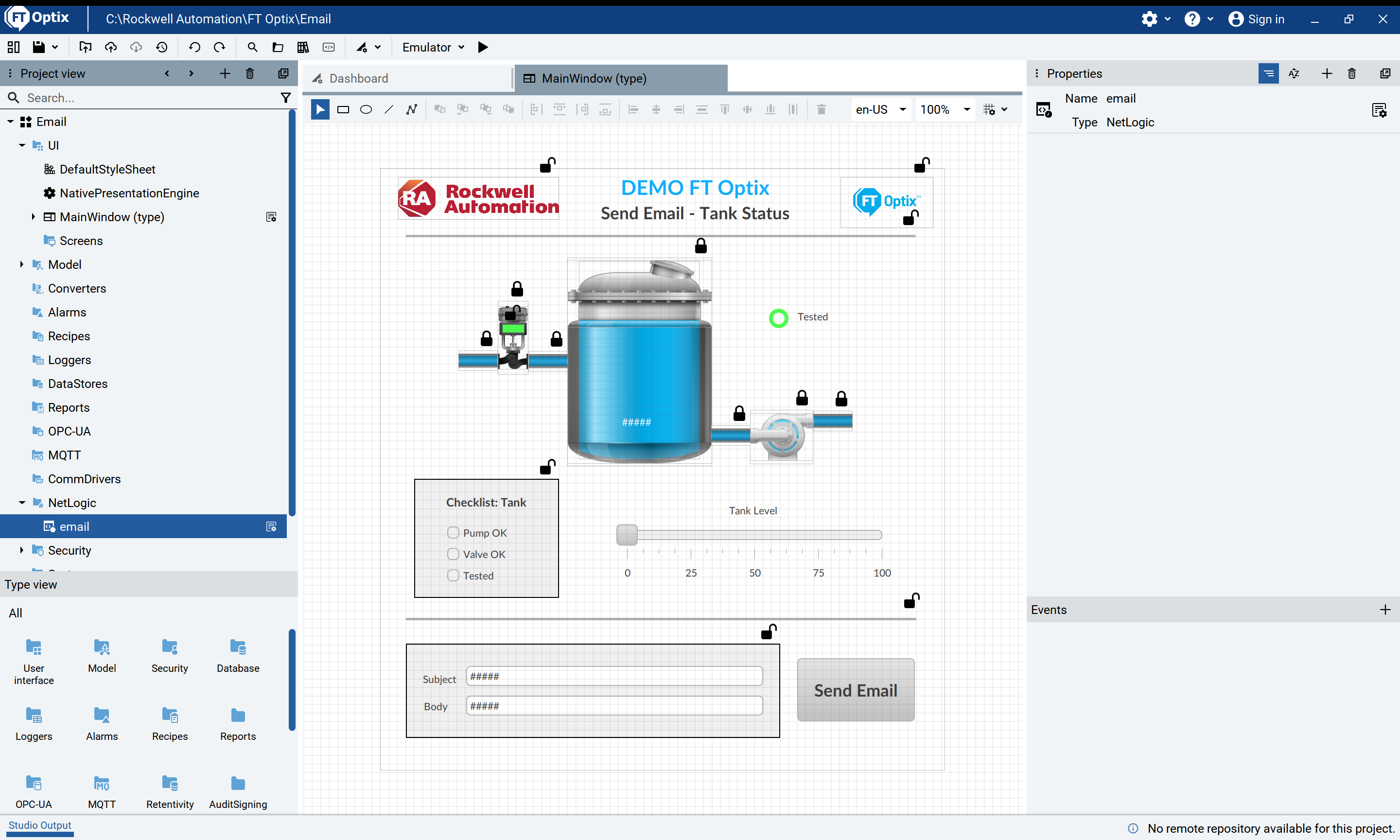
In the project view locate the NetLogic, where the code for sending e-mails is located.

send-email-notifications-with-ft-optix_Step 2_2

send-email-notifications-with-ft-optix_Step 2_2

Step 3.1


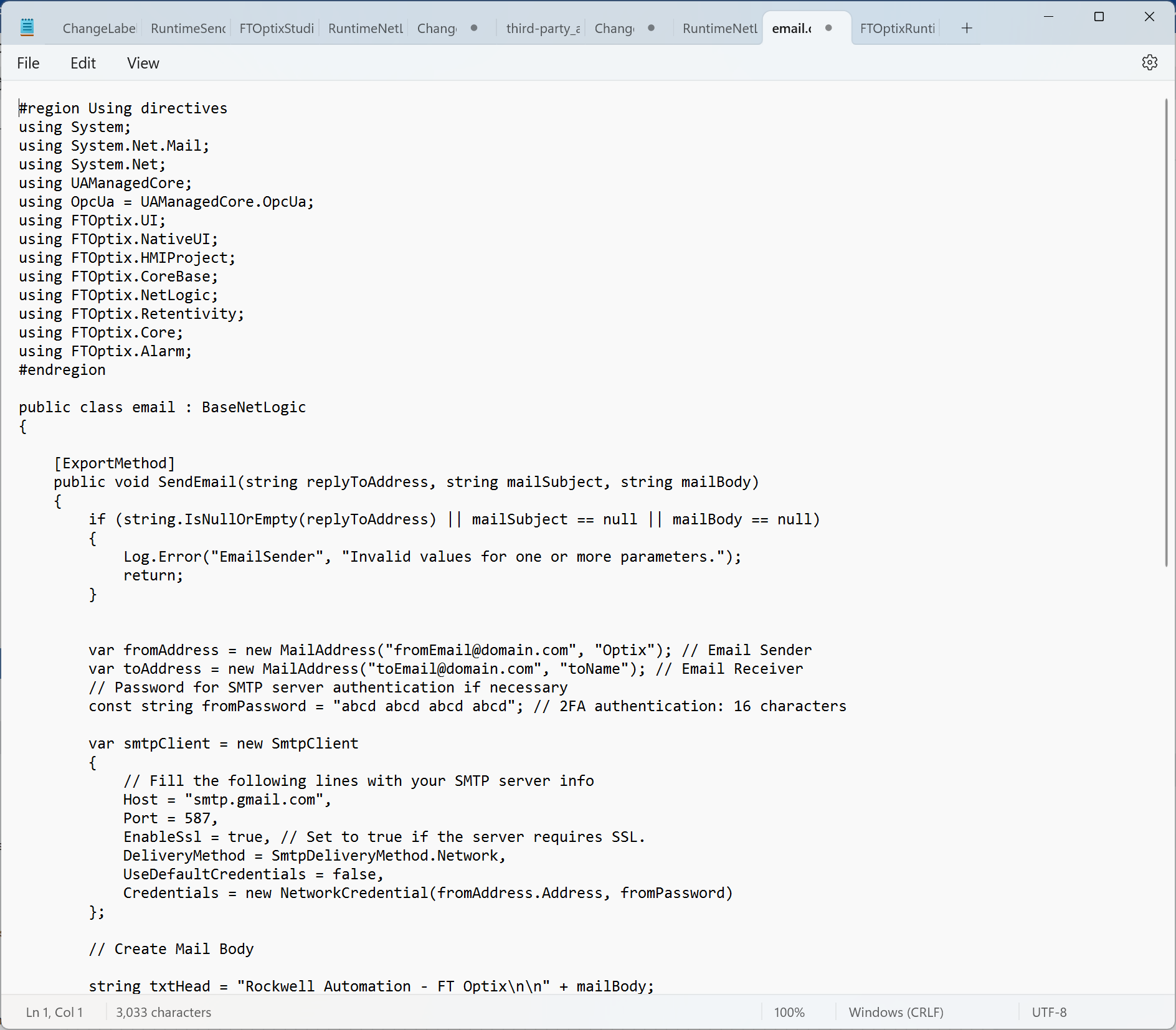
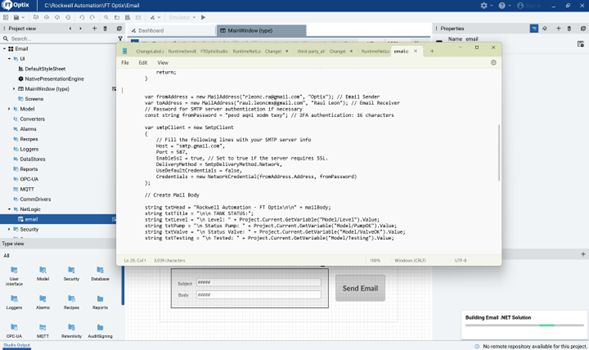
Open C# code to send e-mails

Email > NetLogic > email

send-email-notifications-with-ft-optix_Step 3_1

send-email-notifications-with-ft-optix_Step 3_1

Step 3.2
 
 
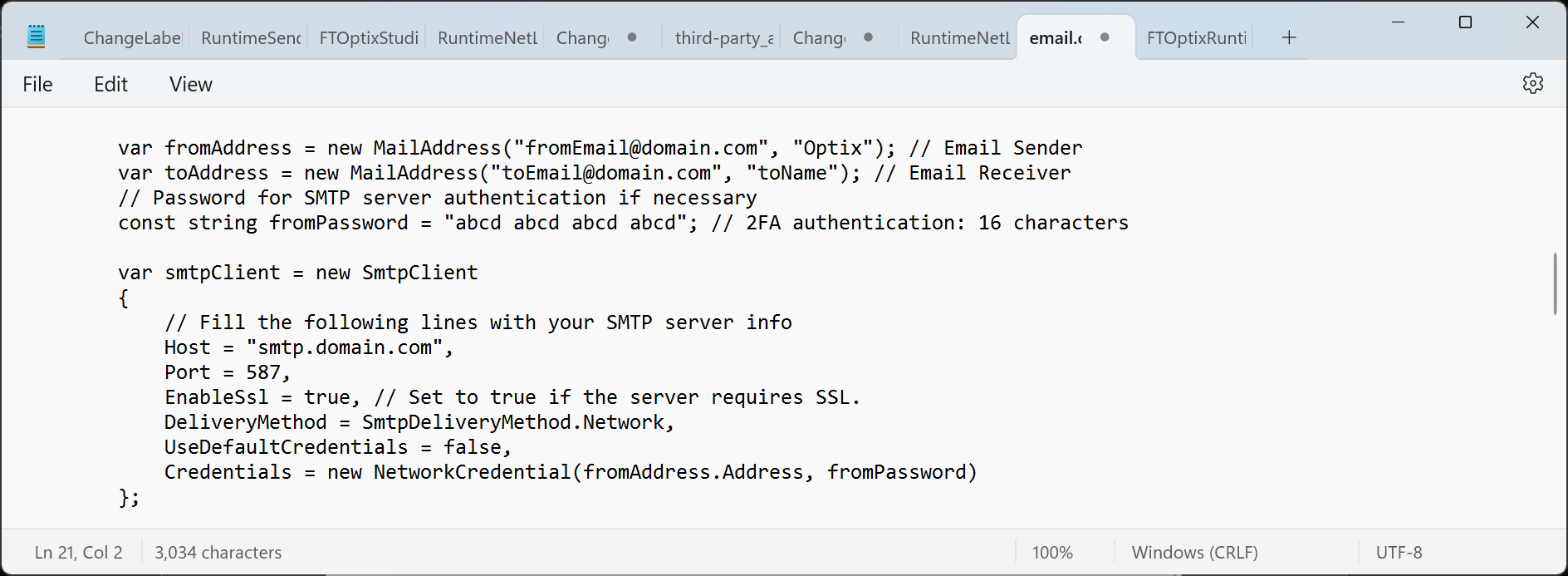
  • Set up the sending email address: var fromAddress = new MailAddress("fromEmail@domain.com", "Optix"); For example: var fromAddress = new MailAddress("mail_application@gmail.com", "Optix");
  • Set up the receiving email address: var toAddress = new MailAddress("toEmail@domain.com", "toName"); For example: var toAddress = new MailAddress("mail_user@gmail.com", "Usuario");
  • Confirm the host to use: Host = "smtp.domain.com", For example: Host = "smtp.gmail.com",
  • Enter the application password of your email, usually 16 characters long: const string fromPassword = "abcd abcd abcd abcd";


If necessary, a brief explanation of how to generate the application password is given in Step 4.

However, it will depend on the email service you will use to send the emails.

 
send-email-notifications-with-ft-optix_Step 3_2

send-email-notifications-with-ft-optix_Step 3_2

Step 3.3


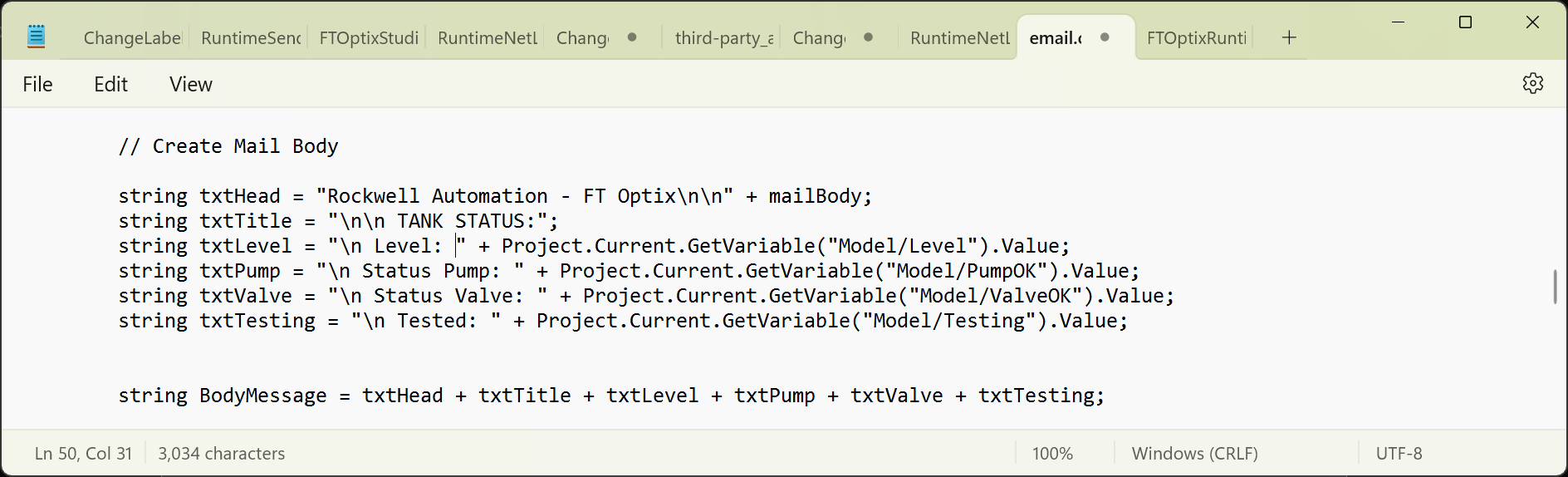
You can customize the body of the email according to the information you want to include in the email.

 
send-email-notifications-with-ft-optix_Step 3_3

send-email-notifications-with-ft-optix_Step 3_3


This sentence allows to obtain the value of a variable of our current project, you only have to substitute the name of the var variable to be used.

Project.Current.GetVariable(“Model/var”).Value:

Step 3.4


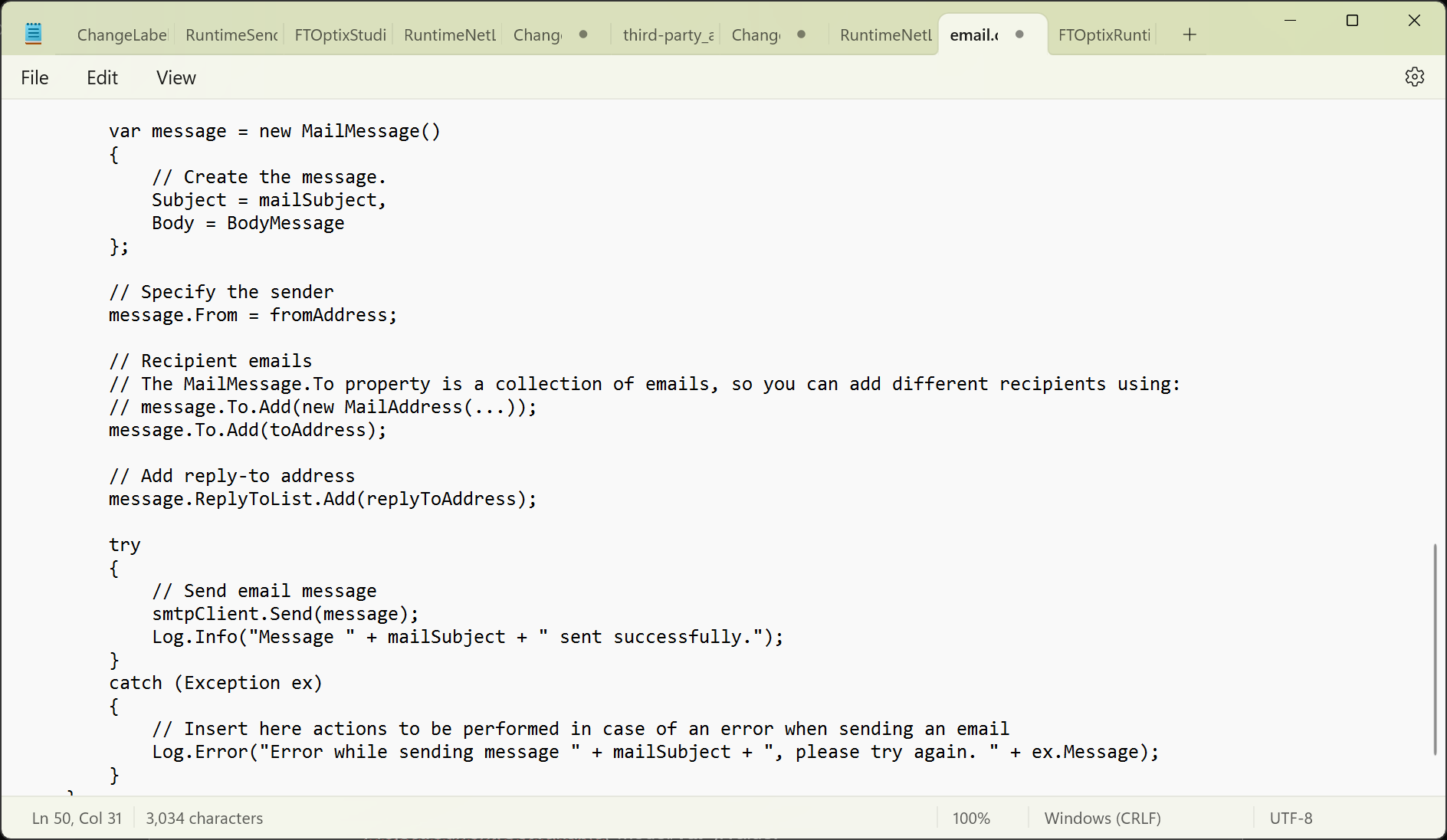
The following lines of code are used to send e-mails.

 
send-email-notifications-with-ft-optix_Step 3_4

send-email-notifications-with-ft-optix_Step 3_4

Step 3.5


Save the code.

 
send-email-notifications-with-ft-optix_Step 3_5

send-email-notifications-with-ft-optix_Step 3_5


The Email .NET solution code should be built. Close the code.

Step 4


SMTP is a protocol for e-mail transmission. It provides the necessary instructions for mail servers to communicate with each other, ensuring effective and reliable delivery of emails.

Generate the 16-character application password in your email account.

  1. Go to your account settings.
  2. Select «Security» in the left sidebar.
  3. Under «Login», find «Application Passwords» and click on it.
  4. You may need to log in again.
  5. At the bottom, select the application and device you are using.
  6. Click «Generate» and follow the instructions to obtain the application password.


A 16-character 2FA password is generated: “abcd abcd abcd abcd abcd abcd” which will be used as the password in Step 3.2.


Step 5


In the Send Email button set the MouseClick event with Email/NetLogic/email/SendEmail method and confirm the input arguments.

send-email-notifications-with-ft-optix_Step 5

send-email-notifications-with-ft-optix_Step 5


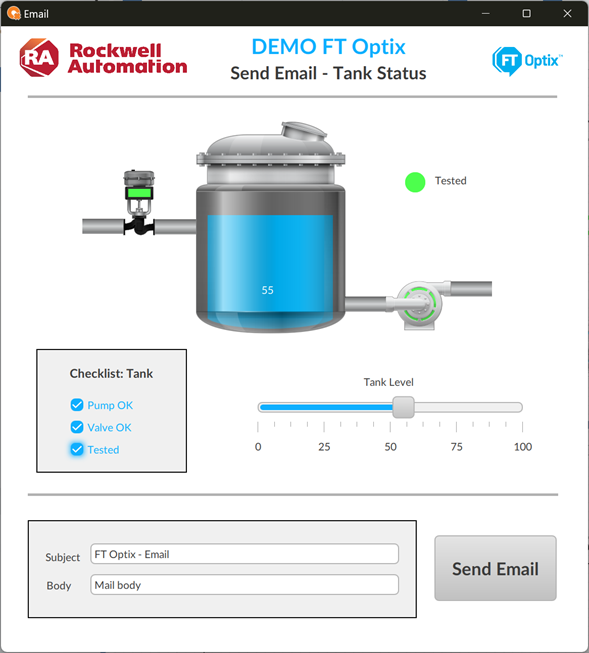
Run the application to see how it works.

Step 6.1


You will be able to see the tank level.

Check the tank checklist.


In the Subject field you can modify the subject (title) of the email.

In the Body field you can add a message in the body of the email.


Send Email button will send the email with the current data.

 
send-email-notifications-with-ft-optix_Step 6_1

send-email-notifications-with-ft-optix_Step 6_1

Step 6.2


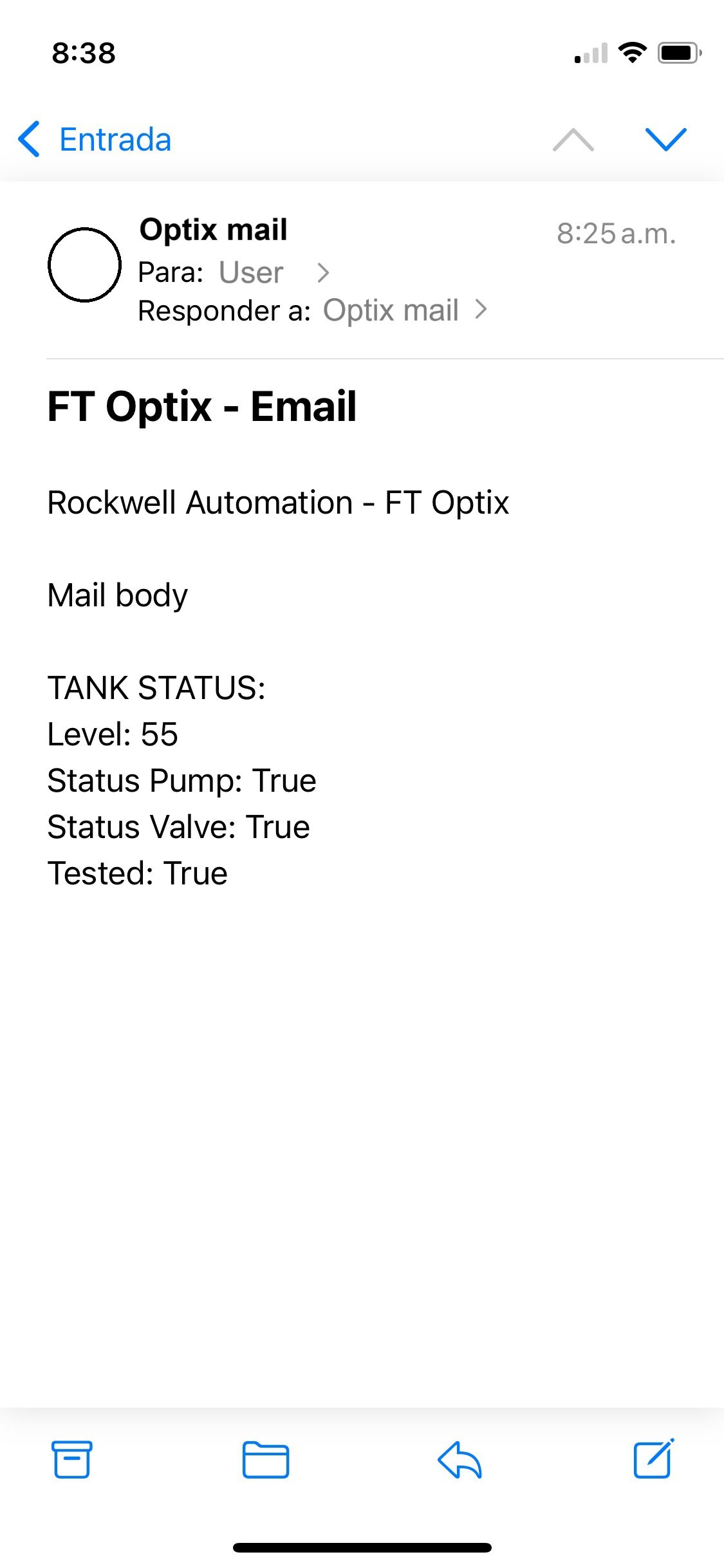
Verify the email address to which the information was sent.

 
send-email-notifications-with-ft-optix_Step 6_2

send-email-notifications-with-ft-optix_Step 6_2


send-email-notifications-with-ft-optix_Step 1

send-email-notifications-with-ft-optix_Step 1

send-email-notifications-with-ft-optix_Step 2_1

send-email-notifications-with-ft-optix_Step 2_1

send-email-notifications-with-ft-optix_Step 2_2

send-email-notifications-with-ft-optix_Step 2_2

send-email-notifications-with-ft-optix_Step 3_1

send-email-notifications-with-ft-optix_Step 3_1

send-email-notifications-with-ft-optix_Step 3_2

send-email-notifications-with-ft-optix_Step 3_2

send-email-notifications-with-ft-optix_Step 3_3

send-email-notifications-with-ft-optix_Step 3_3

send-email-notifications-with-ft-optix_Step 3_4

send-email-notifications-with-ft-optix_Step 3_4

send-email-notifications-with-ft-optix_Step 3_5

send-email-notifications-with-ft-optix_Step 3_5

send-email-notifications-with-ft-optix_Step 5

send-email-notifications-with-ft-optix_Step 5

send-email-notifications-with-ft-optix_Step 6_1

send-email-notifications-with-ft-optix_Step 6_1

send-email-notifications-with-ft-optix_Step 6_2

send-email-notifications-with-ft-optix_Step 6_2


Send Email Notifications with FT Optix

Version 2.0 - September 2026


AHIC White Logo

Receive new applications and Innovation Center updates directly in your inbox.

Subscribe!
 
  1. Chevron LeftChevron Left Rockwell Automation Home
  2. Chevron LeftChevron Left Sup...
  3. Chevron LeftChevron Left Pro...
  4. Chevron LeftChevron Left Downloads
  5. Chevron LeftChevron Left Innovation Center
  6. Chevron LeftChevron Left Send Email Notifications with FT Optix
Please update your cookie preferences to continue.
This feature requires cookies to enhance your experience. Please update your preferences to allow for these cookies:
  • Social Media Cookies
  • Functional Cookies
  • Performance Cookies
  • Marketing Cookies
  • All Cookies
You can update your preferences at any time. For more information please see our {0} Privacy Policy
CloseClose