
1834-AENTR Gateway Status Indicators
See the status indicators on your device to identify its current status.
1834-AENTR Gateway Status Indicators
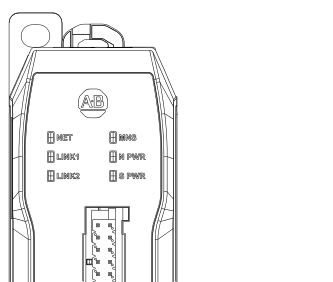
Status Indicator | State | Description |
|---|---|---|
NET Network status for the EtherNet/IP™ network | Off | The gateway is powered off or powered on, but no IP address configured. |
Flashing Green | An IP address is configured, but no CIP™ connections are established. | |
Steady Green | The gateway has an IP address, established at least 1 CIP™ connection, and is operating properly. | |
Flashing Red | The gateway has an IP address but a CIP™ connection has timed out. | |
Red | The gateway shares an IP address with another device on the network. Change the IP
address of the module. | |
Flashing Green and Red | The gateway is performing its power-up testing. | |
LINK1 LINK2 Status of data transmission | Off | Either the module is not powered on or a cable does not exist on the port. |
Flashing Green | Activity exists on the port at 1000 MB or 100 MB. | |
Steady Green | A 1000 MB or 100 MB link exists on the port, but no traffic is being received. | |
Flashing Yellow | Activity exists on the port at 10 MB. | |
Steady Yellow | 10 MB link exists on the port, but no traffic is being received. | |
MNS Module and EtherNet/IP™ In-cabinet network status | Off | IP addresses are not configured on the bus. |
Flashing Green | IP addresses are configured on the bus but there are no connections. | |
Steady Green | IP addresses are configured, at least 1 connection is established, and the bus is
operating properly. | |
Flashing Red | IP addresses are configured but connections have timed out or a major recovery
fault has occurred. | |
Steady Red | A device on the bus has the same IP address or the internal diagnostics has created
a non-resettable fault.
IMPORTANT:
If a duplicate IP address fault is not
present and the fault persists through power cycles, the device should be
replaced.
| |
Flashing Green and Red | The device is performing its power-up testing. | |
N PWR Network power status | Off | The power supply is off. |
Steady Green | The power supply is operating correctly. | |
Steady Red | The power supply in a tripped state. | |
Flashing Red | The power supply is in a warning state. | |
S PWR Switched power status | Off | The power supply is off. |
Steady Green | The power supply is operating correctly. | |
Steady Red | The power supply in a tripped state. | |
Flashing Red | The power supply is in a warning state. |
Provide Feedback