Loading
Innovation Center LOGO
Recent ActivityRecent Activity

Sizing a PlantPAx System for Applications with Up to 5 Operator Workstations

Learn how to size a robust and scalable PlantPAx system (up to 5 operator workstations) using IAB and PSE, validating the architecture, optimizing costs, and ensuring performance and adherence to best practices. - [Implementation Time: 30 Minutes]
Innovation Center Home Page
sizing-a-plantpax-system-for-applications-with-up-to-5-operator-workstations 1.png
Innovation Center LOGO
  • Overview
  • Implementation Guide
  • Download
  • Contact us
  • Subscribe
Innovation Center Home Page
 

What does this application do?

Sizing a PlantPAx system using the Integrated Architecture Builder (IAB) and the Process System Estimator (PSE) is essential to ensure technical accuracy and economic efficiency. IAB enables the selection and validation of the correct components for the control architecture, ensuring compatibility and proper performance, while PSE provides detailed estimates of costs and resources, aligning the project with process requirements and budget constraints. This integrated approach reduces the risks of oversizing or system failures, optimizes scalability, and ensures compliance with Rockwell Automation best practices, resulting in a robust, safe, and economically viable system.

General Characteristics

The proposed system consists of a CompactLogix controller dedicated to process applications, integrated with a set of I/O modules and intelligent drives, all connected through an industrial EtherNet/IP network. This architecture ensures precise and scalable control, reliable communication between devices, support for advanced automation strategies, and integration with supervisory systems, providing high availability, expansion flexibility, and compliance with process automation best practices.

Advantages
  • Sizing using an up-to-date tool
  • Use of up-to-date solutions focused on each discipline
  • Evaluation of potential challenges that may arise
  • Ability to develop comprehensive studies related to the sized system

Limitations and Disadvantages

The IAB (Integrated Architecture Builder) software must be updated to its latest version.

AHIC Download ICON VF.png

Downloads

Please note: You will need to agree to the Terms & Conditions for each download.

Downloadable file ›
Legal Disclaimer Acceptance. ROCKWELL AUTOMATION WILL PROVIDE ACCESS TO ROCKWELL PRODUCTS (BEST PRACTICES, APPLICATIONS AND KNOWLEDGE) ON THE CONDITION THAT YOU ACCEPT AND COMPLY WITH THE FOLLOWING TERMS AND CONDITIONS. YOU ACCEPT AND AGREE TO BE BOUND BY THE TERMS OF THIS AGREEMENT BY DOWNLOADING, INSTALLING, COPYING, OR OTHERWISE USING PRODUCTS. IF YOU ARE ACCEPTING THESE TERMS ON BEHALF OF ANOTHER PERSON, COMPANY, OR OTHER LEGAL ENTITY, YOU REPRESENT AND WARRANT THAT YOU HAVE FULL AUTHORITY TO BIND THAT PERSON, COMPANY, OR LEGAL ENTITY TO THESE TERMS. IF YOU DO NOT AGREE TO THESE TERMS, DO NOT DOWNLOAD, INSTALL, COPY, ACCESS, OR USE THE PRODUCTS, SOFTWARE AND/OR CLOUD SERVICES. 1. Rockwell Automation retains full ownership and title to all Products and related documentation. No rights or licenses are granted other than those set forth in this Agreement. Company grants to Rockwell Automation a non-exclusive, worldwide, royalty-free, perpetual, non-revocable license to use any feedback Company provides regarding the Products, even if Company has designated the feedback as confidential. Rockwell Automation will be entitled to use the feedback without restriction or compensation to Company. 2. Company may not lease sub-lease, assign, license, sub-license or otherwise transfer any of the Products without the prior written consent of Rockwell Automation. Company may not assign or otherwise transfer access rights to the Products without the prior written consent of Rockwell Automation. Any reverse assembly, reverse engineering, decompilation, and creation of derivative works based on the Products by Company is prohibited. 3. Company acknowledges that Products provided under this Agreement are Rockwell Automation’s Confidential Information and are covered by effective or pending copyrights, patents, trademarks and/or trade secrets of Rockwell Automation, and Company agrees to maintain confidentiality by not disclosing Products or documentation to any third party without the prior written consent of Rockwell Automation and to protect the confidentiality of the Products as it would Company’s own confidential information. Company agrees that its obligation of confidentiality under this paragraph shall survive expiration or termination of this Agreement. 4. Company agrees that Products provided under this Agreement are prototypes and examples and its application and results may vary depending on each customer and project conditions. Rockwell Automation do not warranty the same results. This Agreement shall in no way be construed as a commitment by Rockwell Automation at any time to manufacture and/or offer Products for sale. There is no explicit or implicit service level agreement associated with using the Products. Rockwell Automation does not warrant that the functions contained in the Products will meet Company’s requirements. Company agrees to use all Products only in accordance with the instructions and only for the intended usages identified in the documentation. 5. EXCLUSION OF WARRANTIES AND LIMITATION OF LIABILITY. THE PRODUCTS ARE PROVIDED "AS IS". ROCKWELL AUTOMATION DISCLAIMS ANY AND ALL WARRANTIES, EXPRESS, IMPLIED OR STATUTORY, INCLUDING WITHOUT LIMITATION ANY WARRANTIES OF MERCHANTABILITY OR FITNESS FOR A PARTICULAR PURPOSE. ROCKWELL AUTOMATION EXPLICITLY DISCLAIMS ALL WARRANTIES OF NON- INFRINGEMENT AND EXPRESSLY DOES NOT WARRANT THAT THE PRODUCTS, IN WHOLE OR IN PART, WILL BE ERROR FREE OR FREE FROM SECURITY VULNERABILITIES. IN NO EVENT SHALL ROCKWELL AUTOMATION BE LIABLE FOR (i) LOST PROFITS, LOST SAVINGS, DOWNTIME, SPECIAL, INDIRECT OR CONSEQUENTIAL DAMAGES OF ANY KIND, OR (ii) ANY PERSONAL INJURY, PROPERTY DAMAGE OR ENVIRONMENTAL DAMAGE ARISING OUT OF OR IN CONNECTION WITH THIS AGREEMENT, WHETHER IN AN ACTION IN CONTRACT, STRICT LIABILITY OR IN TORT INCLUDING NEGLIGENCE. 6. COMPANY AGREES TO INDEMNIFY AND HOLD ROCKWELL AUTOMATION HARMLESS FROM ALL COSTS, AWARDS, DAMAGES, EXPENSES AND FEES (INCLUDING ATTORNEYS FEES) RESULTING FROM OR RELATED TO ANY THIRD-PARTY CLAIMS (INCLUDING EMPLOYEES AND AGENTS OF COMPANY) AGAINST ROCKWELL AUTOMATION, ITS DISTRIBUTORS, AGENTS, OFFICERS, DIRECTORS OR EMPLOYEES FOR PERSONAL INJURY (INCLUDING DEATH), PROPERTY DAMAGE OR ENVIRONMENTAL DAMAGE RELATED TO OR RESULTING FROM THE USE OF THE PRODUCTS. 7. In the event a Product is exported, Company agrees to comply with all applicable United States Export Control Law and Regulations, and the applicable export control laws of other countries. This Agreement shall be governed by the laws of the state of Wisconsin. This Agreement is the complete and exclusive Agreement between Rockwell Automation and the Company, and supersedes all prior agreements, whether written or oral, relating to the Products.
AHIC NEED HELP ICON VF.png


Need Help?

If you need help with an application or have feedback from the Innovation Center, please contact us.


Is this application relevant to me?

This type of solution is advantageous for the user because it offers simplicity, reliability, and integration in a single package. With a CompactLogix controller, I/O, and network-connected drives, the user achieves centralized control and standardized communication, reducing installation and maintenance complexity. Additionally, the architecture is scalable and flexible, allowing future expansions without significant investments, and ensures high availability and performance—resulting in greater operational efficiency, reduced downtime, and easier integration with supervisory and management systems.


How can I make it work?

Requirements: products, tools, prior knowledge.

Hardware

  • Standard computer or notebook.

Software

  • IAB (Integrated Architecture Builder), available for free download from the Rockwell Automation website.


AHIC STEP ICON.png

Implementation Guide


  1. Step 1
  2. Step 2
  3. Step 3
  4. Step 4
  5. Step 5
Open All Close All
Step 1


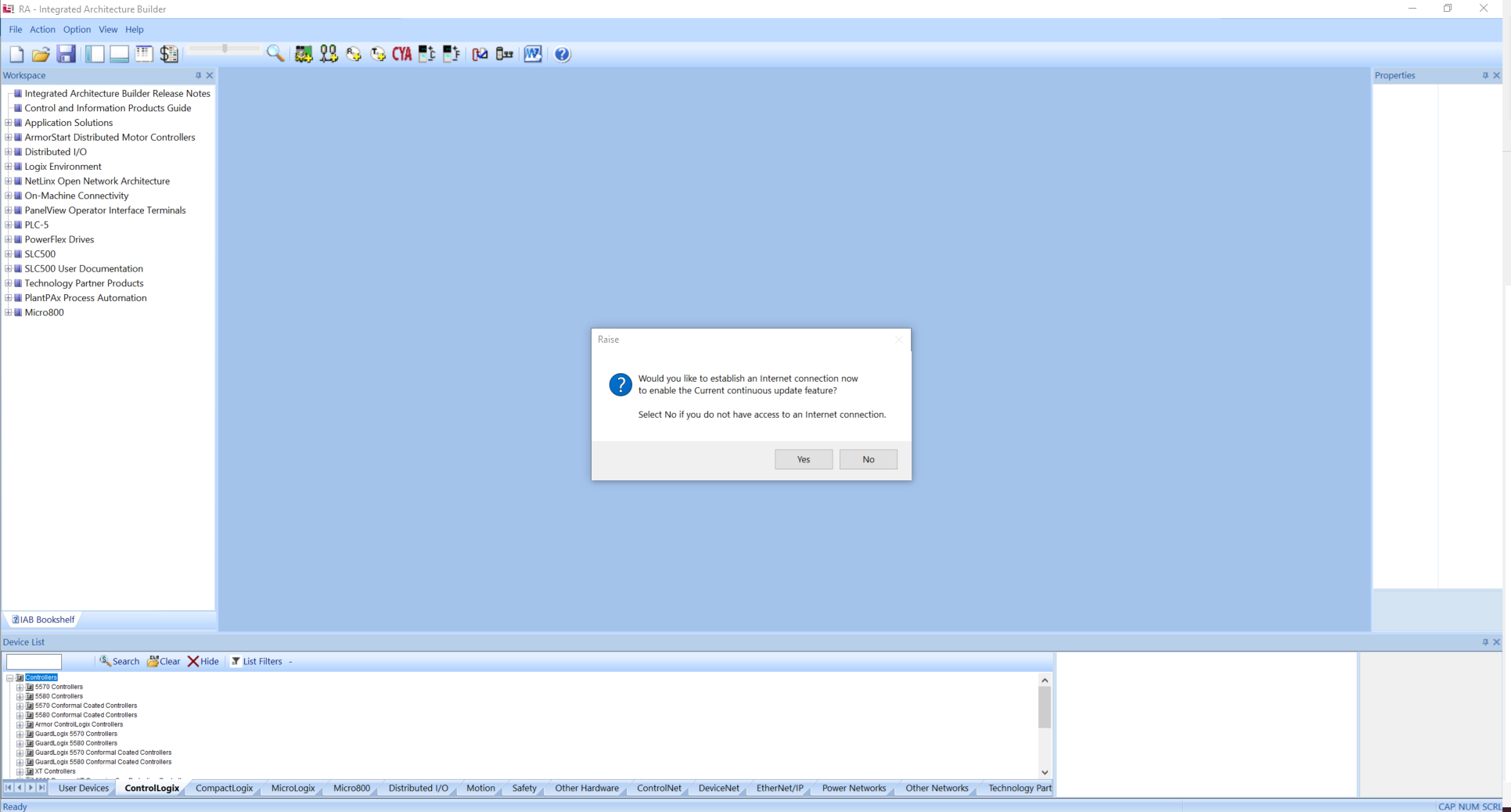
Open the IAB (Integrated Architecture Builder) and, if necessary, update the program’s database. If you have internet access, you can update your IAB by clicking “Yes”.
sizing-a-plantpax-system-for-applications-with-up-to-5-operator-workstations 2.png

sizing-a-plantpax-system-for-applications-with-up-to-5-operator-workstations 2.png

Step 2


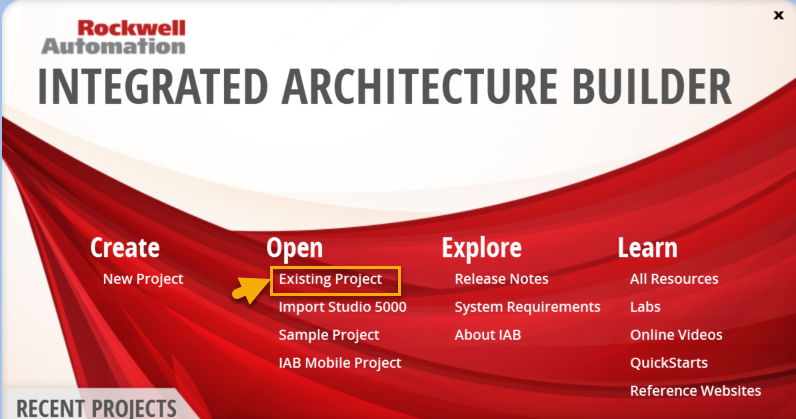
To start our project, click on “Existing Project” and import the provided file “App Innovation Center”.
sizing-a-plantpax-system-for-applications-with-up-to-5-operator-workstations 3.png

sizing-a-plantpax-system-for-applications-with-up-to-5-operator-workstations 3.png

Step 3


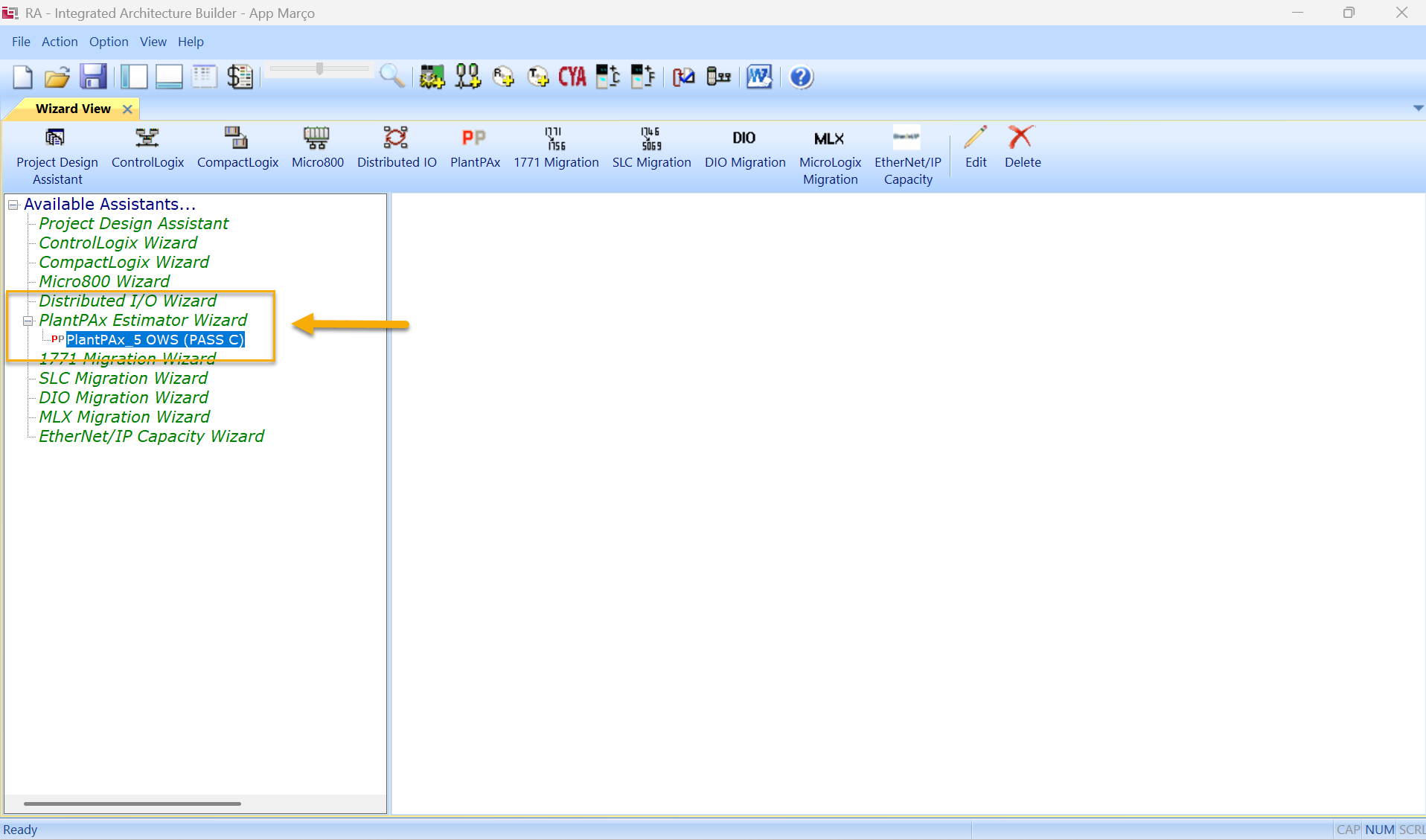
Select the application generated in Process System Estimator named “PlantPAx 5 OWS (PASS C)”.
sizing-a-plantpax-system-for-applications-with-up-to-5-operator-workstations 4.png

sizing-a-plantpax-system-for-applications-with-up-to-5-operator-workstations 4.png

Step 4


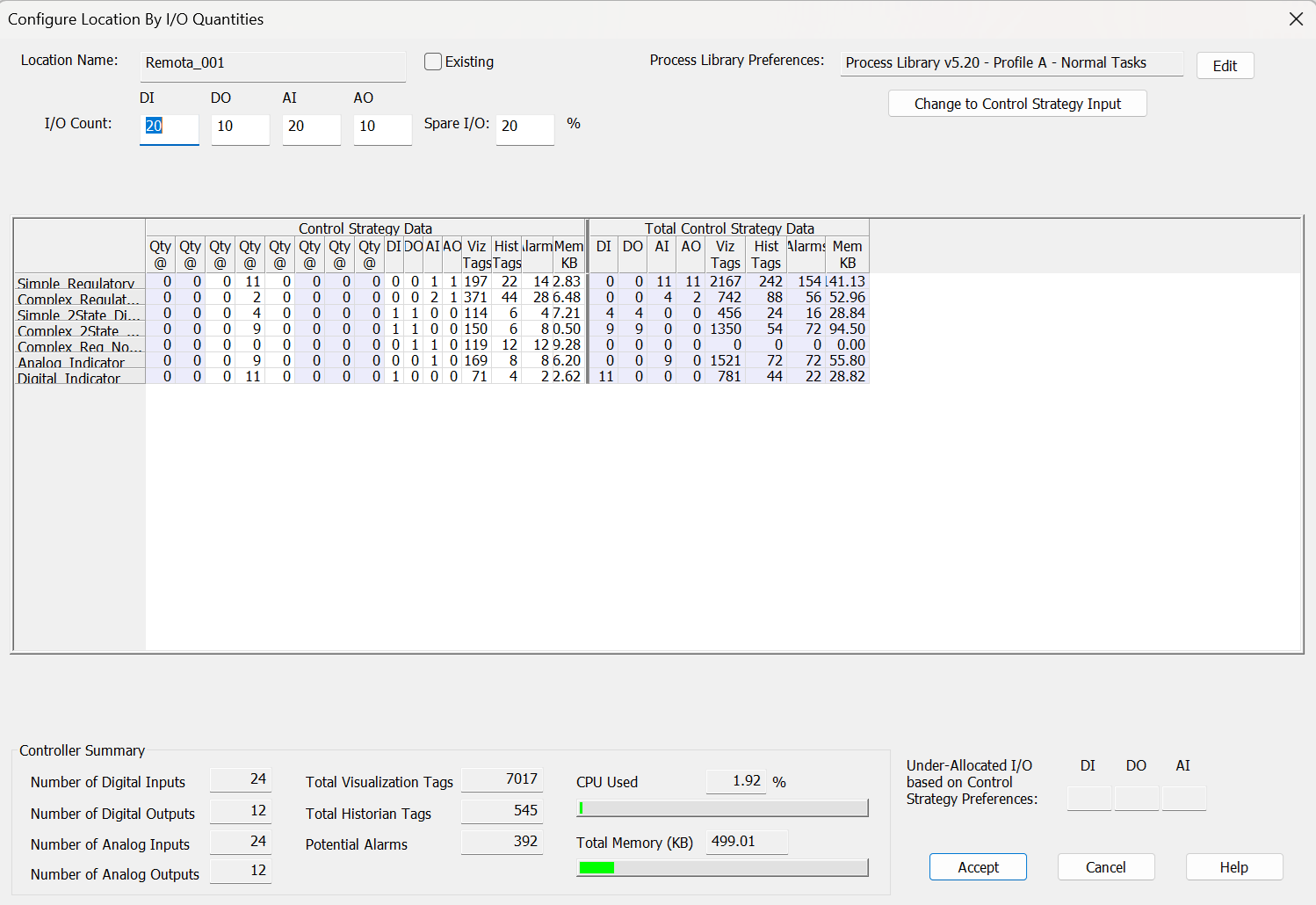
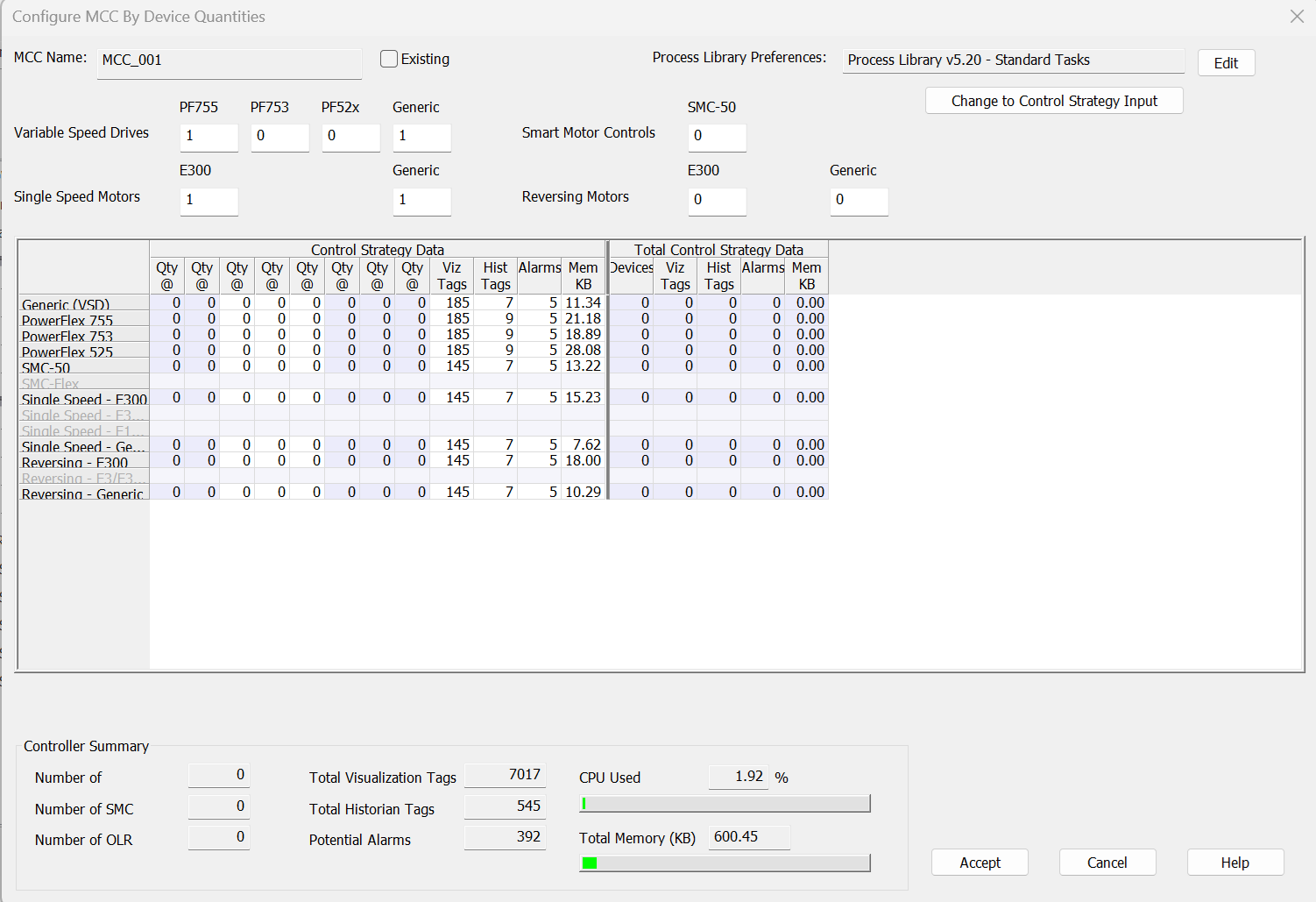
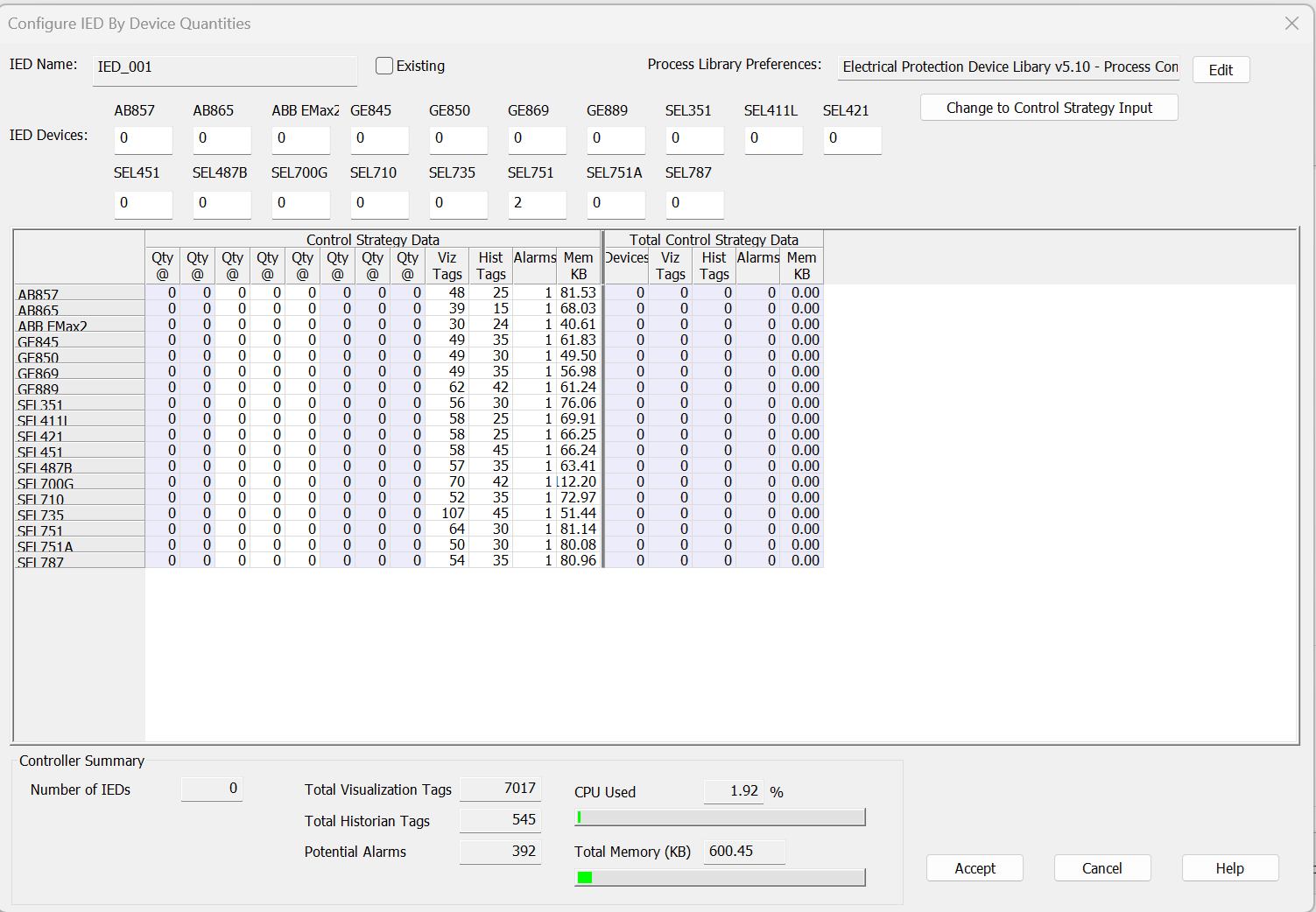
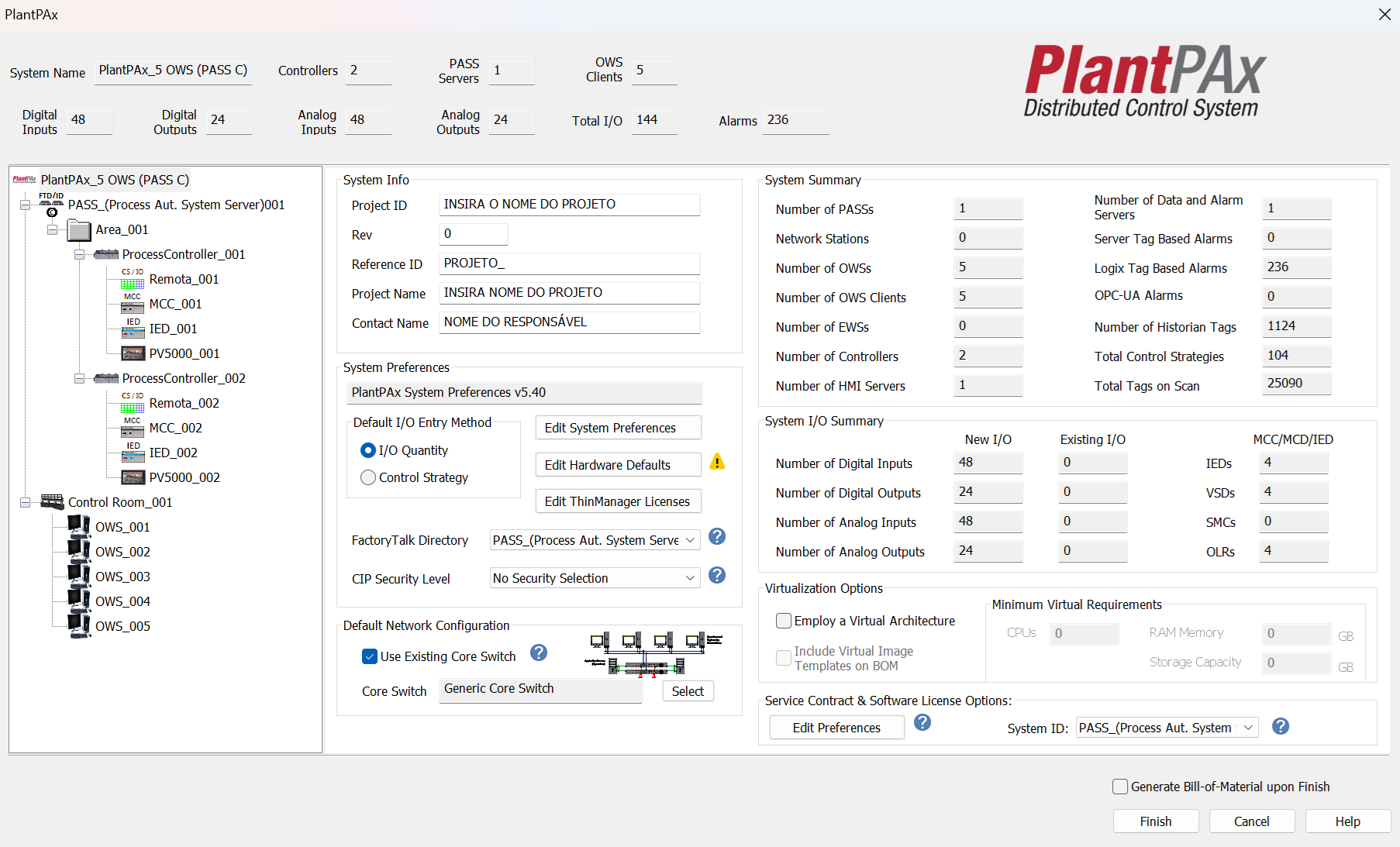
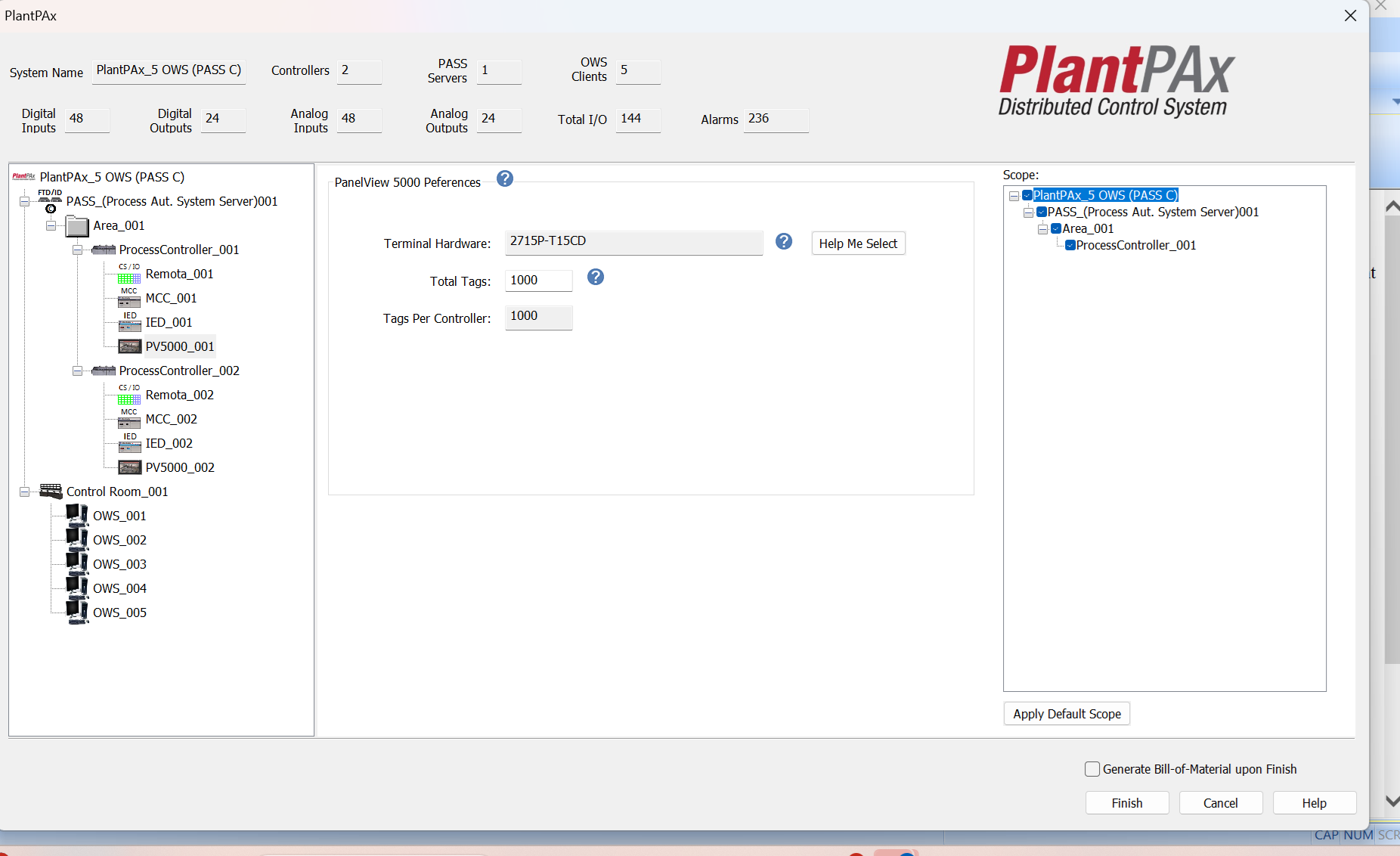
Once the application is open, you can configure the remotes, drives, IED protection relays, and local operator stations for each area of your system: 
  • sizing-a-plantpax-system-for-applications-with-up-to-5-operator-workstations 5.png

    sizing-a-plantpax-system-for-applications-with-up-to-5-operator-workstations 5.png

  • Configurations related to I/O.

     
    sizing-a-plantpax-system-for-applications-with-up-to-5-operator-workstations 6.png

    sizing-a-plantpax-system-for-applications-with-up-to-5-operator-workstations 6.png

  • Configurations related to drives.

     
    sizing-a-plantpax-system-for-applications-with-up-to-5-operator-workstations 7.png

    sizing-a-plantpax-system-for-applications-with-up-to-5-operator-workstations 7.png

  • Configurations related to IED relays.

     
    sizing-a-plantpax-system-for-applications-with-up-to-5-operator-workstations 8.png

    sizing-a-plantpax-system-for-applications-with-up-to-5-operator-workstations 8.png

  • Configurations related to local operation.
     
    sizing-a-plantpax-system-for-applications-with-up-to-5-operator-workstations 9.png

    sizing-a-plantpax-system-for-applications-with-up-to-5-operator-workstations 9.png

Step 5


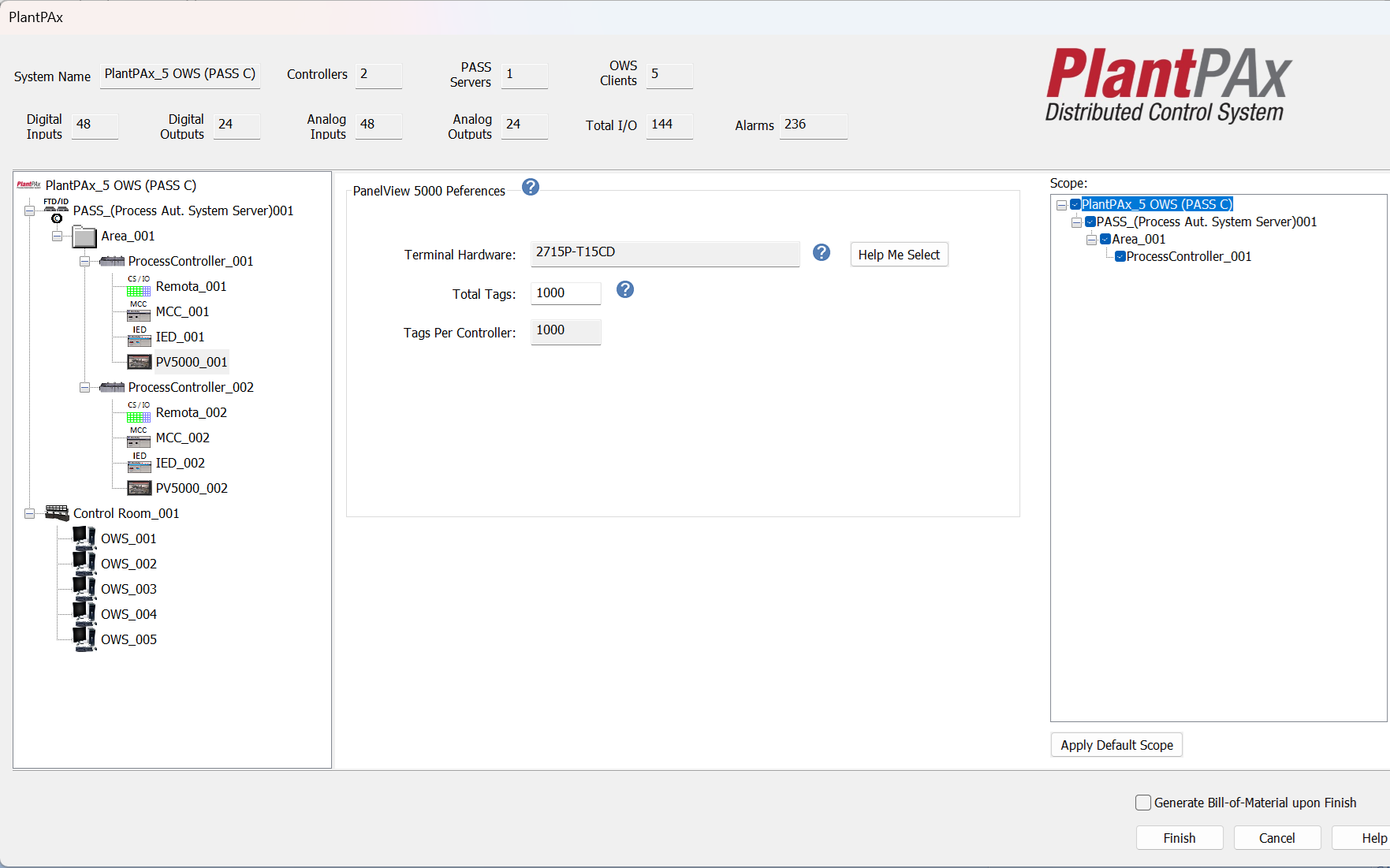
Once the above items are configured, it is possible to evaluate the Controller Status, providing a broader view of the project as a whole. After the evaluation, simply finalize and export the bill of materials.
sizing-a-plantpax-system-for-applications-with-up-to-5-operator-workstations 10.png


Note: It is important to emphasize that PlantPAx is a characterized Distributed Control System; therefore, it is essential to adopt all best practices, from system sizing to commissioning, always using the official Rockwell Automation manuals available through the provided link PlantPAx Distributed Control System | Rockwell Automation | US.


Sizing a PlantPAx System for Applications with Up to 5 Operator Workstations

Version 2.0 - September 2026


AHIC White Logo

Receive new applications and Innovation Center updates directly in your inbox.

Subscribe!
 
  1. Chevron LeftChevron Left Rockwell Automation Home
  2. Chevron LeftChevron Left Sup...
  3. Chevron LeftChevron Left Pro...
  4. Chevron LeftChevron Left Downloads
  5. Chevron LeftChevron Left Innovation Center
  6. Chevron LeftChevron Left Sizing a PlantPAx system for applications with up to 5 Operator Workstations
Please update your cookie preferences to continue.
This feature requires cookies to enhance your experience. Please update your preferences to allow for these cookies:
  • Social Media Cookies
  • Functional Cookies
  • Performance Cookies
  • Marketing Cookies
  • All Cookies
You can update your preferences at any time. For more information please see our {0} Privacy Policy
CloseClose