Loading
Innovation Center LOGO
Recent ActivityRecent Activity

Emonitor: Event-based data extraction from Dynamix 1444
To configure data extraction in Emonitor EEM so that it starts upon the occurrence of a specific event. - [Implementation time: 60 Minutes]
Innovation Center Home Page
Emonitor-event-based-date-extraction-from-Dynamix-1444_header.jpg
Innovation Center LOGO
  • Overview
  • Installation Guide
  • Downloads
  • Contact us
  • I want to subscribe.
Innovation Center Home Page
 

What is this for?

This application allows configuring data collection from the Dynamix 1444 so that it occurs upon a previously selected event.


General Features

This development includes:

  • Program configuration in Studio 5000
  • Procedure for Emonitor EEM
  • Procedure for Scheduler

Advantages

  • Allow limiting data collection to a defined period
  • Simplifies configuration for extraction in Emonitor

Limitations / Disadvantages

  • Limited to “Live Data Extraction”; does not support “Demand Data Extraction”
  • Limited to Emonitor versions 4.1 and above
 

Is this useful to me?

Yes, if you need to extract data from 1444 only when a specific event occurs (e.g., presence of elements on a conveyor belt).


Application Areas: Can be applied in vibration monitoring environments for rotating machinery.

AHIC Download ICON VF.png

Downloads

Please note: You will need to agree to the Terms & Conditions for each download.

Downloadable file ›
Legal Disclaimer Acceptance. ROCKWELL AUTOMATION WILL PROVIDE ACCESS TO ROCKWELL PRODUCTS (BEST PRACTICES, APPLICATIONS AND KNOWLEDGE) ON THE CONDITION THAT YOU ACCEPT AND COMPLY WITH THE FOLLOWING TERMS AND CONDITIONS. YOU ACCEPT AND AGREE TO BE BOUND BY THE TERMS OF THIS AGREEMENT BY DOWNLOADING, INSTALLING, COPYING, OR OTHERWISE USING PRODUCTS. IF YOU ARE ACCEPTING THESE TERMS ON BEHALF OF ANOTHER PERSON, COMPANY, OR OTHER LEGAL ENTITY, YOU REPRESENT AND WARRANT THAT YOU HAVE FULL AUTHORITY TO BIND THAT PERSON, COMPANY, OR LEGAL ENTITY TO THESE TERMS. IF YOU DO NOT AGREE TO THESE TERMS, DO NOT DOWNLOAD, INSTALL, COPY, ACCESS, OR USE THE PRODUCTS, SOFTWARE AND/OR CLOUD SERVICES. 1. Rockwell Automation retains full ownership and title to all Products and related documentation. No rights or licenses are granted other than those set forth in this Agreement. Company grants to Rockwell Automation a non-exclusive, worldwide, royalty-free, perpetual, non-revocable license to use any feedback Company provides regarding the Products, even if Company has designated the feedback as confidential. Rockwell Automation will be entitled to use the feedback without restriction or compensation to Company. 2. Company may not lease sub-lease, assign, license, sub-license or otherwise transfer any of the Products without the prior written consent of Rockwell Automation. Company may not assign or otherwise transfer access rights to the Products without the prior written consent of Rockwell Automation. Any reverse assembly, reverse engineering, decompilation, and creation of derivative works based on the Products by Company is prohibited. 3. Company acknowledges that Products provided under this Agreement are Rockwell Automation’s Confidential Information and are covered by effective or pending copyrights, patents, trademarks and/or trade secrets of Rockwell Automation, and Company agrees to maintain confidentiality by not disclosing Products or documentation to any third party without the prior written consent of Rockwell Automation and to protect the confidentiality of the Products as it would Company’s own confidential information. Company agrees that its obligation of confidentiality under this paragraph shall survive expiration or termination of this Agreement. 4. Company agrees that Products provided under this Agreement are prototypes and examples and its application and results may vary depending on each customer and project conditions. Rockwell Automation do not warranty the same results. This Agreement shall in no way be construed as a commitment by Rockwell Automation at any time to manufacture and/or offer Products for sale. There is no explicit or implicit service level agreement associated with using the Products. Rockwell Automation does not warrant that the functions contained in the Products will meet Company’s requirements. Company agrees to use all Products only in accordance with the instructions and only for the intended usages identified in the documentation. 5. EXCLUSION OF WARRANTIES AND LIMITATION OF LIABILITY. THE PRODUCTS ARE PROVIDED "AS IS". ROCKWELL AUTOMATION DISCLAIMS ANY AND ALL WARRANTIES, EXPRESS, IMPLIED OR STATUTORY, INCLUDING WITHOUT LIMITATION ANY WARRANTIES OF MERCHANTABILITY OR FITNESS FOR A PARTICULAR PURPOSE. ROCKWELL AUTOMATION EXPLICITLY DISCLAIMS ALL WARRANTIES OF NON- INFRINGEMENT AND EXPRESSLY DOES NOT WARRANT THAT THE PRODUCTS, IN WHOLE OR IN PART, WILL BE ERROR FREE OR FREE FROM SECURITY VULNERABILITIES. IN NO EVENT SHALL ROCKWELL AUTOMATION BE LIABLE FOR (i) LOST PROFITS, LOST SAVINGS, DOWNTIME, SPECIAL, INDIRECT OR CONSEQUENTIAL DAMAGES OF ANY KIND, OR (ii) ANY PERSONAL INJURY, PROPERTY DAMAGE OR ENVIRONMENTAL DAMAGE ARISING OUT OF OR IN CONNECTION WITH THIS AGREEMENT, WHETHER IN AN ACTION IN CONTRACT, STRICT LIABILITY OR IN TORT INCLUDING NEGLIGENCE. 6. COMPANY AGREES TO INDEMNIFY AND HOLD ROCKWELL AUTOMATION HARMLESS FROM ALL COSTS, AWARDS, DAMAGES, EXPENSES AND FEES (INCLUDING ATTORNEYS FEES) RESULTING FROM OR RELATED TO ANY THIRD-PARTY CLAIMS (INCLUDING EMPLOYEES AND AGENTS OF COMPANY) AGAINST ROCKWELL AUTOMATION, ITS DISTRIBUTORS, AGENTS, OFFICERS, DIRECTORS OR EMPLOYEES FOR PERSONAL INJURY (INCLUDING DEATH), PROPERTY DAMAGE OR ENVIRONMENTAL DAMAGE RELATED TO OR RESULTING FROM THE USE OF THE PRODUCTS. 7. In the event a Product is exported, Company agrees to comply with all applicable United States Export Control Law and Regulations, and the applicable export control laws of other countries. This Agreement shall be governed by the laws of the state of Wisconsin. This Agreement is the complete and exclusive Agreement between Rockwell Automation and the Company, and supersedes all prior agreements, whether written or oral, relating to the Products.
AHIC NEED HELP ICON VF.png

Need Help?

If you need help with an application or have feedback from the Innovation Center, please contact us.


How do you make it work?

Requirements: products, tools, prior knowledge.

Hardware

  • Logix Controllers
  • Dynamix 1444

Software

  • Studio 5000 (program developed in version 37)
  • Emonitor, version 4.1 or higher

Knowledge

  • Basic programming and configuration knowledge in: Studio 5000, Ladder Logic and Emonitor.



AHIC STEP ICON.png

Implementation Guide

 
  1. Step 1
  2. Step 2
  3. Step 3
  4. Step 4
Open All Close All
Step 1
 

Studio 5000 Program.

  • Create a program in Studio 5000 and add the 1444 module.
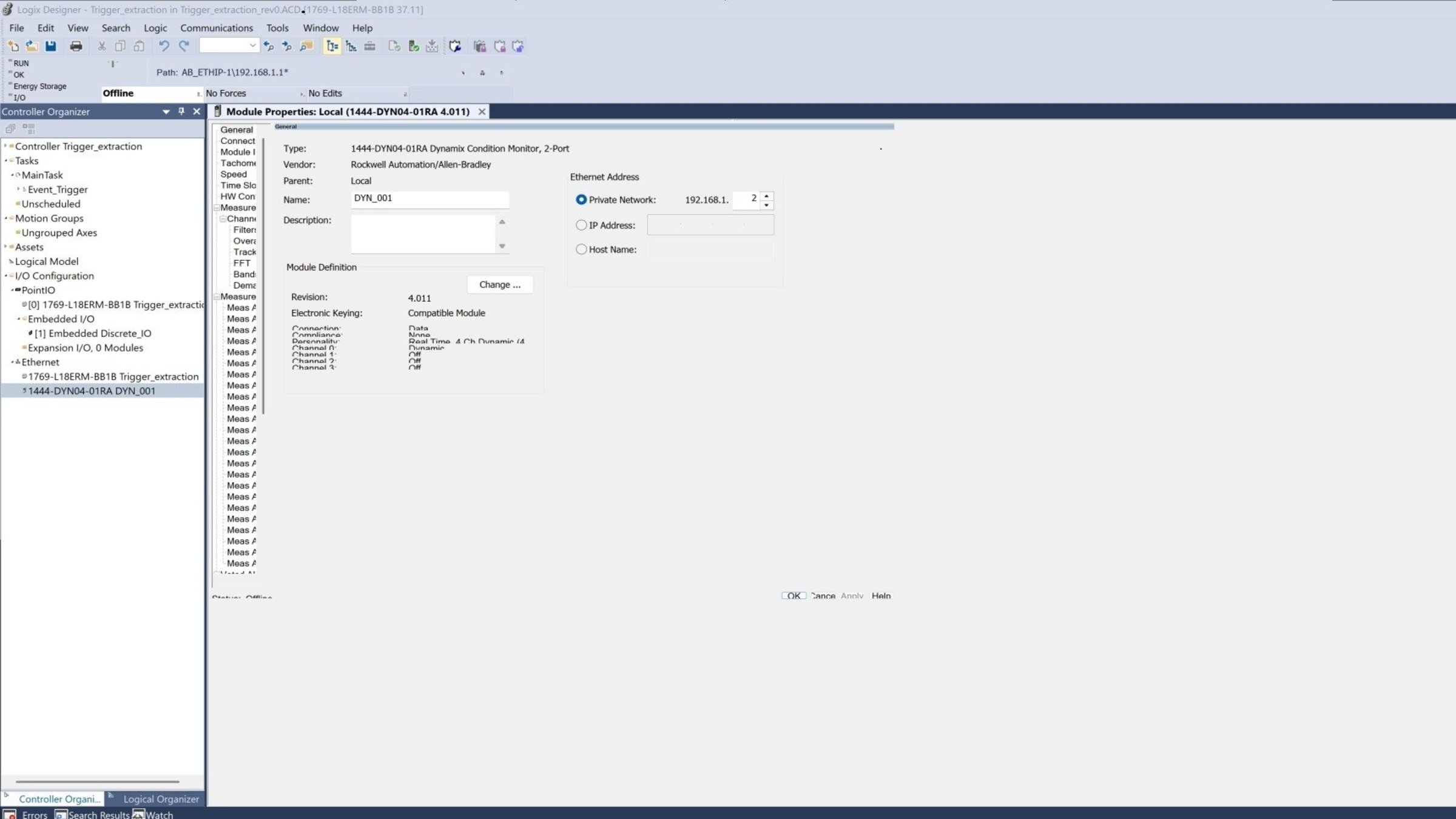
    Emonitor-event-based-date-extraction-from-Dynamix-1444_step1_image1.jpg

    Emonitor-event-based-date-extraction-from-Dynamix-1444_step1_image1

  • Configure the Dynamix 1444 for use with a single 1443-ACC-GP-T accelerometer.


    • Set the module “personality” to operate at 4 kHz per channel.
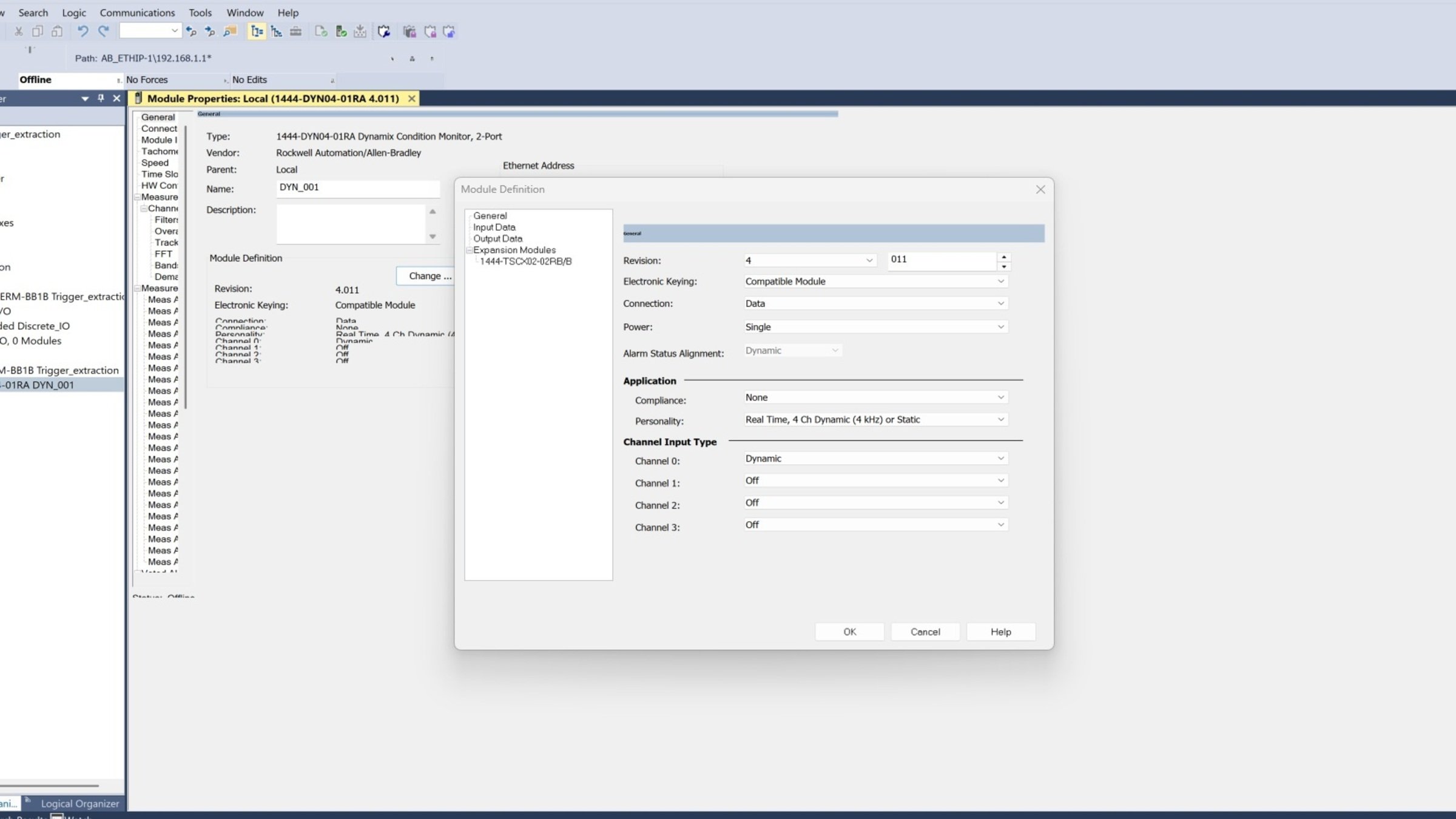
    Emonitor-event-based-date-extraction-from-Dynamix-1444_step1_image2.jpg

    Emonitor-event-based-date-extraction-from-Dynamix-1444_step1_image2

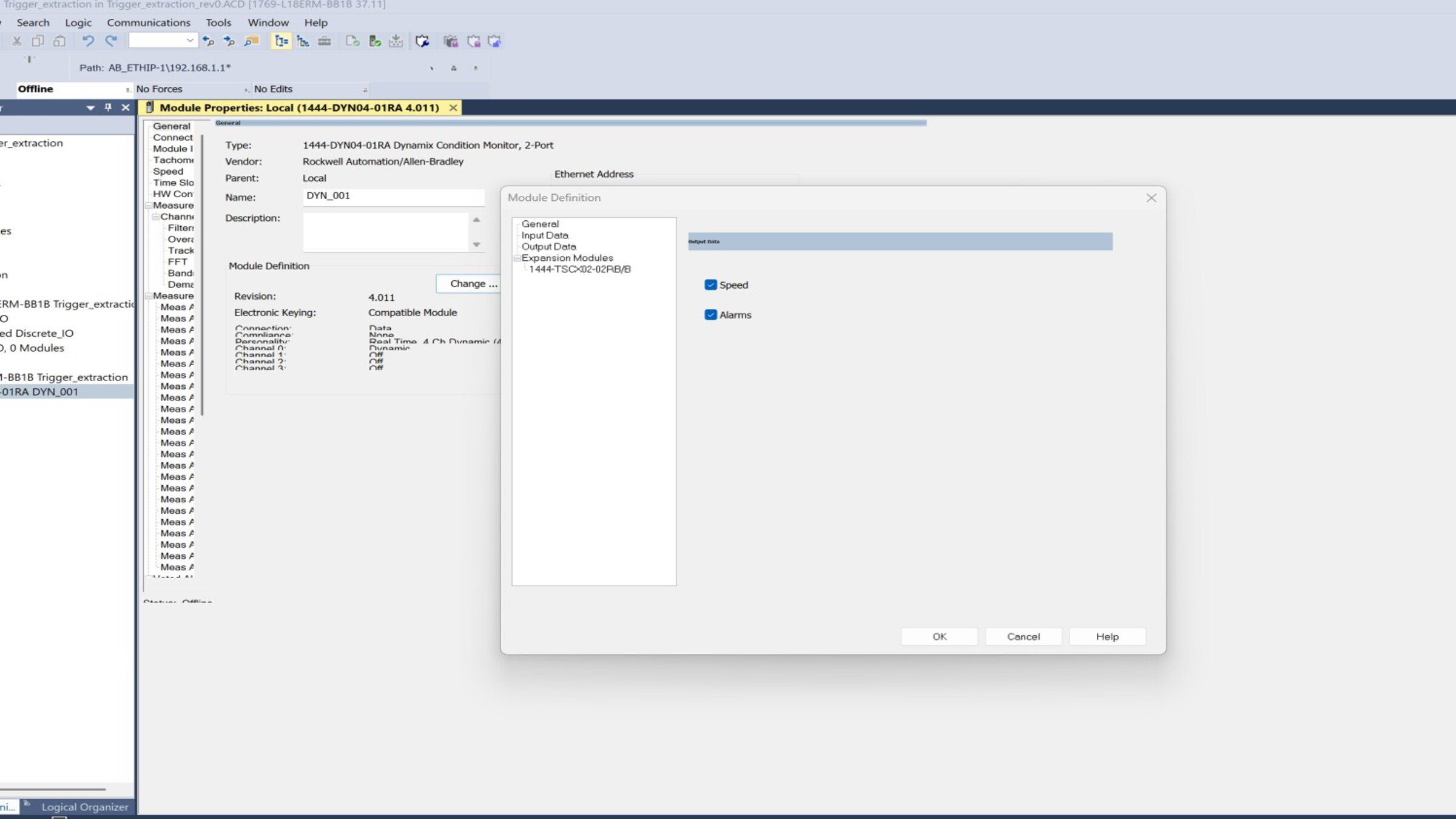
    • Select the measurements to be sent by the Dynamix 1444 module.
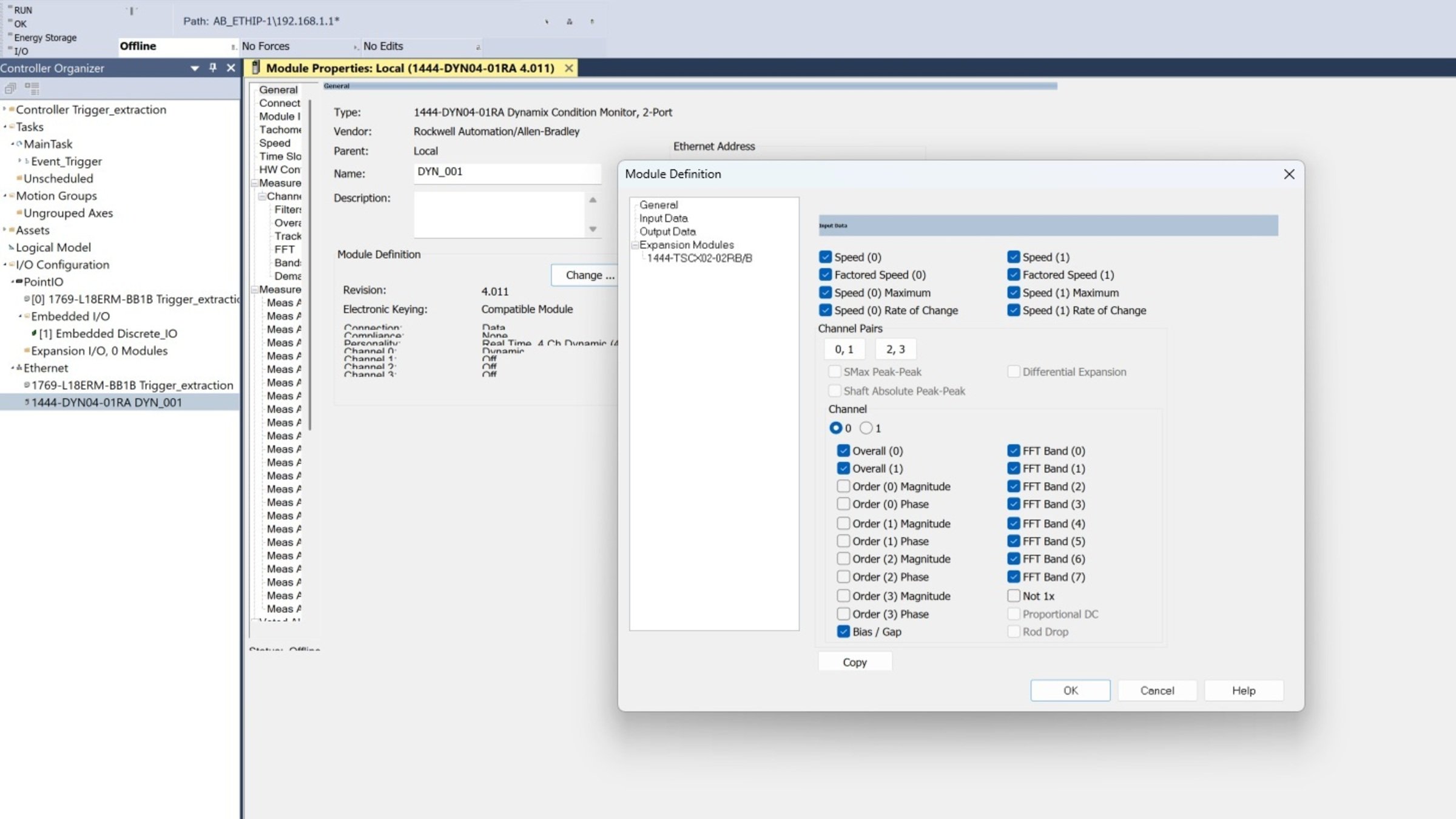
     

    Emonitor-event-based-date-extraction-from-Dynamix-1444_step1_image3.jpg

    Emonitor-event-based-date-extraction-from-Dynamix-1444_step1_image3

    • Select the measurements obtained from the accelerometer signal.
    Emonitor-event-based-date-extraction-from-Dynamix-1444_step1_image4.jpg

    Emonitor-event-based-date-extraction-from-Dynamix-1444_step1_image4

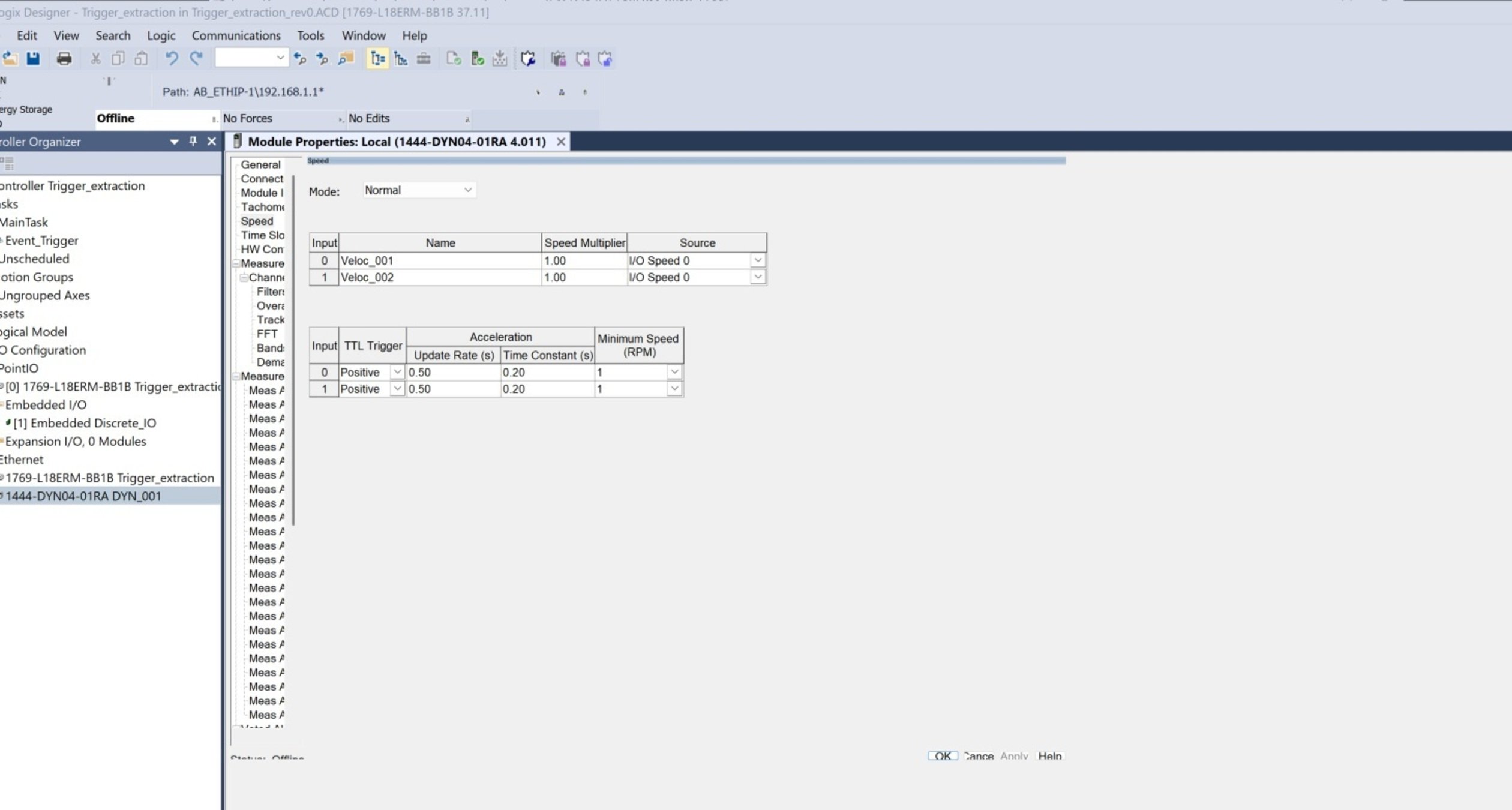
    • Configure reference speeds.


    Emonitor-event-based-date-extraction-from-Dynamix-1444_step1_image5.jpg

    Emonitor-event-based-date-extraction-from-Dynamix-1444_step1_image5

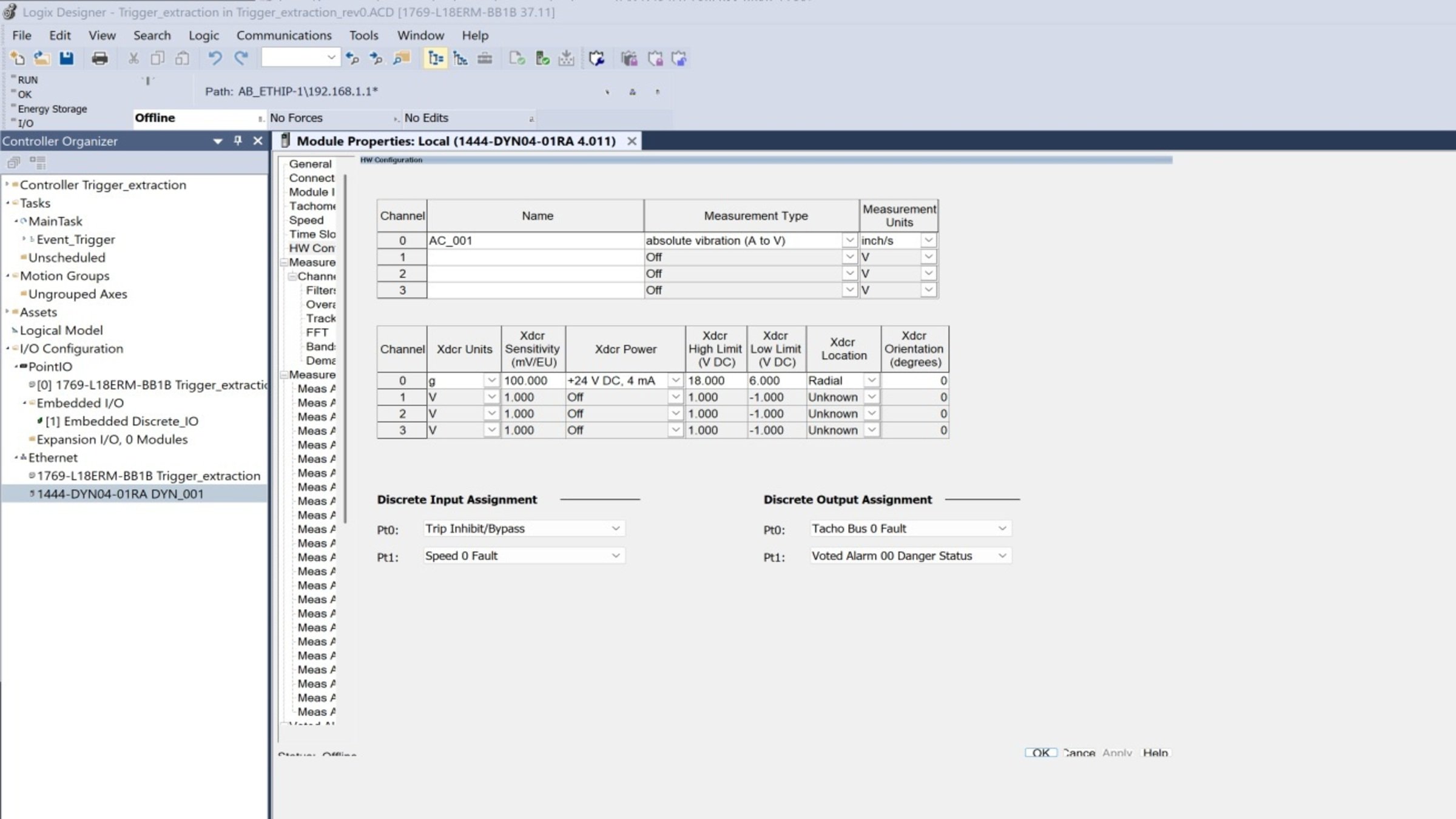
    • Configure the accelerometer.


    Emonitor-event-based-date-extraction-from-Dynamix-1444_step1_image6.jpg

    Emonitor-event-based-date-extraction-from-Dynamix-1444_step1_image6

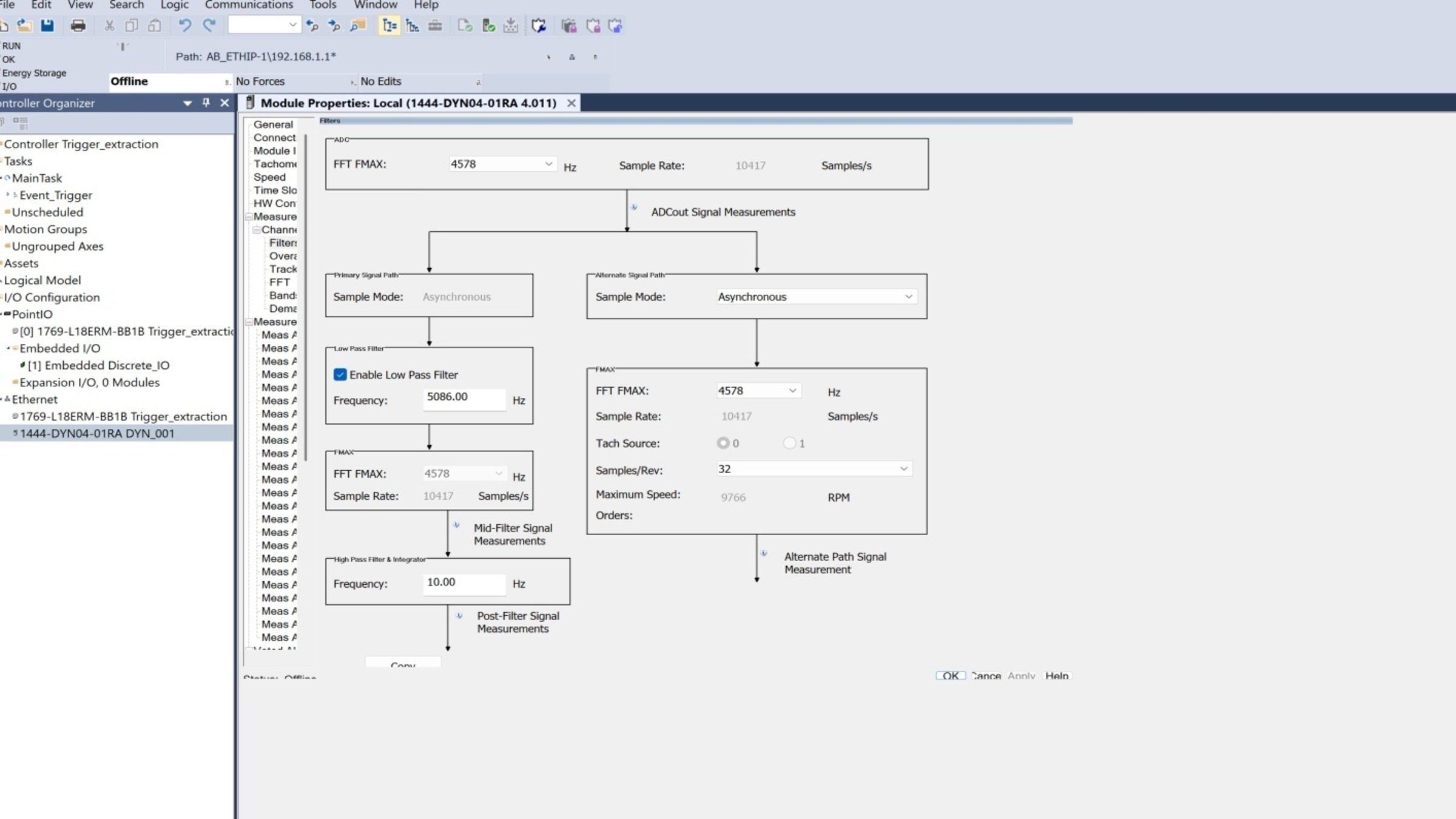
    • Configure channel 0 filters.


    Emonitor-event-based-date-extraction-from-Dynamix-1444_step1_image7.jpg

    Emonitor-event-based-date-extraction-from-Dynamix-1444_step1_image7

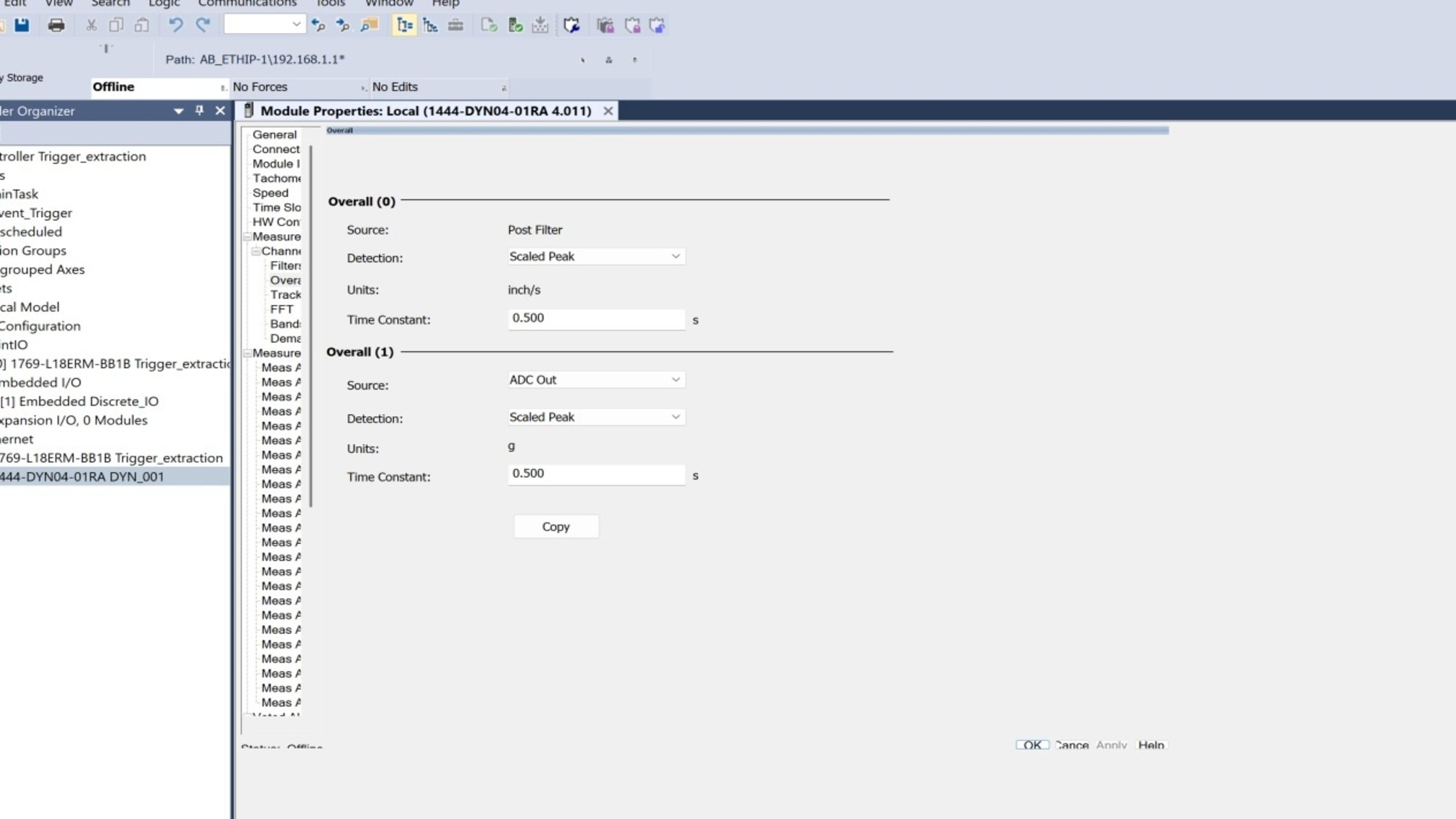
    • Configure Overall measurements.
    Emonitor-event-based-date-extraction-from-Dynamix-1444_step1_image8.jpg

    Emonitor-event-based-date-extraction-from-Dynamix-1444_step1_image8

    • Configure the measurements to be extracted by Emonitor.
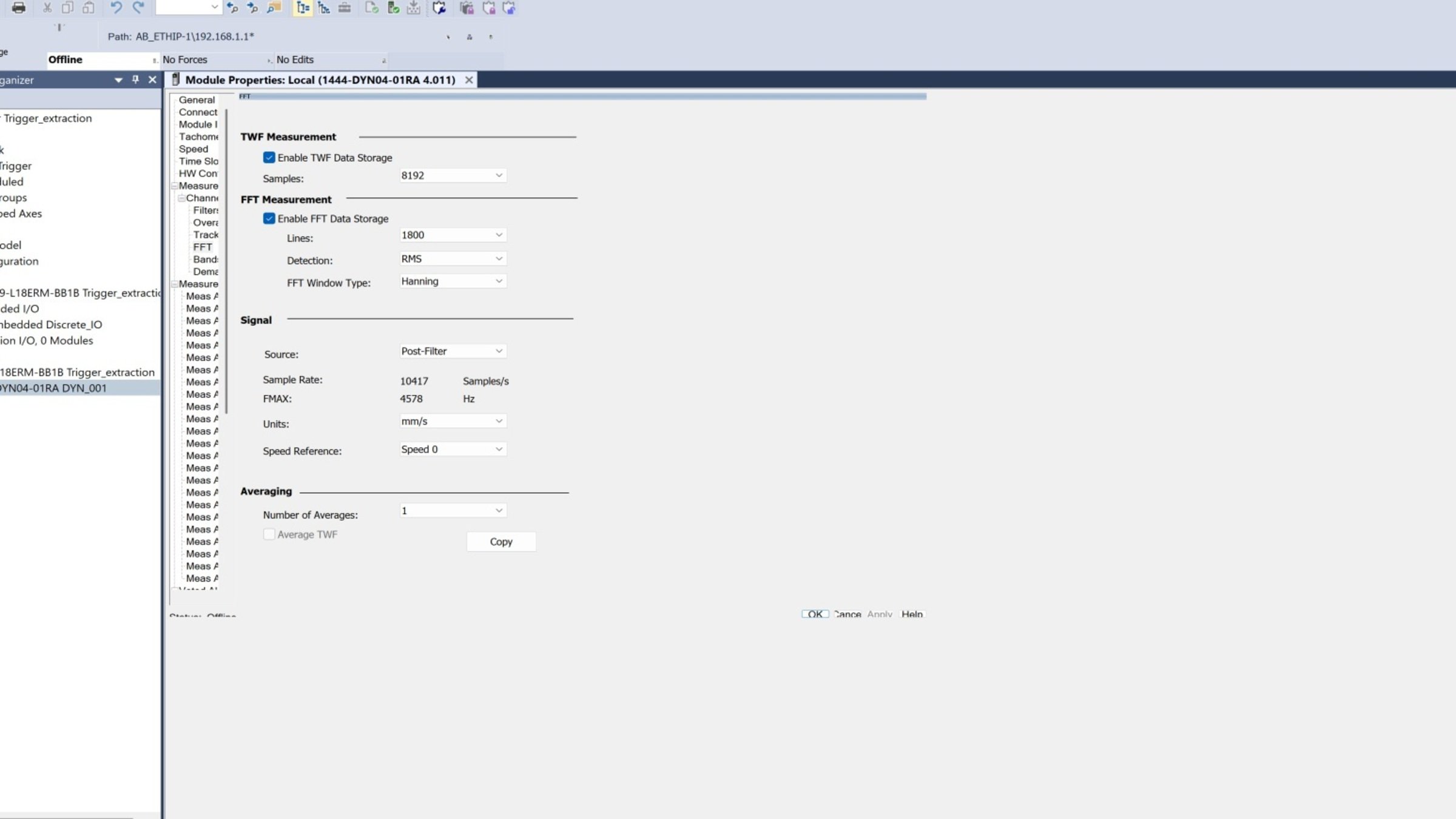
    Emonitor-event-based-date-extraction-from-Dynamix-1444_step1_image9.jpg

    Emonitor-event-based-date-extraction-from-Dynamix-1444_step1_image9

    • Configure the measurements to be extracted by Emonitor.
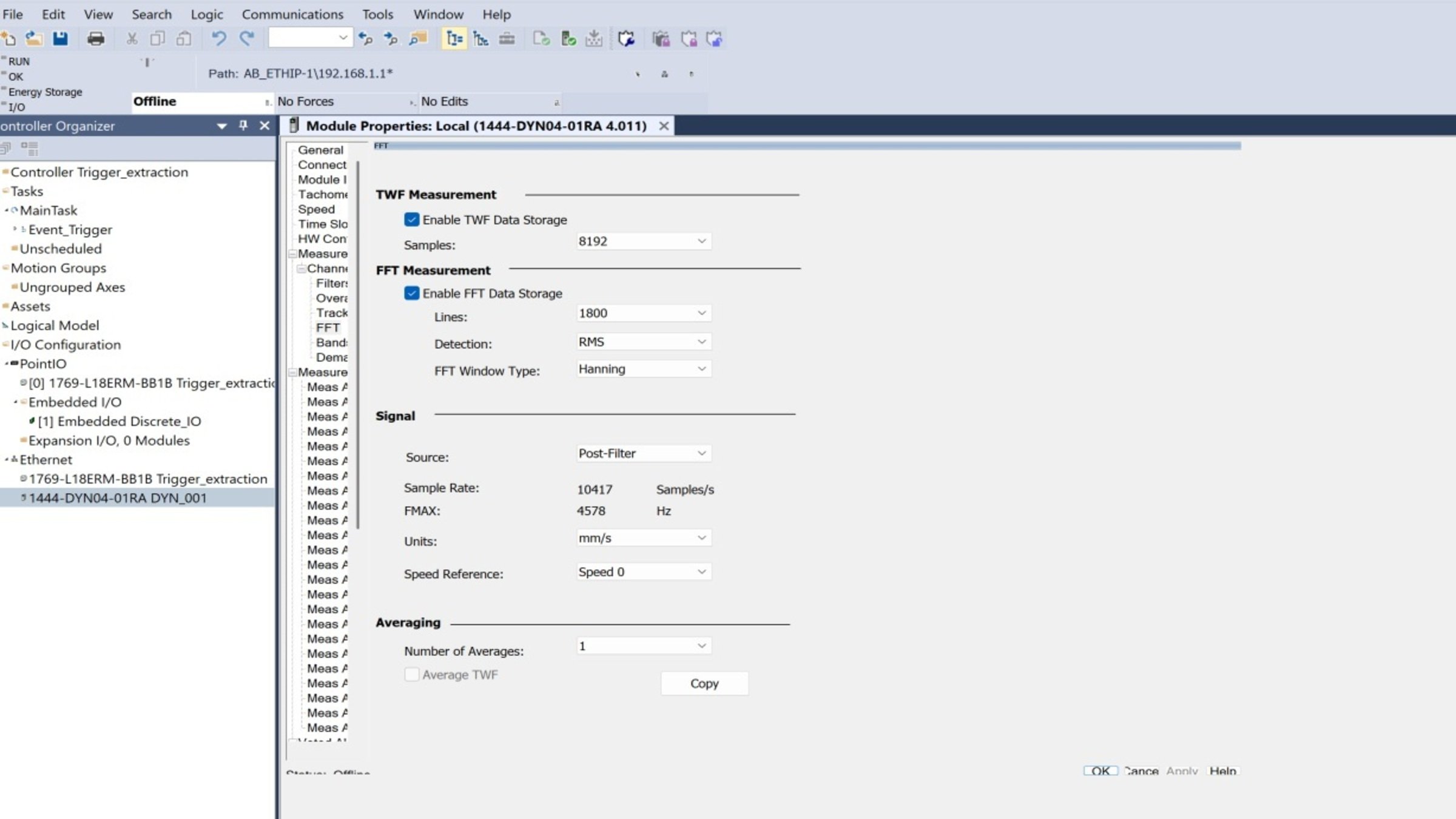
    Emonitor-event-based-date-extraction-from-Dynamix-1444_step1_image10.jpg

    Emonitor-event-based-date-extraction-from-Dynamix-1444_step1_image10

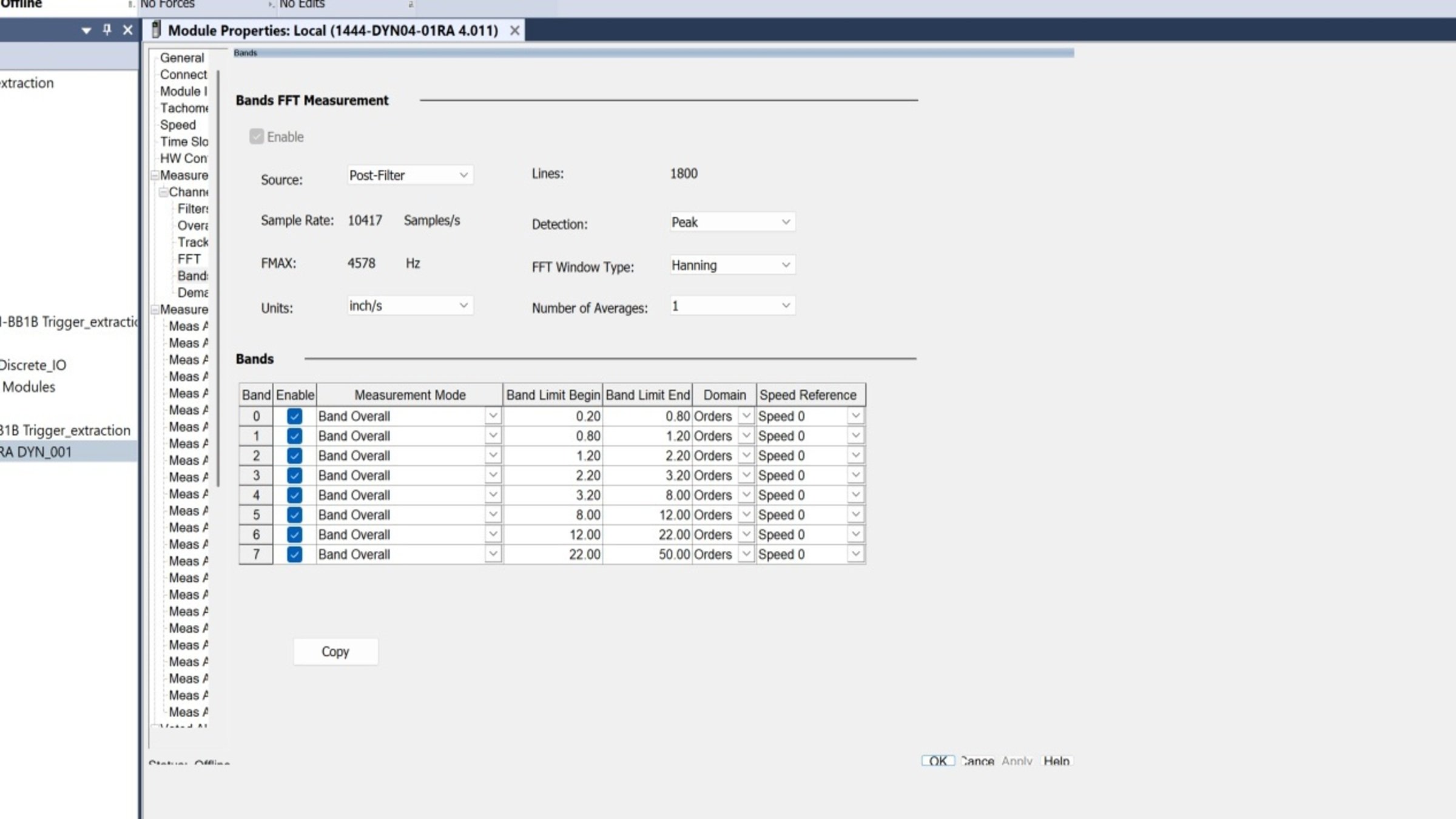
    • Configure FFT analysis bands.
    Emonitor-event-based-date-extraction-from-Dynamix-1444_step1_image11.jpg

    Emonitor-event-based-date-extraction-from-Dynamix-1444_step1_image11

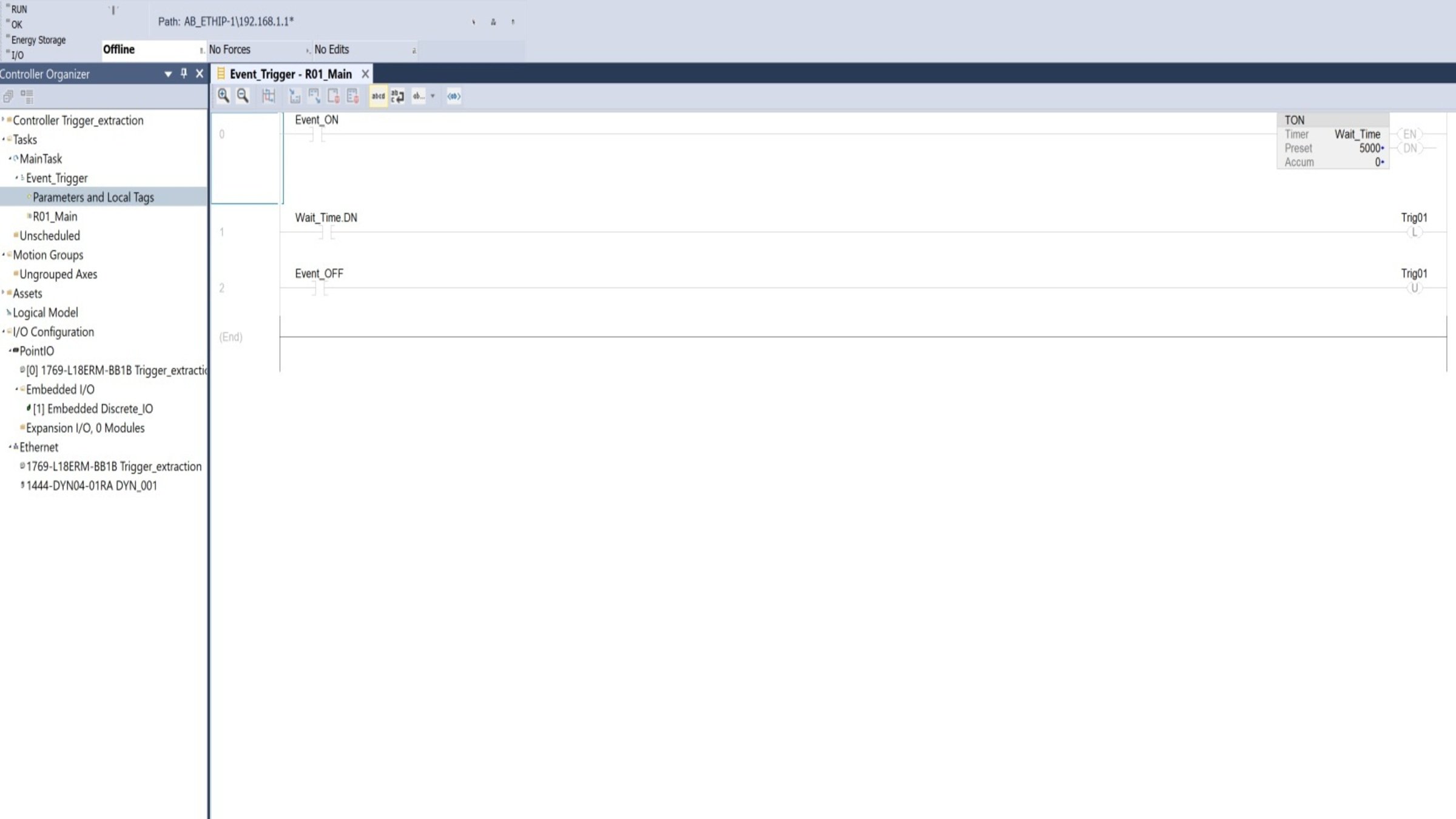
  • Add logic for the activation tag.


    • A boolean tag will be configured to initiate data collection.
    • This tag must be a “local tag”.


    Emonitor-event-based-date-extraction-from-Dynamix-1444_step1_image12.jpg

    Emonitor-event-based-date-extraction-from-Dynamix-1444_step1_image12


    Download and run the program.
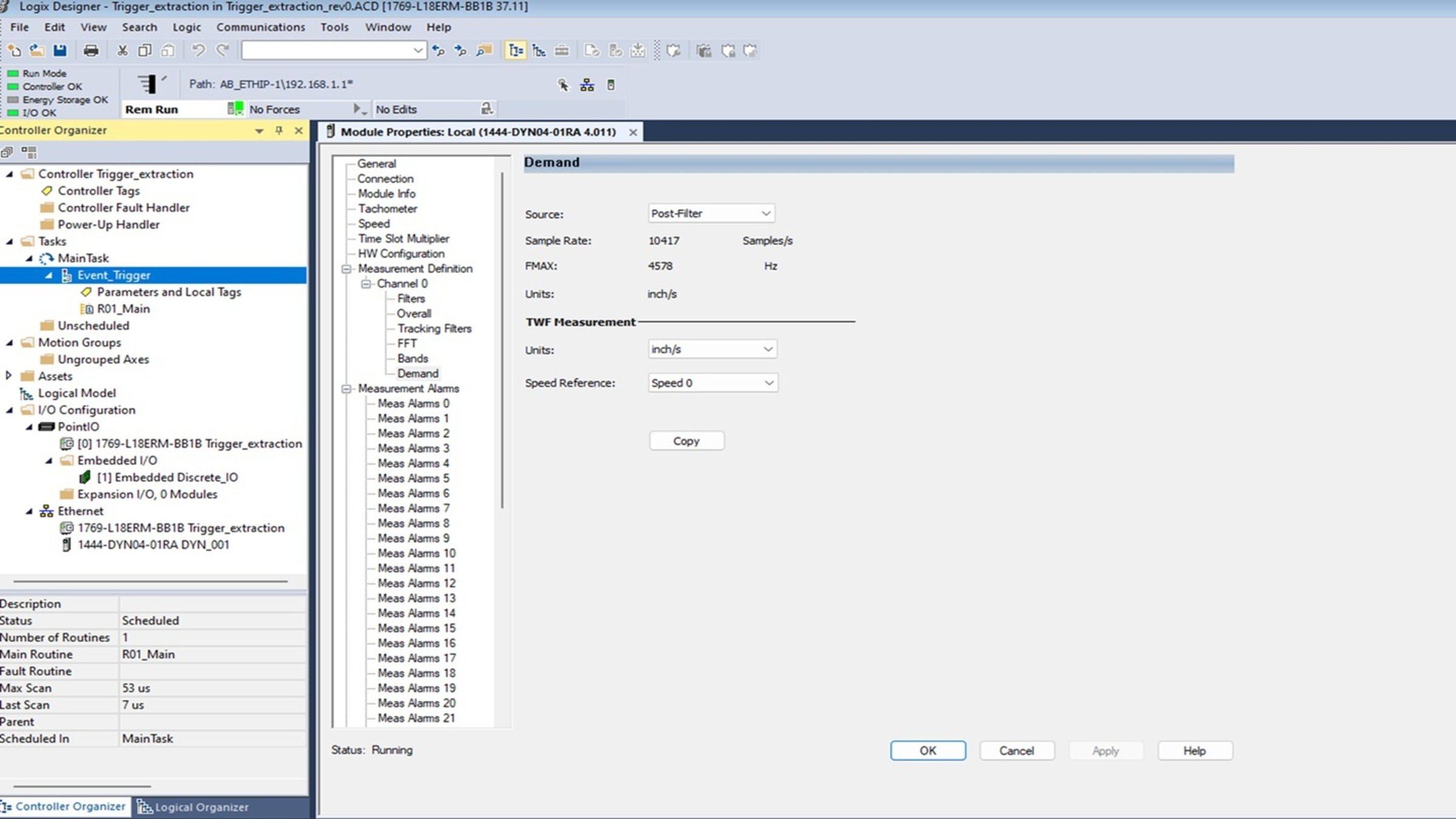


    Emonitor-event-based-date-extraction-from-Dynamix-1444_step1_image13.jpg

    Emonitor-event-based-date-extraction-from-Dynamix-1444_step1_image13

Step 2
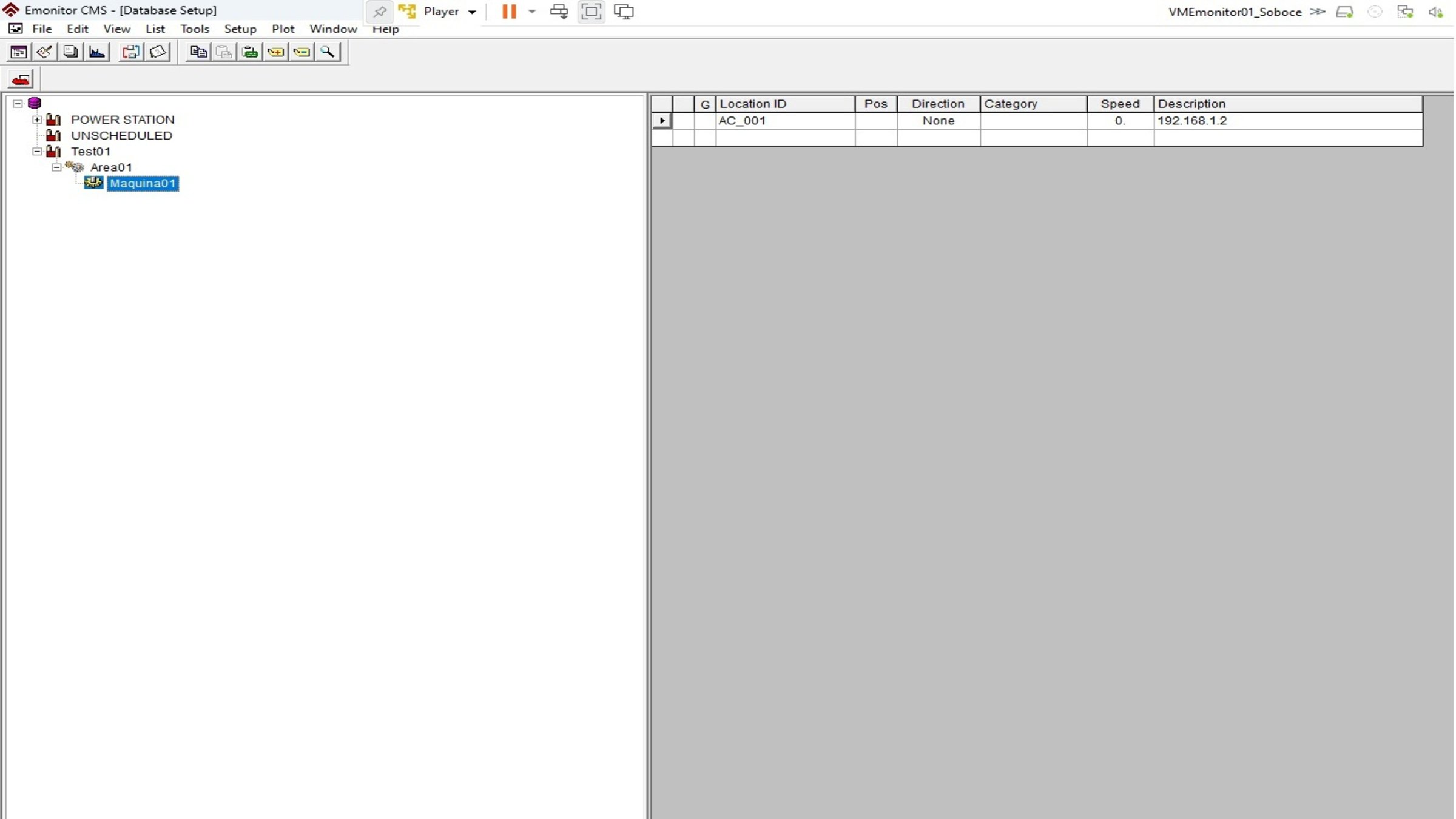
 

Emonitor CMS Configuration.

Create the equipment where data will be collected.


Process to add a plant, production line, and machine to the database:

  • Start Emonitor CMS.
  • Open the Database window by selecting Window > Database and choose the Database Setup view in the Select View dialog box.
  • The view shows the Hierarchy pane on the left and the Location pane on the right. To add a plant, select the disk icon in the Hierarchy pane and press Insert. The cursor will appear in a box next to a new hierarchy item at the bottom of the Hierarchy tree
Emonitor-event-based-date-extraction-from-Dynamix-1444_step2_image1.jpg

Emonitor-event-based-date-extraction-from-Dynamix-1444_step2_image1

Step 3
 

EEM Configuration.

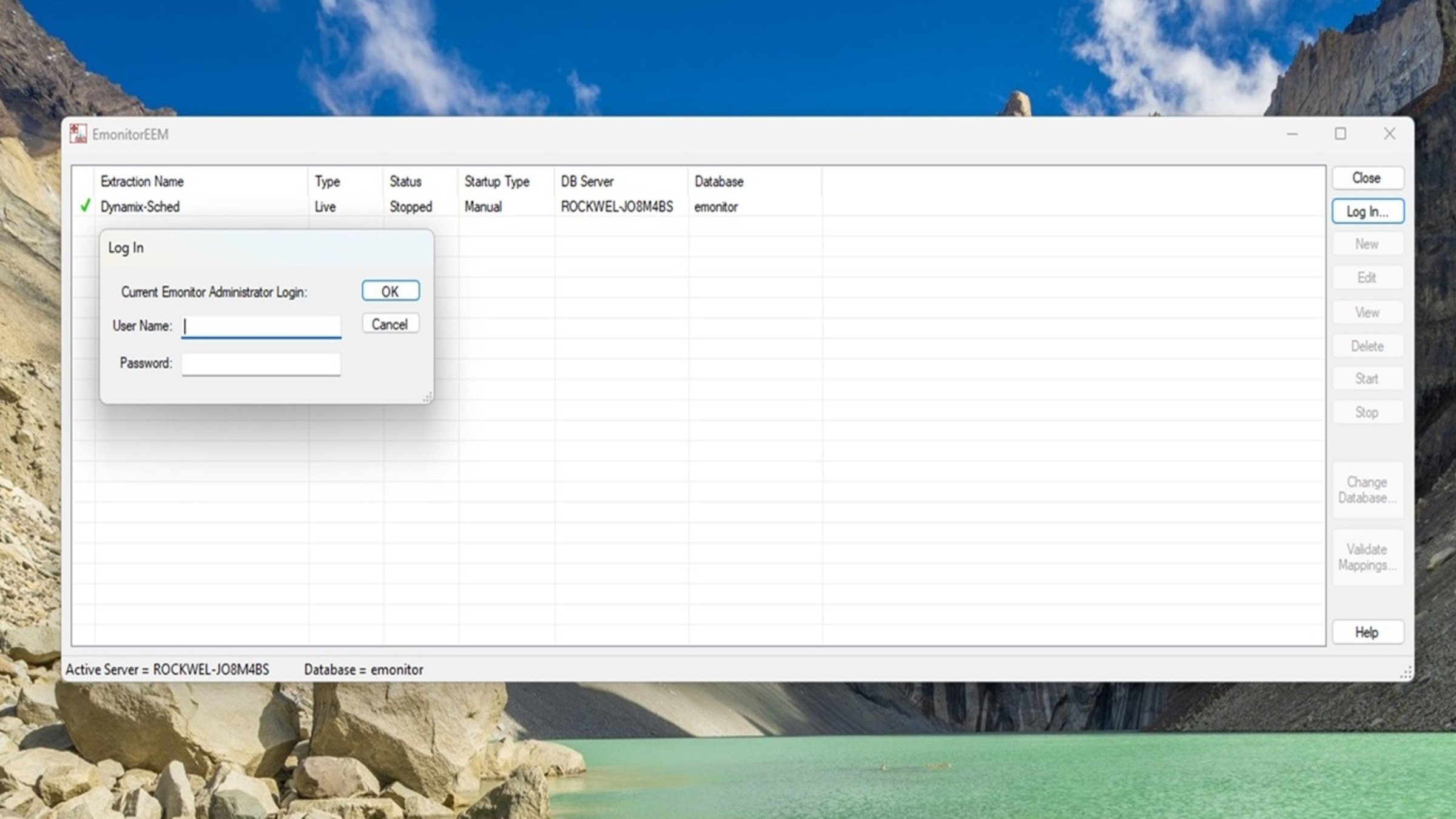
  • Open the EmonitorEEM tool.


    • Log in with the following credentials:
      • Username: admin
      • Password: password


    Emonitor-event-based-date-extraction-from-Dynamix-1444_step3_image1.jpg

    Emonitor-event-based-date-extraction-from-Dynamix-1444_step3_image1

    • Create a new extraction by selecting “Triggered”.
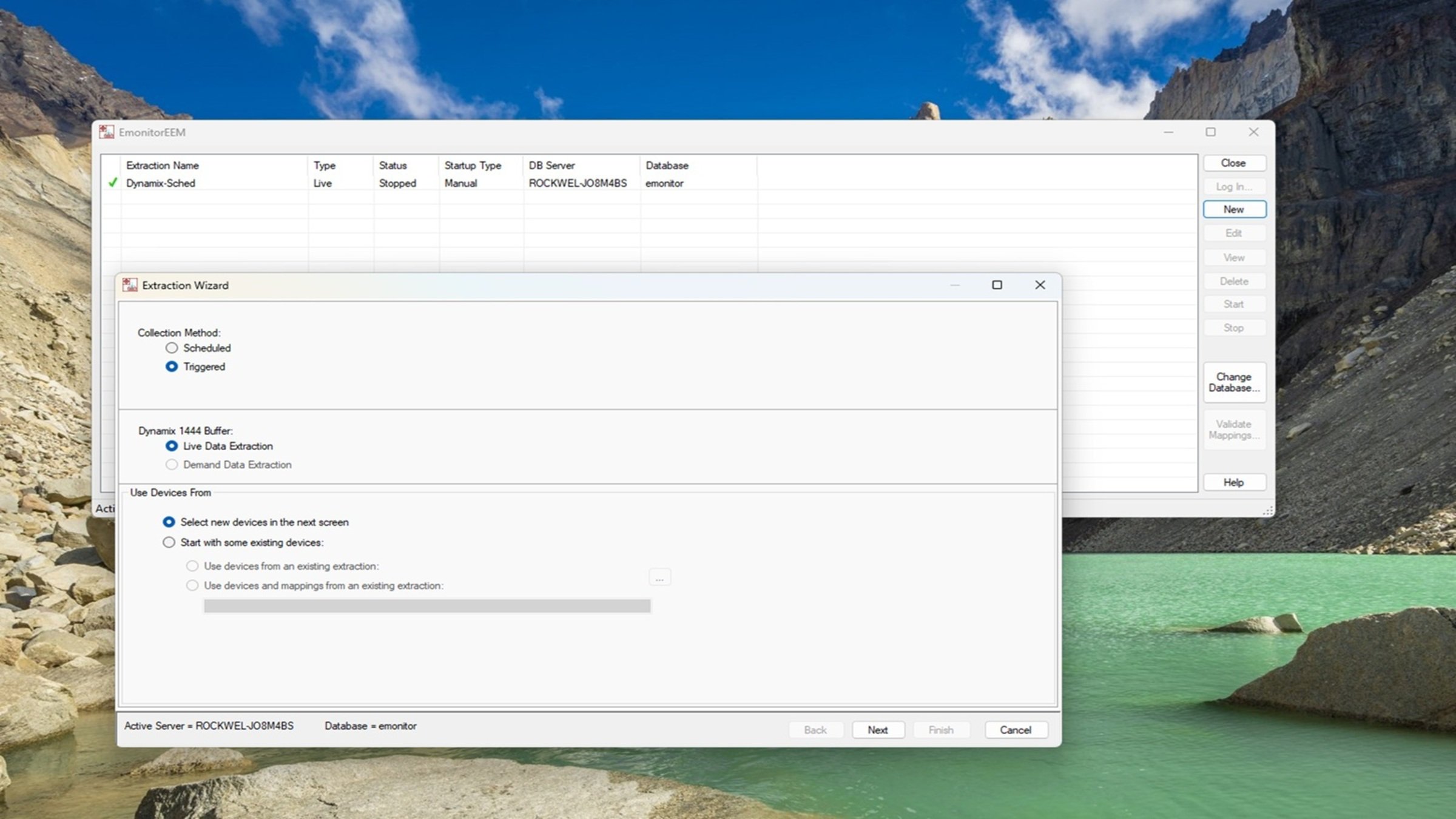
    Emonitor-event-based-date-extraction-from-Dynamix-1444_step3_image2.jpg

    Emonitor-event-based-date-extraction-from-Dynamix-1444_step3_image2

    • Create an OPC topic (in RSLinx) and use it:
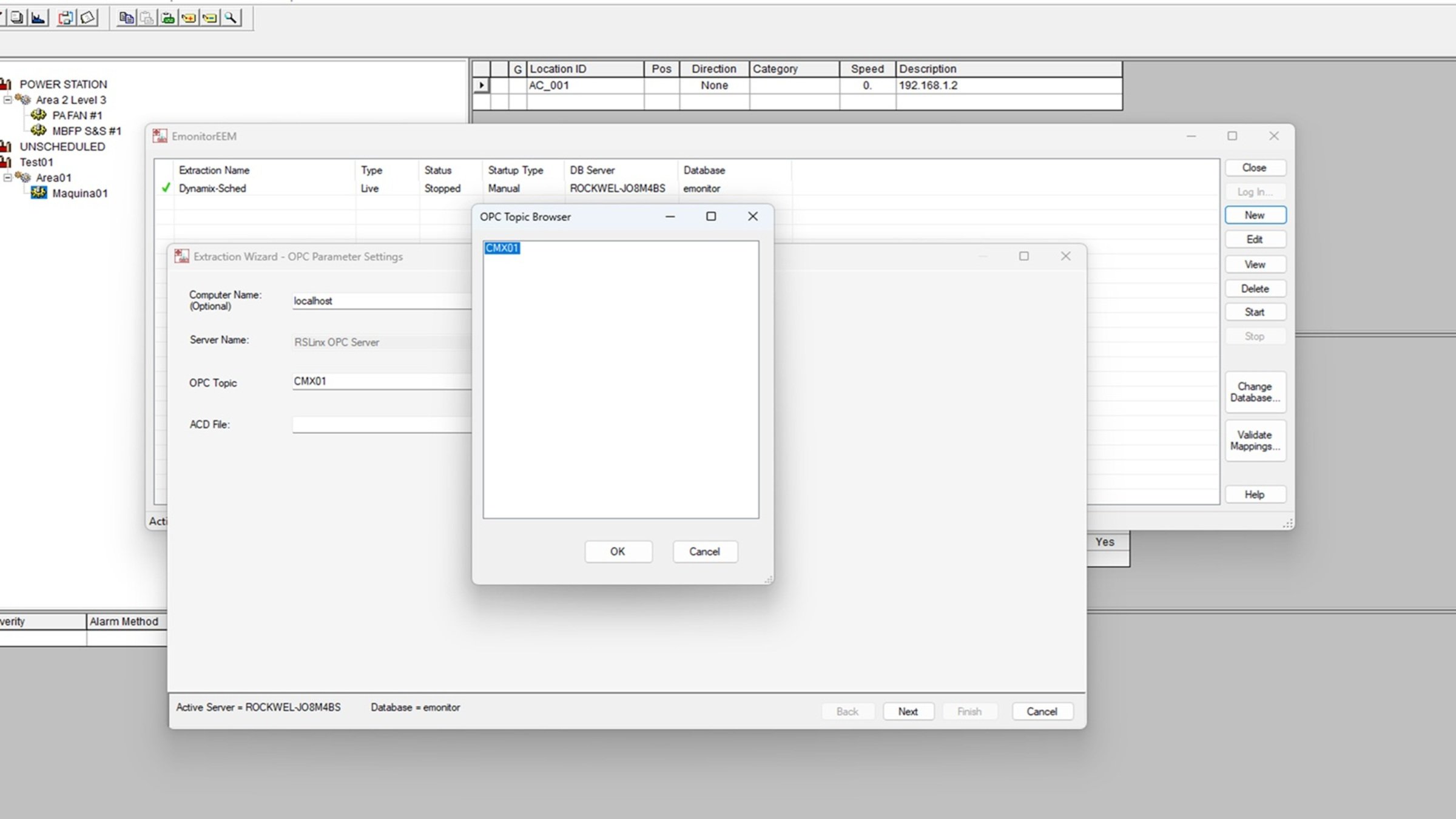
    Emonitor-event-based-date-extraction-from-Dynamix-1444_step3_image3.jpg

    Emonitor-event-based-date-extraction-from-Dynamix-1444_step3_image3

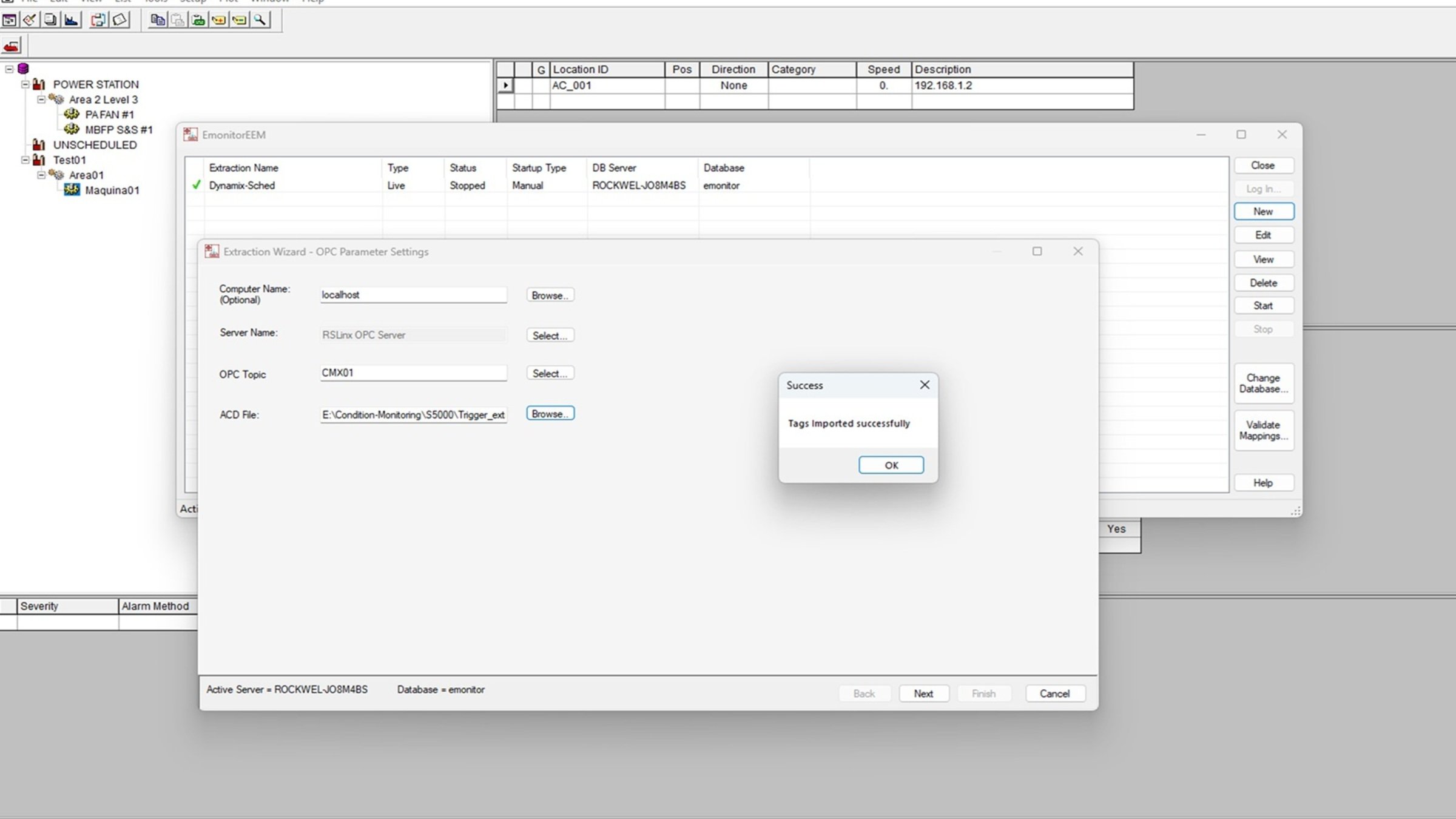
    • Complete the field with the Studio 5000 program where the “trigger” tag is located.
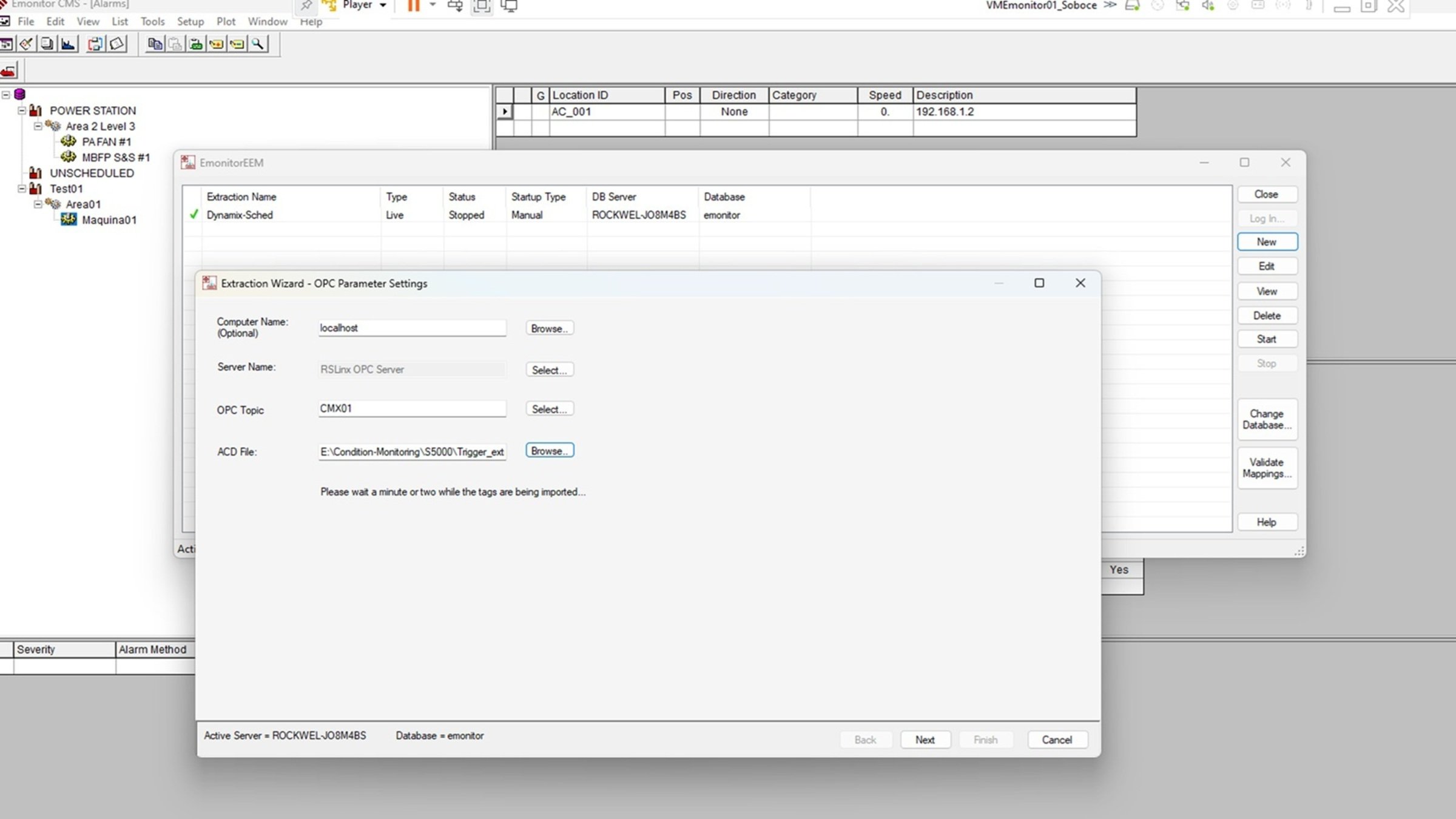
    Emonitor-event-based-date-extraction-from-Dynamix-1444_step3_image4.jpg

    Emonitor-event-based-date-extraction-from-Dynamix-1444_step3_image4

    • Create the extraction:  


    Emonitor-event-based-date-extraction-from-Dynamix-1444_step3_image5.jpg

    Emonitor-event-based-date-extraction-from-Dynamix-1444_step3_image5

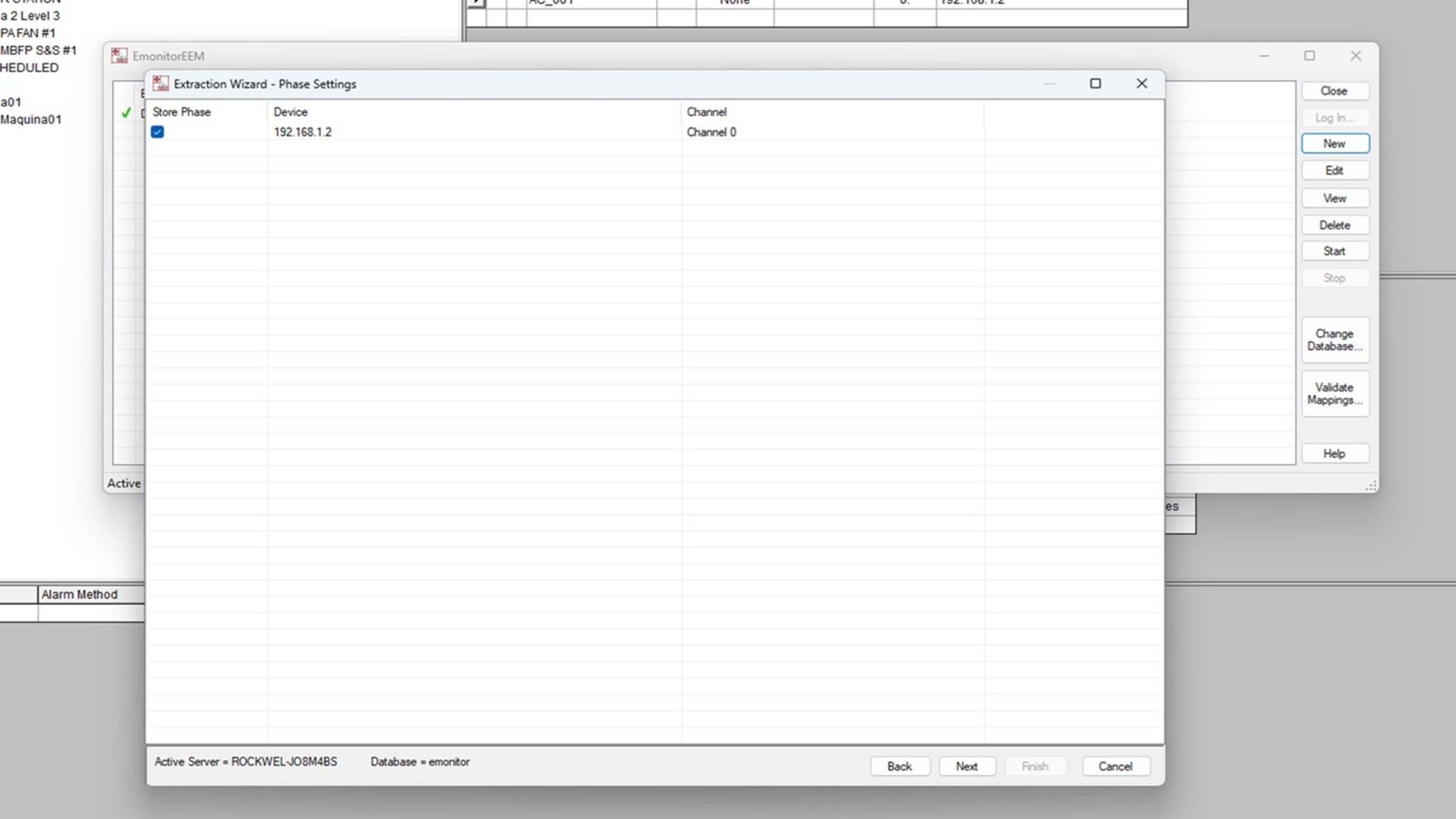
    • Link the extraction to the Dynamix 1444 module.
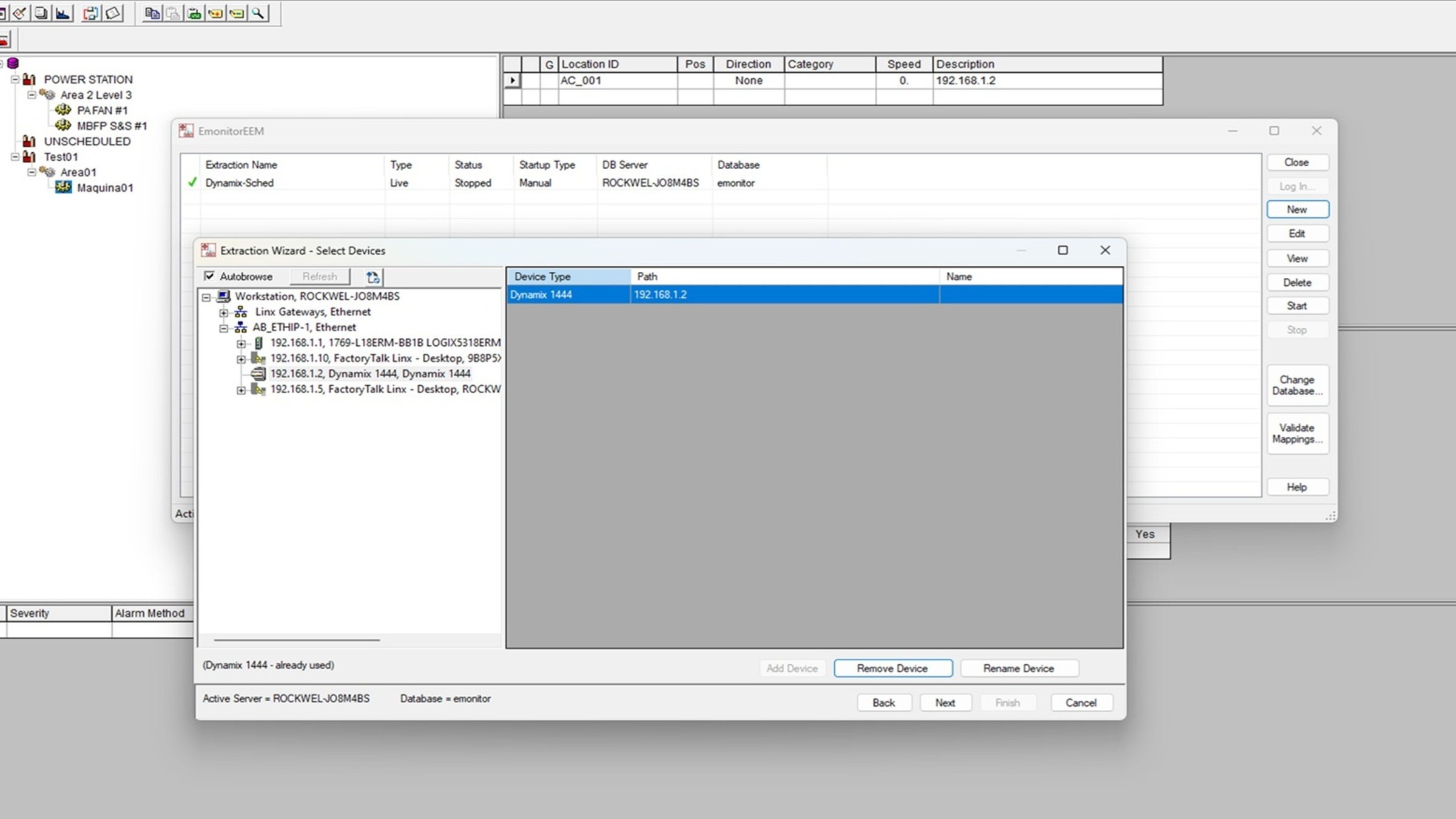
    Emonitor-event-based-date-extraction-from-Dynamix-1444_step3_image6.jpg

    Emonitor-event-based-date-extraction-from-Dynamix-1444_step3_image6

    • Map the available measurements from channel 0 to the machine configured in Emonitor CMS hierarchy (use “Auto Map”).
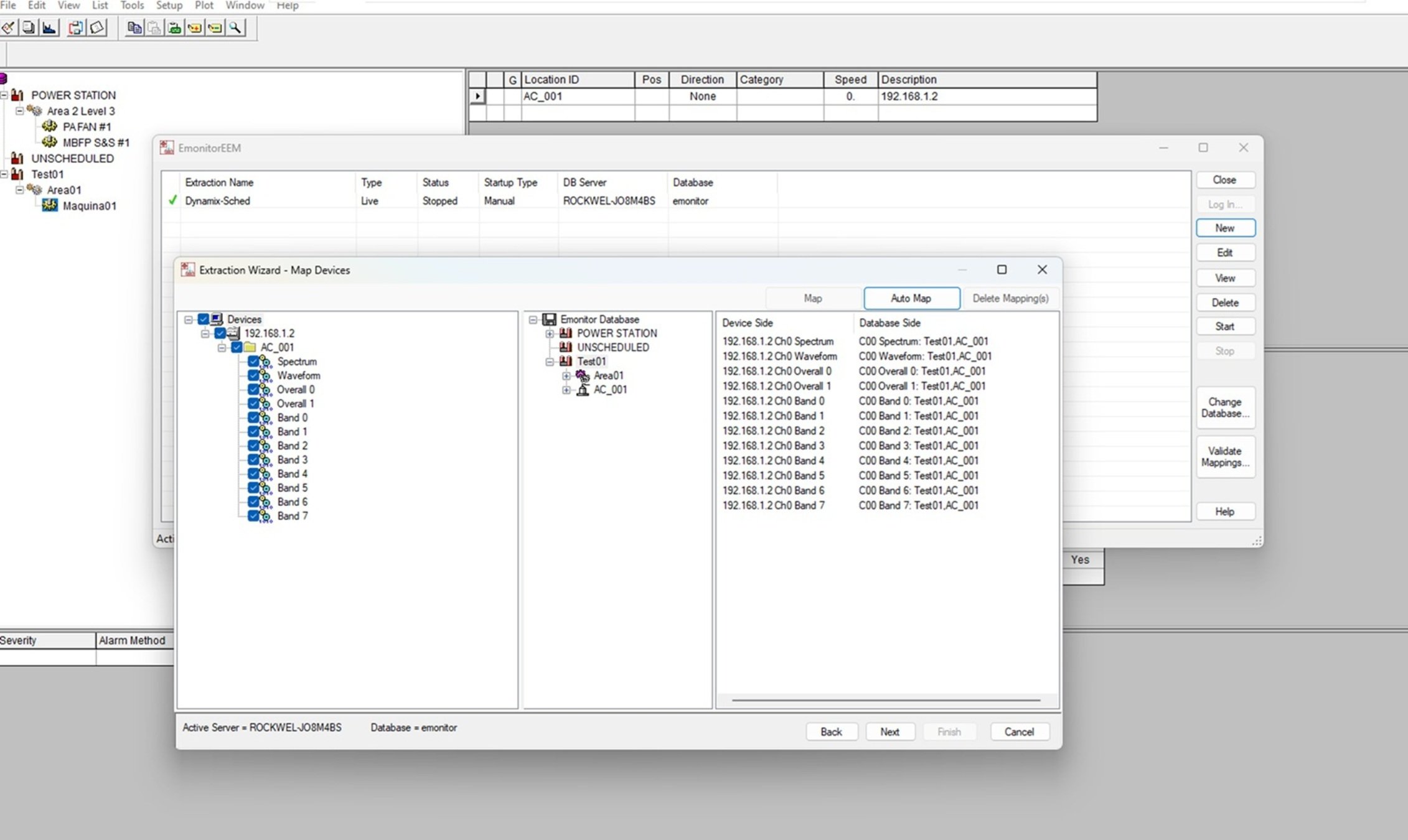
    Emonitor-event-based-date-extraction-from-Dynamix-1444_step3_image7.jpg

    Emonitor-event-based-date-extraction-from-Dynamix-1444_step3_image7

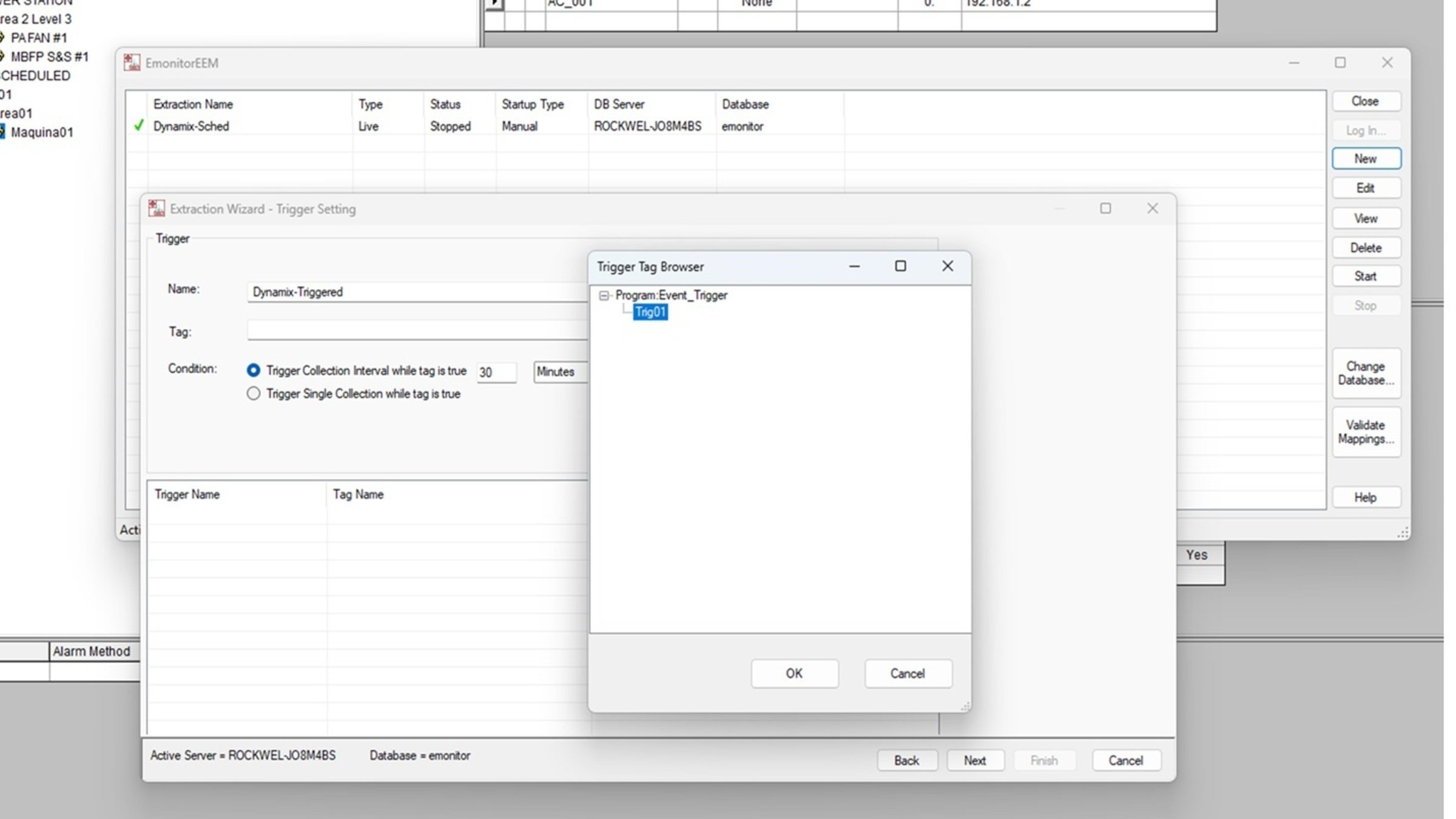
    • Configure the “trigger” using the designated tag:
    Emonitor-event-based-date-extraction-from-Dynamix-1444_step3_image8.jpg

    Emonitor-event-based-date-extraction-from-Dynamix-1444_step3_image8

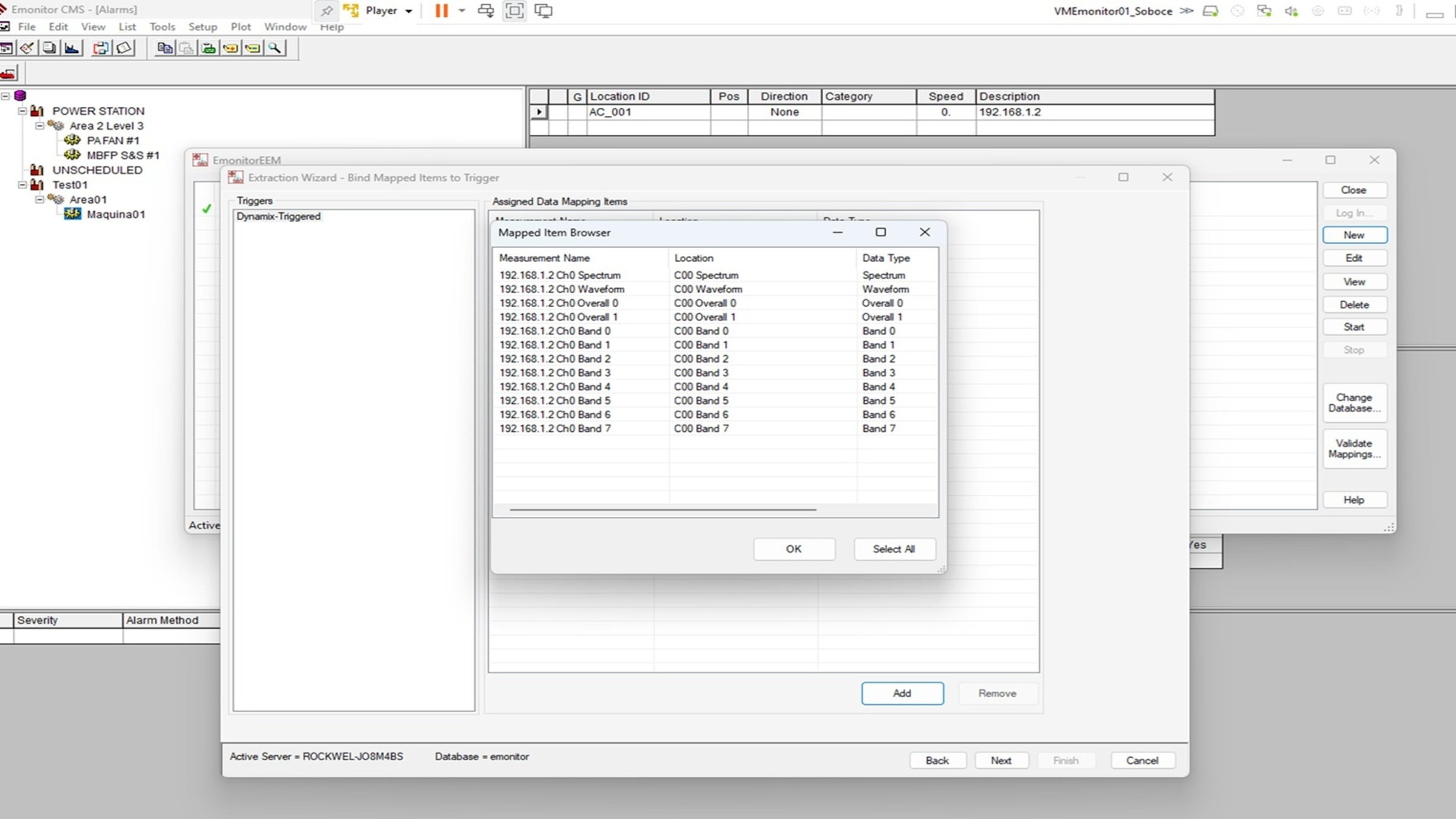
    • Assign the mapped measurements to the extraction created:
    Emonitor-event-based-date-extraction-from-Dynamix-1444_step3_image9.jpg

    Emonitor-event-based-date-extraction-from-Dynamix-1444_step3_image9

    • Link to the Dynamix 1444 module:
    Emonitor-event-based-date-extraction-from-Dynamix-1444_step3_image10.jpg

    Emonitor-event-based-date-extraction-from-Dynamix-1444_step3_image10

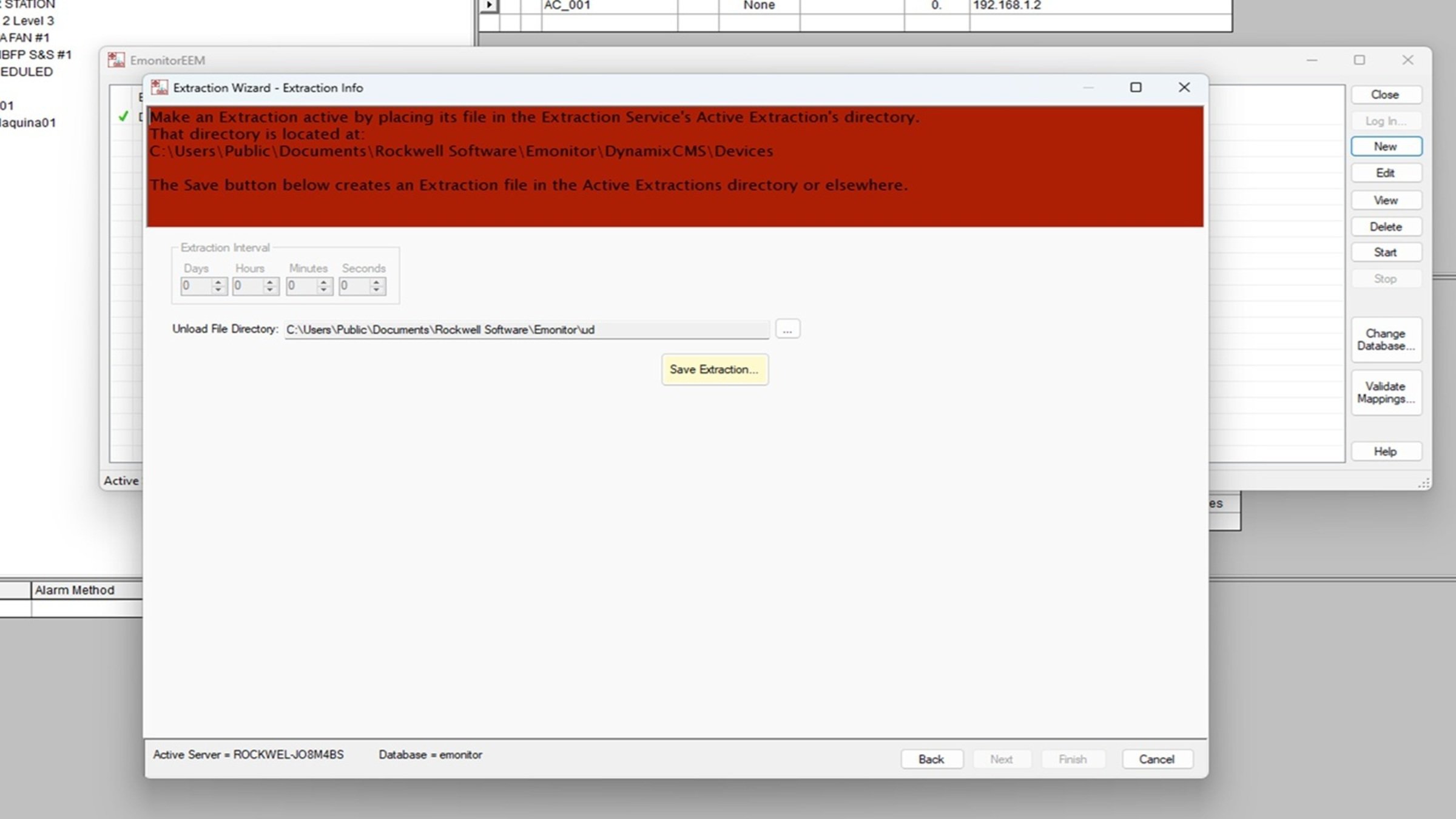
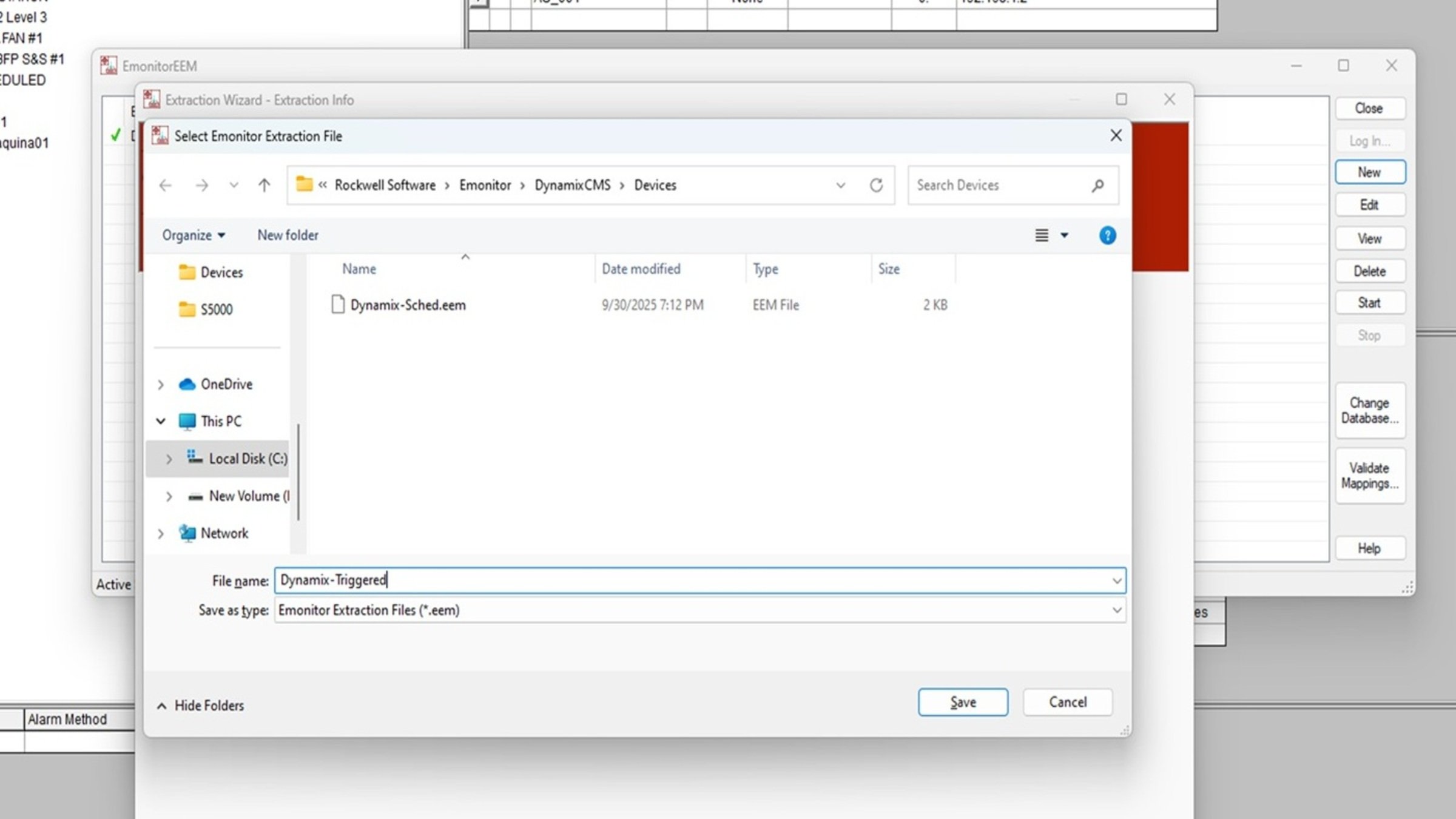
    • Save the extraction:


    Emonitor-event-based-date-extraction-from-Dynamix-1444_step3_image11.jpg

    Emonitor-event-based-date-extraction-from-Dynamix-1444_step3_image11


    Note: It is no longer necessary to configure the extraction interval. 
     

    Emonitor-event-based-date-extraction-from-Dynamix-1444_step3_image12.jpg

    Emonitor-event-based-date-extraction-from-Dynamix-1444_step3_image12

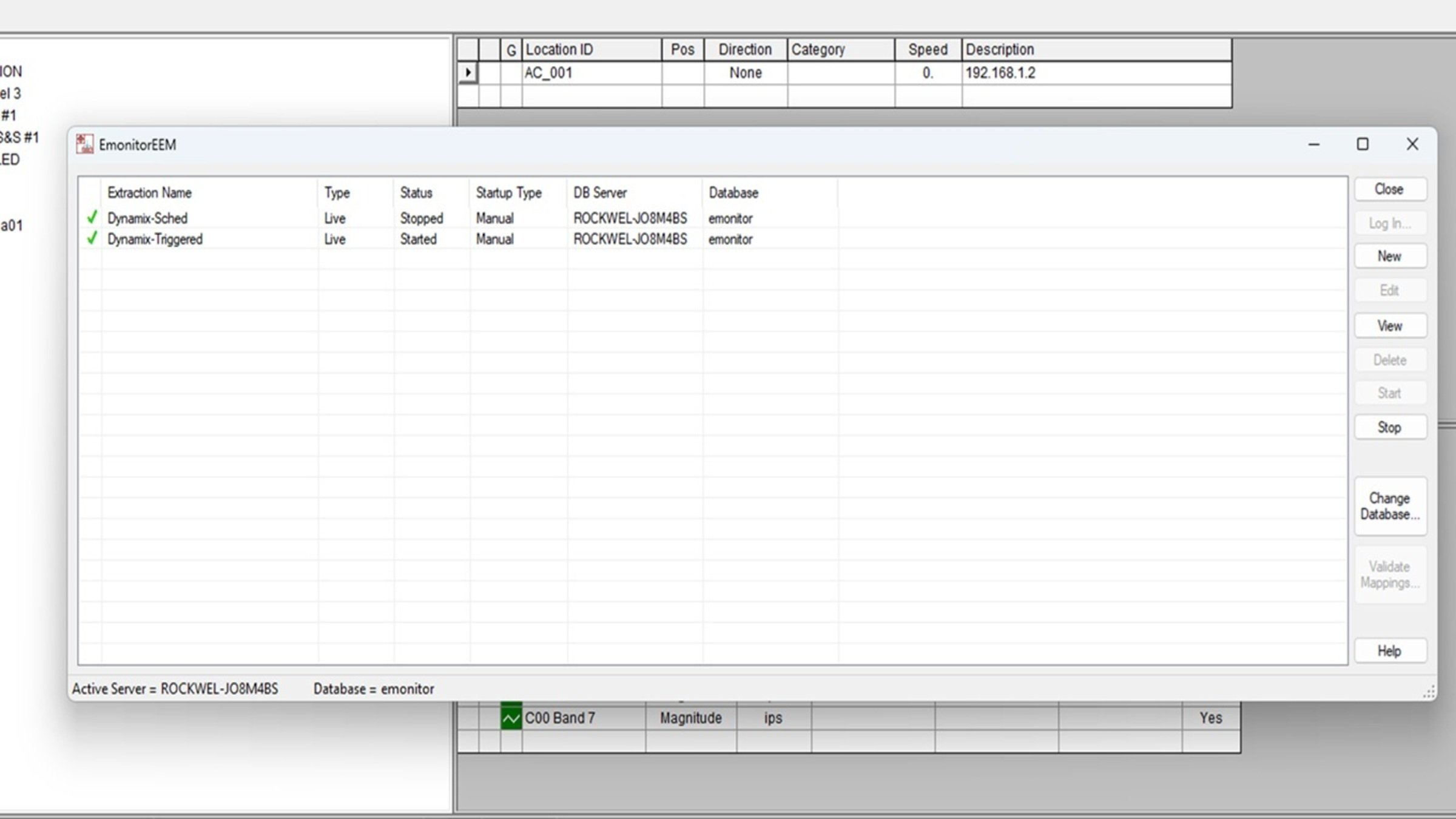
    • Start the extraction:
    Emonitor-event-based-date-extraction-from-Dynamix-1444_step3_image13.jpg

    Emonitor-event-based-date-extraction-from-Dynamix-1444_step3_image13

Step 4
 

Scheduler Configuration.

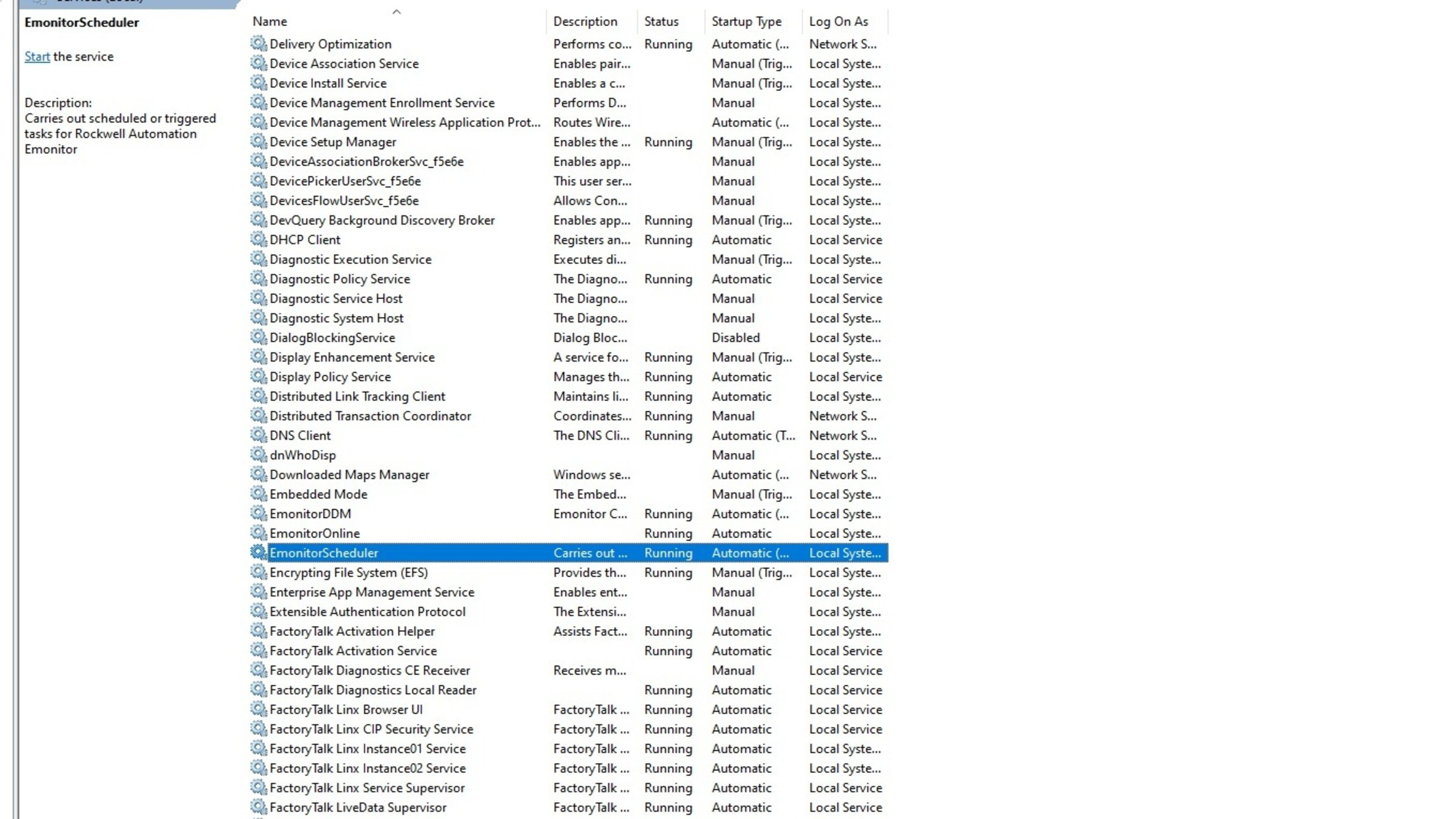
  • Verify that the following services are active:
    • EmonitorDDM.
    • EmonitorScheduler.
    • RSLinx Classic.


    Emonitor-event-based-date-extraction-from-Dynamix-1444_step4_image1.jpg

    Emonitor-event-based-date-extraction-from-Dynamix-1444_step4_image1

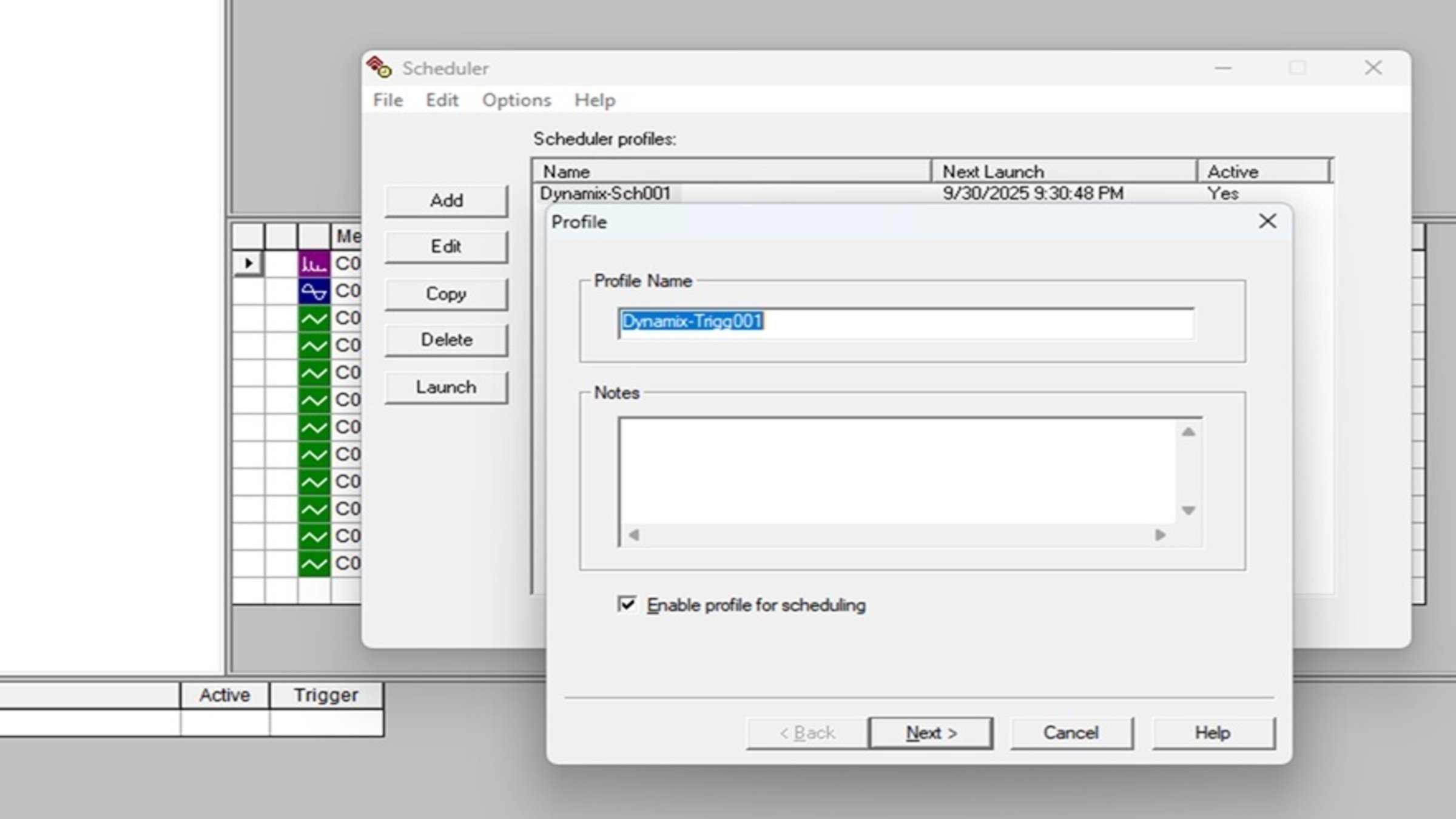
    • Open the Scheduler tool and create a new profile.
    Emonitor-event-based-date-extraction-from-Dynamix-1444_step4_image2.jpg

    Emonitor-event-based-date-extraction-from-Dynamix-1444_step4_image2

    • Configure the executable and command line.
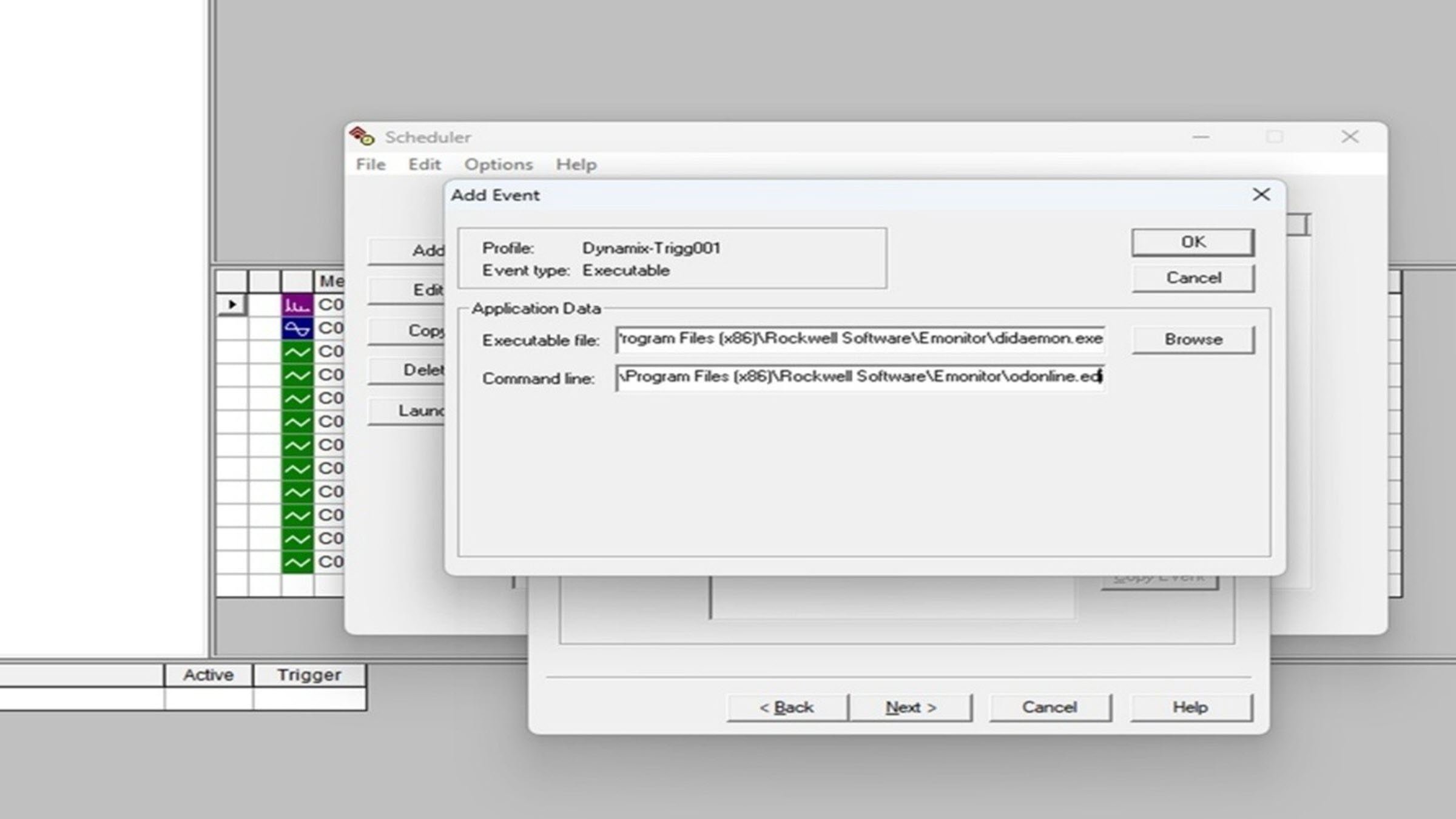
    Emonitor-event-based-date-extraction-from-Dynamix-1444_step4_image3.jpg

    Emonitor-event-based-date-extraction-from-Dynamix-1444_step4_image3

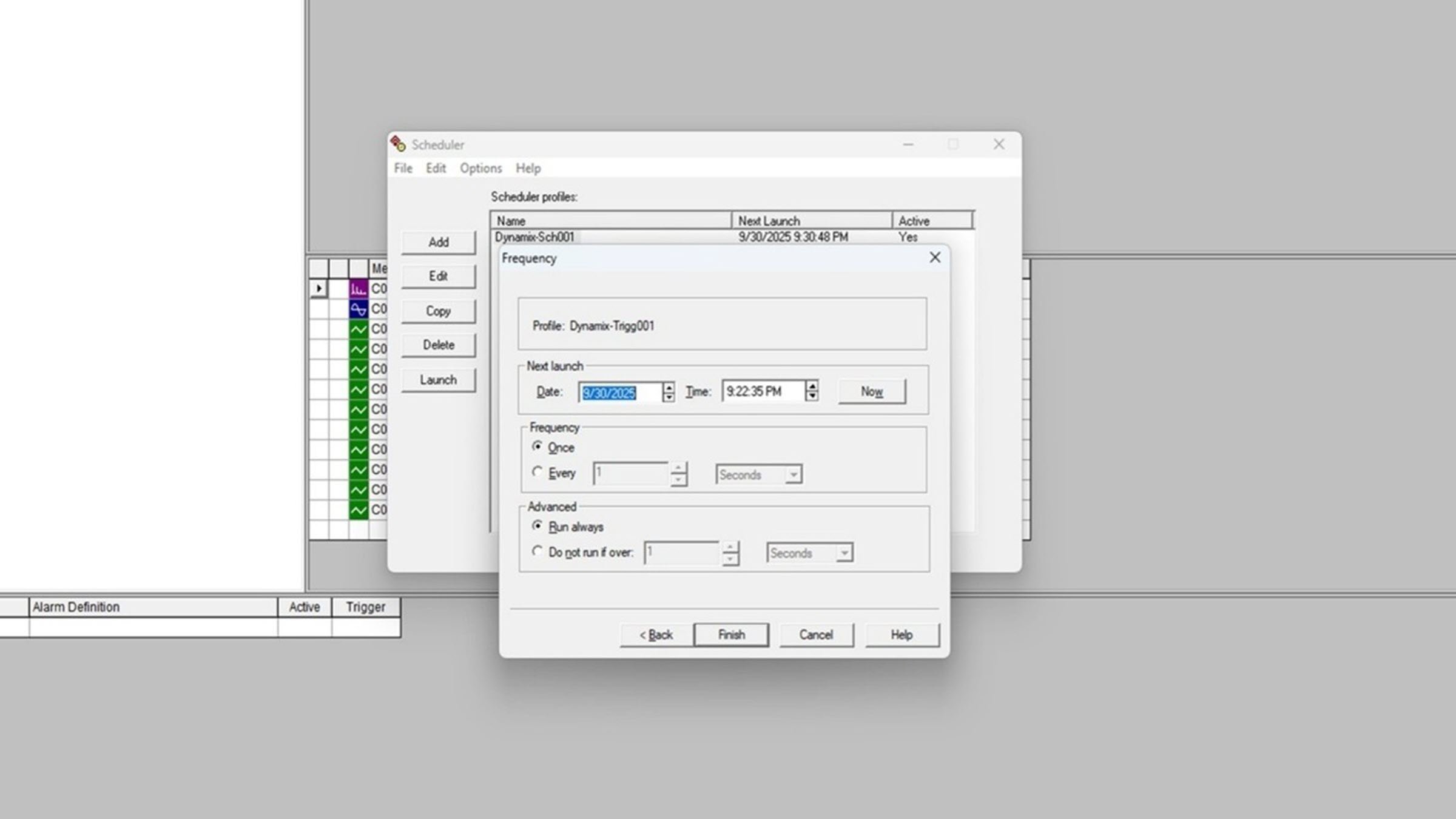
    • Set the extraction frequency:
    Emonitor-event-based-date-extraction-from-Dynamix-1444_step4_image4.jpg

    Emonitor-event-based-date-extraction-from-Dynamix-1444_step4_image1

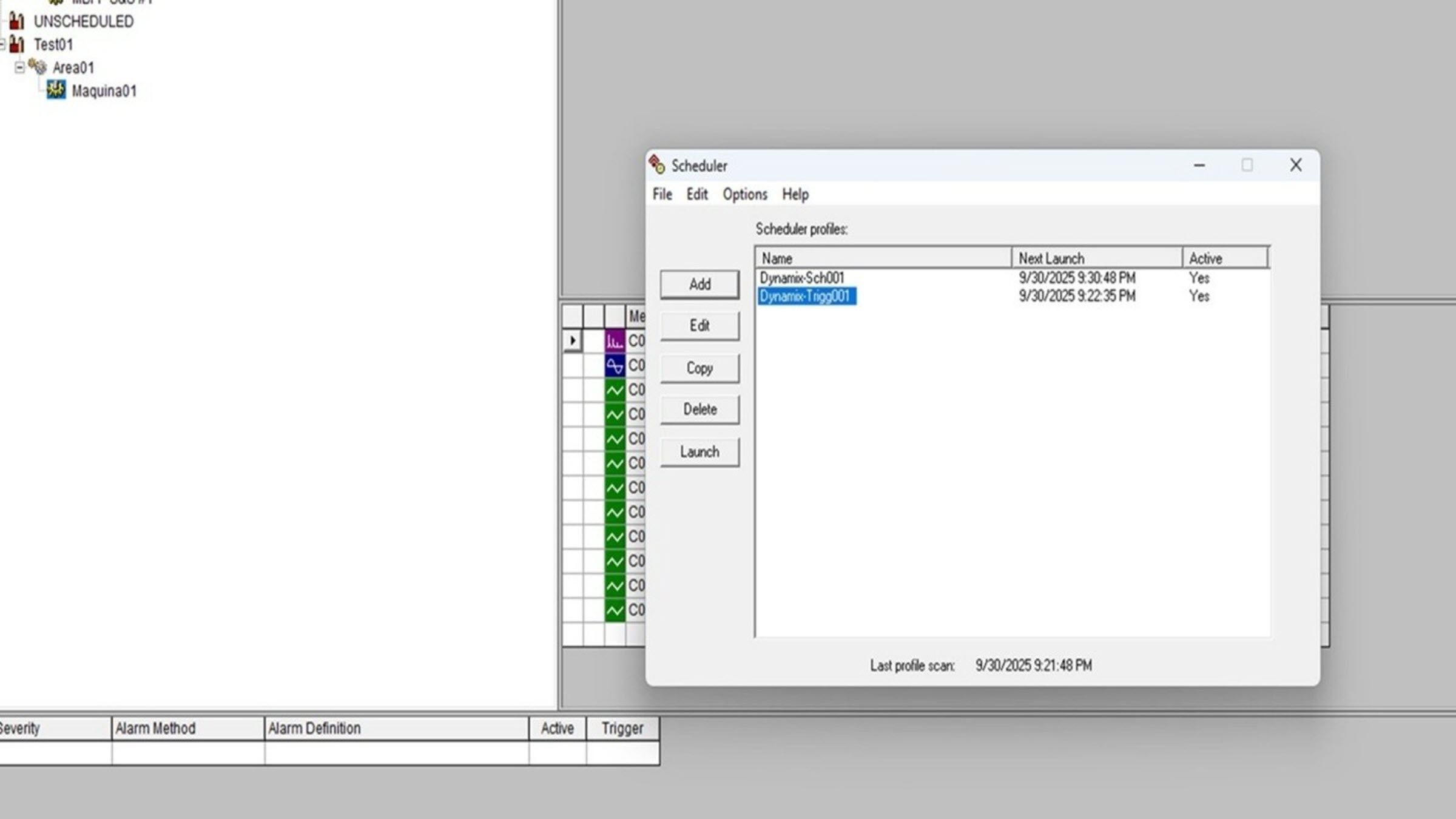
    • Ready for extraction:
    Emonitor-event-based-date-extraction-from-Dynamix-1444_step4_image5.jpg

    Emonitor-event-based-date-extraction-from-Dynamix-1444_step4_image5

Emonitor-event-based-date-extraction-from-Dynamix-1444_step1_image1.jpg

Emonitor-event-based-date-extraction-from-Dynamix-1444_step1_image1

Emonitor-event-based-date-extraction-from-Dynamix-1444_step1_image2.jpg

Emonitor-event-based-date-extraction-from-Dynamix-1444_step1_image2

Emonitor-event-based-date-extraction-from-Dynamix-1444_step1_image3.jpg

Emonitor-event-based-date-extraction-from-Dynamix-1444_step1_image3

Emonitor-event-based-date-extraction-from-Dynamix-1444_step1_image4.jpg

Emonitor-event-based-date-extraction-from-Dynamix-1444_step1_image4

Emonitor-event-based-date-extraction-from-Dynamix-1444_step1_image5.jpg

Emonitor-event-based-date-extraction-from-Dynamix-1444_step1_image5

Emonitor-event-based-date-extraction-from-Dynamix-1444_step1_image6.jpg

Emonitor-event-based-date-extraction-from-Dynamix-1444_step1_image6

Emonitor-event-based-date-extraction-from-Dynamix-1444_step1_image7.jpg

Emonitor-event-based-date-extraction-from-Dynamix-1444_step1_image7

Emonitor-event-based-date-extraction-from-Dynamix-1444_step1_image8.jpg

Emonitor-event-based-date-extraction-from-Dynamix-1444_step1_image8

Emonitor-event-based-date-extraction-from-Dynamix-1444_step1_image9.jpg

Emonitor-event-based-date-extraction-from-Dynamix-1444_step1_image9

Emonitor-event-based-date-extraction-from-Dynamix-1444_step1_image10.jpg

Emonitor-event-based-date-extraction-from-Dynamix-1444_step1_image10

Emonitor-event-based-date-extraction-from-Dynamix-1444_step1_image11.jpg

Emonitor-event-based-date-extraction-from-Dynamix-1444_step1_image11

Emonitor-event-based-date-extraction-from-Dynamix-1444_step1_image12.jpg

Emonitor-event-based-date-extraction-from-Dynamix-1444_step1_image12

Emonitor-event-based-date-extraction-from-Dynamix-1444_step1_image13.jpg

Emonitor-event-based-date-extraction-from-Dynamix-1444_step1_image13

Emonitor-event-based-date-extraction-from-Dynamix-1444_step2_image1.jpg

Emonitor-event-based-date-extraction-from-Dynamix-1444_step2_image1

Emonitor-event-based-date-extraction-from-Dynamix-1444_step3_image1.jpg

Emonitor-event-based-date-extraction-from-Dynamix-1444_step3_image1

Emonitor-event-based-date-extraction-from-Dynamix-1444_step3_image2.jpg

Emonitor-event-based-date-extraction-from-Dynamix-1444_step3_image2

Emonitor-event-based-date-extraction-from-Dynamix-1444_step3_image3.jpg

Emonitor-event-based-date-extraction-from-Dynamix-1444_step3_image3

Emonitor-event-based-date-extraction-from-Dynamix-1444_step3_image4.jpg

Emonitor-event-based-date-extraction-from-Dynamix-1444_step3_image4

Emonitor-event-based-date-extraction-from-Dynamix-1444_step3_image5.jpg

Emonitor-event-based-date-extraction-from-Dynamix-1444_step3_image5

Emonitor-event-based-date-extraction-from-Dynamix-1444_step3_image6.jpg

Emonitor-event-based-date-extraction-from-Dynamix-1444_step3_image6

Emonitor-event-based-date-extraction-from-Dynamix-1444_step3_image7.jpg

Emonitor-event-based-date-extraction-from-Dynamix-1444_step3_image7

Emonitor-event-based-date-extraction-from-Dynamix-1444_step3_image8.jpg

Emonitor-event-based-date-extraction-from-Dynamix-1444_step3_image8

Emonitor-event-based-date-extraction-from-Dynamix-1444_step3_image9.jpg

Emonitor-event-based-date-extraction-from-Dynamix-1444_step3_image9

Emonitor-event-based-date-extraction-from-Dynamix-1444_step3_image10.jpg

Emonitor-event-based-date-extraction-from-Dynamix-1444_step3_image10

Emonitor-event-based-date-extraction-from-Dynamix-1444_step3_image11.jpg

Emonitor-event-based-date-extraction-from-Dynamix-1444_step3_image11

Emonitor-event-based-date-extraction-from-Dynamix-1444_step3_image12.jpg

Emonitor-event-based-date-extraction-from-Dynamix-1444_step3_image12

Emonitor-event-based-date-extraction-from-Dynamix-1444_step3_image13.jpg

Emonitor-event-based-date-extraction-from-Dynamix-1444_step3_image13

Emonitor-event-based-date-extraction-from-Dynamix-1444_step4_image1.jpg

Emonitor-event-based-date-extraction-from-Dynamix-1444_step4_image1

Emonitor-event-based-date-extraction-from-Dynamix-1444_step4_image2.jpg

Emonitor-event-based-date-extraction-from-Dynamix-1444_step4_image2

Emonitor-event-based-date-extraction-from-Dynamix-1444_step4_image3.jpg

Emonitor-event-based-date-extraction-from-Dynamix-1444_step4_image3

Emonitor-event-based-date-extraction-from-Dynamix-1444_step4_image4.jpg

Emonitor-event-based-date-extraction-from-Dynamix-1444_step4_image4

Emonitor-event-based-date-extraction-from-Dynamix-1444_step4_image5.jpg

Emonitor-event-based-date-extraction-from-Dynamix-1444_step4_image5


 Emonitor: event-based date extraction from Dynamix 1444

Version 1.0 - June 2026


AHIC White Logo
Subscribe!

Receive new app releases and other updates from the Innovation Center directly in your inbox.

I want to subscribe.
 
  1. Chevron LeftChevron Left Rockwell Automation Home
  2. Chevron LeftChevron Left Sup...
  3. Chevron LeftChevron Left Pro...
  4. Chevron LeftChevron Left Downloads
  5. Chevron LeftChevron Left Innovation Center
  6. Chevron LeftChevron Left Emonitor: event-based date extraction from Dynamix 1444.
Please update your cookie preferences to continue.
This feature requires cookies to enhance your experience. Please update your preferences to allow for these cookies:
  • Social Media Cookies
  • Functional Cookies
  • Performance Cookies
  • Marketing Cookies
  • All Cookies
You can update your preferences at any time. For more information please see our {0} Privacy Policy
CloseClose