
Cable Maintenance and Replacement
If a 1486-CBL flat media cable has already been crimped with a 1486-CON-P1 connector and is unattached or unplugged from a communication interface, the 1486-CON-D1 connector temporarily replaces a missing communication interface device.
Follow these instructions to maintain the correct line impedance and communication to the bus cable.
- Attach a 1486-CON-D1 connector to the 1486-CON-P1 connector.Attach 1486-CON-D1 to 1486-CON-P1

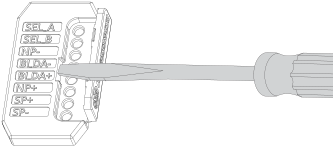
- Using a small flat-head screwdriver, gently pry open the hinged door on the 1486-CON-D1 connector to obtain access to test points.Access Test Points
Provide Feedback