
Information - Actual Topology View
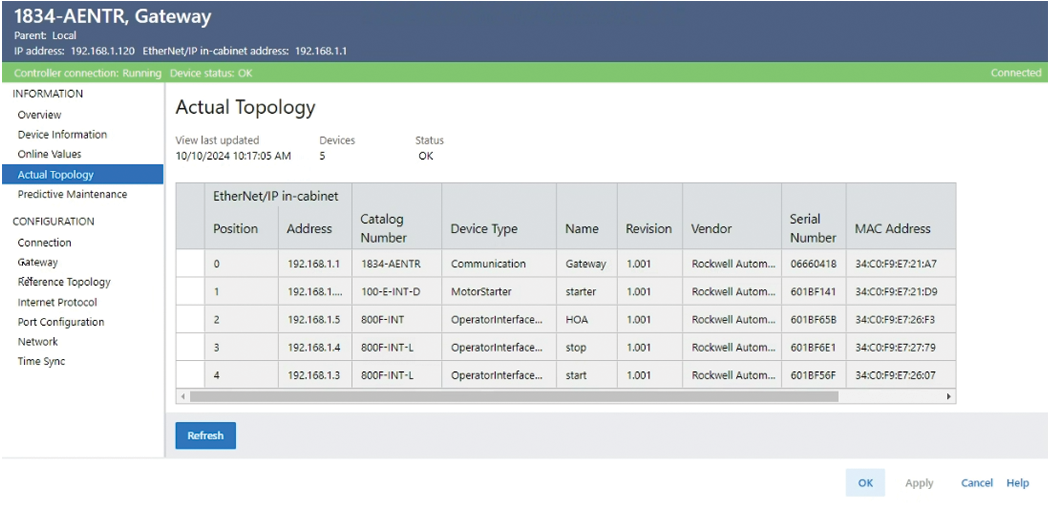
After your system is configured, this view displays information when the
Studio 5000 Logix Designer®
application is online with the controller and the device that is
associated with this profile is reachable within the network:- Lists the devices on the physical network
- Reports if devices connected to the network media are present in the Project Topology
Each row in the table shows the device identity and configuration data. The table row
number refers to the device position in the network.
System Topology
Parameter | Description |
|---|---|
View last updated | Displays the date and time that the data in the EtherNet/IP™ In-cabinet Actual Topology view was last read from the In-cabinet Actual
Topology CIP Object. |
Devices | Lists the number of devices on the physical network when the discovery of the
network is complete and ready. Otherwise, no data is shown. |
Status | Displays the status of the In-Cabinet Actual Topology State CIP Object:
|
First column | Displays an error icon when:
|
Position | Displays the device position on the media.
|
Address | Displays the EtherNet/IP™ address of the Gateway.Allows values of 192.168.1.1 to 192.168.1.254. |
Catalog Number | Displays the catalog number when available. If the catalog number is unavailable,
it displays Unknown Product Code . |
Device Type | Displays the type of connected device when available. If the device type is
unavailable, it displays Unknown Device Type X , where X is a Device
Type. |
Name | Displays the assigned name of the connected device when the data in a row matches
the device in the project. If the data in a table row does not match any device in
the project, the table cell is blank. |
Revision | Displays the device revision in the format: Major Revision.Minor Revision. The
Minor Revision is always displayed as 3 characters with leading zeros. |
Vendor | Displays the device vendor when available. If the vendor name is not available,
it displays Unknown Vendor X , where X is a Vendor ID that does not
match. |
Serial Number | Displays the serial number of the device. |
MAC Address | Displays the MAC address of the device in the format: 00:0A:E6:3E:FD:E1 |
PHY Mode | Displays the PHY mode of the device.
|
PLCA ID | Displays the PLCA ID of the device. |
Refresh | Refreshes data in the view. |
Provide Feedback